
Aircraft autopilot systems are a core part of modern flight operations. For pilots, student pilots, and instructors, understanding how autopilot systems actually work matters more than memorizing button names. Practical knowledge of sensors, flight director logic, control laws, and failure modes lets crews use automation to reduce workload while maintaining safety and good judgment.
This article explains how autopilots sense the aircraft, make control decisions, and move control surfaces or flight controls. It highlights what automation does well and where human judgment remains essential. The primary keyword "aircraft autopilot systems" appears early because pilots searching for practical explanations want clear answers about modes, interfaces, and real-world behavior.
How Aircraft Autopilot Systems Work: The Core Idea
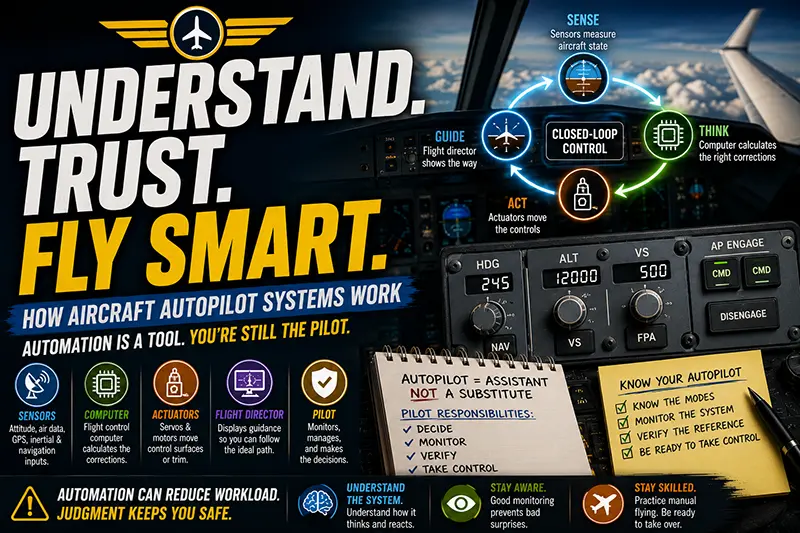
At its simplest, an autopilot is a control system that closes a loop between measured aircraft state and control outputs. Sensors measure attitude, altitude, air data, and navigation cues. A flight control computer or autopilot computer computes corrections to achieve a commanded flight path. Actuators move the controls to apply those corrections. A flight director provides cueing to the pilot when the system is not coupled or when manual intervention is needed.
Think of an autopilot as a decision-making instrument that translates a pilot's mode selections into precise, repeatable control inputs. The autopilot does not replace the pilot's responsibility. It executes control laws within its design limits and the data it receives. Pilots must understand what the autopilot is attempting to control and how it responds to failures or degraded sensors.
Key Components and How They Interact
Breaking the system into components helps clarify where things can go wrong and what pilots should monitor.
1) Sensors and inputs. The autopilot relies on attitude sensors, rate sensors, air data computers, altimeters, GPS, inertial reference systems, and navigation receivers. Each provides part of the aircraft state. Redundancy is common. When a sensor fails or gives inconsistent data, the autopilot can unsettle or disengage depending on the design.
2) Flight director. A flight director generates the guidance cues you see on the attitude indicator. It computes the ideal aircraft attitude or flight path to achieve the selected mode, such as heading hold, course capture, or vertical speed. Pilots often use the flight director to hand-fly a commanded profile with reference guidance even when the autopilot is off.
3) Autopilot control laws. These are the algorithms that convert guidance into control surface motions. Control laws can be simple proportional-integral-derivative feedback loops or more advanced gain-scheduled laws with limits and nonlinear behavior. Higher-end systems include protections and envelope awareness; simpler systems focus on tracking commands within a limited flight regime.
4) Servo or actuator system. The computed corrections are sent to electric, hydraulic, or mechanical actuators that move the control surfaces, trim, or autopilot servos. Actuators include position feedback so the system knows it achieved the commanded deflection.
5) Mode logic and human interface. Mode selectors, annunciators, and tactile disengage switches are how pilots interact with the system. Mode logic defines what happens when conflicting commands exist, when the pilot selects a new mode, or when the autopilot encounters a condition it cannot manage.
Why This Matters in Real-World Aviation
Autopilots are not magic. They influence pilot decision-making, workload distribution, and safety margins. Used well, they reduce pilot fatigue and enable precision in instrument flight and long flights. Misused, they can mask degradations, erode basic stick-and-rudder skills, and contribute to loss of situational awareness.
In training and operations, autopilot understanding affects several domains:
• Flight training. Instructors need to teach not just how to engage automation, but why and when to disconnect it. Teaching coupled and hand-flown transitions prevents students from becoming automation-dependent.
• Operational decision-making. Knowing the autopilot's limits informs dispatch decisions, alternate planning, and approaches. This includes recognizing when an autopilot should not be used, such as in some low-altitude, high-workload situations or when flight control authority is limited.
• Safety and error management. Familiarity with common failure modes lets crews recognize automation anomalies early and execute appropriate reversion procedures, including prompt manual flying and use of standby instruments.
How Pilots Should Understand Autopilot Behavior
Move past buttonology and learn functional categories. Ask yourself, "What is the system trying to control right now?" rather than "What does this switch do?" The following ways to conceptualize autopilot behavior help during flight.
1) Which axes are controlled. Autopilots commonly control one, two, or three axes. A lateral mode controls roll and heading or navigation tracking. A vertical mode controls pitch for altitude, vertical speed, or flight-level changes. Some advanced systems also control speed through thrust or autothrust integration. Know which axes are active in each mode and what limits apply.
2) What the reference is. Modes can reference different guidance sources. For lateral guidance the reference might be a heading bug, a GPS course, or an ILS localizer. For vertical guidance the reference might be a selected altitude, a VNAV path, or a vertical speed. When changing modes, verify the reference to avoid sudden nose-up or nose-down commands.
3) How the autopilot transitions. When capturing a localizer or glideslope, many systems transition through a capture mode that modifies gains to reduce overshoot. On a missed approach, mode logic should hand authority back to the pilot or reconfigure to track the missed approach if properly coupled. Expect different behavior when the autopilot is in coupled FMS navigation vs raw heading/altitude hold.
4) Interaction with trim. Autopilots often use trim to relieve control loads and stay in command range. Trim buildup during prolonged autopilot use can surprise the pilot at disconnect. Always monitor trimming and check trim after disconnects, especially in light aircraft where pitch control authority is smaller.
5) Failure annunciation and disconnect behavior. Systems vary in how they alert the pilot and what happens on loss of sensor data. Some autopilots will provide an alert and disengage automatically. Others may continue using degraded sources. Maintain a habit of scanning annunciators and test the disengage switch in training so muscle memory drives immediate response when needed.
Common Mistakes and Misunderstandings
Pilots often make similar errors when using automation. Recognizing them in training reduces risk.
Overreliance on autopilot. Treat the autopilot as an aid, not a substitute for active flying. Overreliance becomes evident when crews fail to notice subtle changes in aircraft behavior or system health because they trust the autopilot to correct everything.
Mode confusion. Selecting a heading bug when you meant to select NAV is a classic error that can lead the aircraft off the intended course. Mode annunciations and mindset checks reduce this risk.
Poor monitoring of flight director cues. Pilots may follow the flight director blindly instead of cross-checking airspeed, vertical speed, and altitude capture. The flight director assumes the sensors are correct. If those sensors fail, the cues can be misleading.
Not practicing manual hand-flying. Automation de-skills fine motor control and energy management. Periodic practice of hand-flying with the flight director on and off keeps pilots proficient at attitude control, trim coordination, and go-around maneuvers.
Improper use during critical phases. Some pilots engage the autopilot too early or leave it on during unstable approaches. Understand the aircraft's and operator's procedures for when automation may be beneficial and when manual control is safer.
Practical Example: IFR Cruise to Coupled Approach
Scenario. You are flying a single-pilot IFR flight in IMC at cruising altitude with the autopilot coupled to GPS lateral navigation and VNAV managing descent. ATC issues an ILS approach. You must transition from VNAV to a coupled ILS approach and prepare for possible go-around.
Step 1: Confirm navigation source. Verify the ILS frequency is tuned and identified. Make sure the autopilot’s lateral source is set to the localizer when cleared for the approach. If the system supports automatic tuning, confirm the selected frequency matches the clearance.
Step 2: Select approach mode and check the flight director. Arm or select the approach capture mode. Watch the flight director for anticipated capture behavior. Do not assume capture will be smooth; plan for a potential manual capture if the glideslope is weak or the localizer signal fluctuates.
Step 3: Manage the descent. Crosscheck vertical speed and airspeed while VNAV transitions. If the aircraft tends to float or if winds are strong, consider switching to a vertical speed or flight level mode that you can manually control with quick adjustments.
Step 4: Monitor trim and autopilot workload. Trim changes during the descent may be significant. Keep a hand near the disconnect and be ready to take control if the autopilot shows any oscillatory behavior.
Step 5: Brief the missed approach. Before reaching the final approach fix brief the missed approach procedure and the autopilot behavior you expect during a missed approach. If the autopilot supports automatic missed approach capture, know the conditions under which it will engage. Otherwise, be prepared to disconnect, apply power, and reconfigure manually.
Outcome. By anticipating mode transitions, verifying references, and maintaining manual readiness, you mitigate the most common automation-related risks during instrument approaches.
Best Practices for Pilots
Good habits around autopilot use are practical and teachable. Below are concise practices that improve safety and operational effectiveness.
- Brief automation use before flight. Decide when and how you'll use the autopilot during critical phases and transitions.
- Understand modes, not buttons. Know what each engaged mode controls and what reference source it follows.
- Monitor instruments and annunciators continuously. Autopilot can mask sensor failures unless you keep a proper scan.
- Practice manual flying regularly. Include hand-flown instrument approaches and go-arounds in training syllabi.
- Manage trim proactively. Check trim settings after disconnects and during mode transitions.
- Use the flight director to build situational awareness. Hand-fly using the flight director to reinforce control techniques and visual cues.
- Plan for failures. Include simple, rehearsed fallback plans like immediate disconnect and transition to basic pitch and power profiles.
Frequently Asked Questions
Can I let the autopilot fly the entire flight?
Autopilots are capable of flying long phases of flight, but pilots must remain actively involved. Regulations and company policies address who is responsible for overall flight safety. Even when automation performs the control tasks, pilots must monitor systems, be ready to intervene, and manage communications and decision-making. Use autopilot to reduce workload, not remove the human from the loop.
How do I know when to disconnect the autopilot?
Disconnect when the autopilot demonstrates behavior you did not expect, when flight conditions exceed the system's known limits, when you need immediate manual control for a maneuver, or when safety demands direct human control. If an instrument disagreement or unusual control input occurs, disconnect and fly manually until you diagnose the cause.
What are typical autopilot failure modes?
Common failure modes include sensor discrepancies, actuator jams, runaway trim, loss of navigation source, and software or power anomalies. Many systems are designed to detect and announce failures, but detection is not perfect. Training to recognize subtle signs such as unexpected control feel, oscillations, or unusual flight director cues is essential.
Does using the autopilot reduce pilot skills?
Automation can erode manual flying proficiency if pilots rely on it exclusively. Regular practice with the autopilot off, including basic attitude flying and approaches, preserves skills. Integrate manual flying practice into recurrent training and personal minimums.
How does a flight director differ from an autopilot?
A flight director computes the ideal control inputs and displays them as cues on the attitude indicator. The autopilot can be coupled to execute those inputs automatically. Pilots can hand-fly following flight director cues without the autopilot engaged, which is a valuable training technique.
Common Misconceptions
Misconception: Autopilots always make smoother and safer control inputs. Reality: Autopilots make consistent inputs based on available data. If that data is wrong or the control law is unsuitable for the flight regime, the autopilot can exacerbate the situation. Pilot oversight is essential.
Misconception: Autopilot disengage always returns immediate manual control without surprises. Reality: On disconnect, trim position and control forces may produce unexpected pitch or roll unless the pilot anticipates them. Expect trim-induced changes and plan to counter them quickly.
Misconception: Automation removes the need for pilot monitoring. Reality: Automation changes the nature of monitoring. Pilots move from direct control to system oversight, which is a different skill set requiring deliberate training.
Key Takeaways
- Practical takeaway: Understand which axes are under autopilot control and what reference source each mode uses before you engage automation.
- Safety takeaway: Always monitor instruments and annunciators. Be ready to disconnect and fly manually if the system shows unexpected behavior.
- Training and decision-making takeaway: Practice hand-flying with the flight director and rehearse simple failure responses to maintain skills and confidence.
Understanding aircraft autopilot systems involves more than learning button names. It requires a conceptual model of sensors, guidance, control laws, and human interaction. For instructors, emphasize scenario-based training that teaches transitions, failures, and realistic use. For operators and professional pilots, maintain clear standard operating procedures that prescribe when to use automation and how to manage it safely.
If you are a student or an experienced pilot returning to the cockpit, focus your study and practice on mode awareness, manual takeover drills, and the reasons behind each autopilot action. Those skills make automation a safe and effective tool rather than an unexamined convenience.