
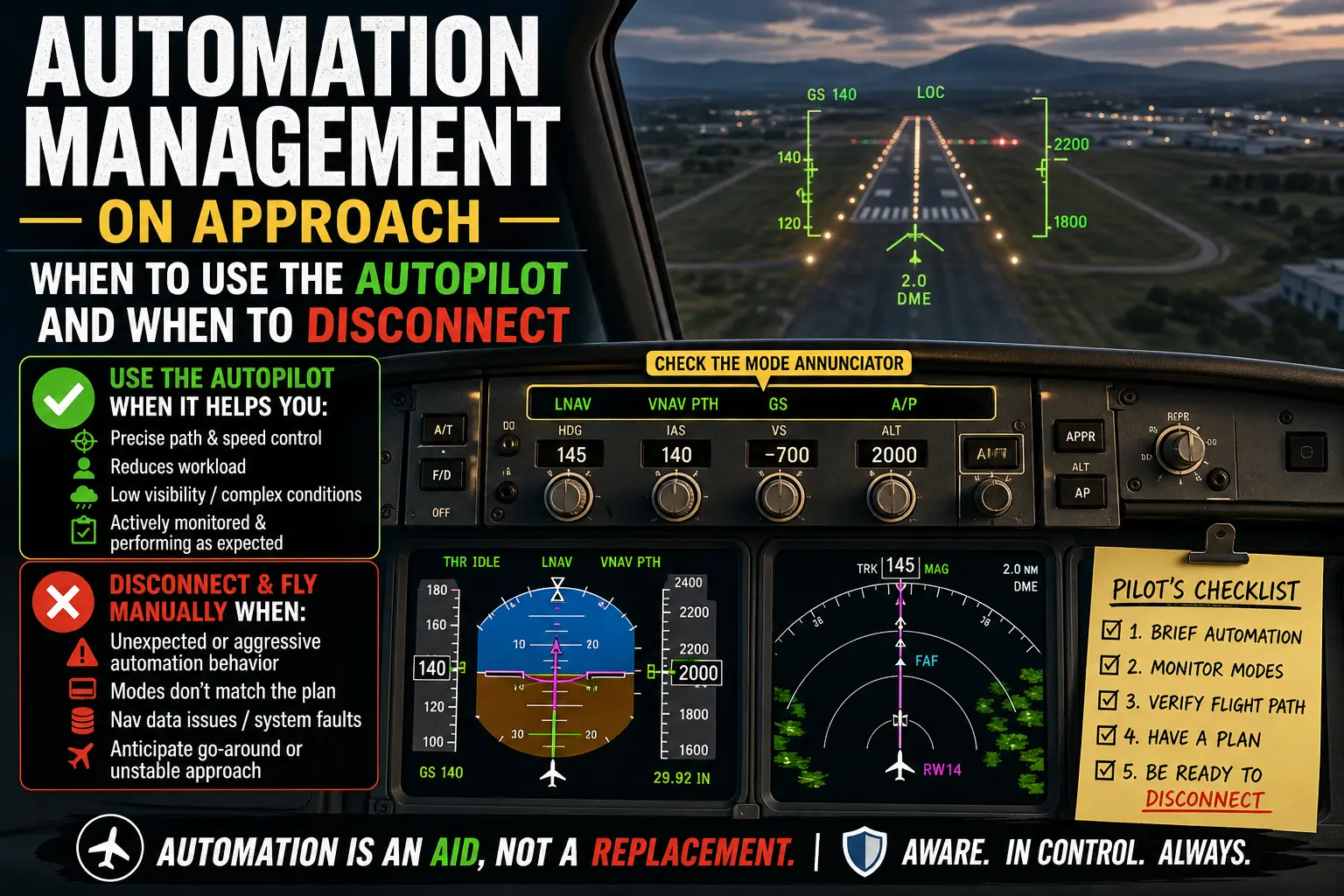
Automation management on approach is one of the most important piloting skills in modern aviation. Automation management on approach describes the decisions a flight crew makes about engaging, monitoring, changing modes, or disconnecting the autopilot and flight director during the descent and final stages of flight. For pilots, instructors, and aviation professionals, sound automation management reduces workload, preserves situational awareness, and mitigates risks associated with mode confusion and overreliance on automation.
This article explains the core ideas behind autopilot use on approach, highlights the benefits and limitations of automation, explores mode awareness, and outlines practical guidance for when to hand fly. You will find real-world context, a training-focused example, common mistakes to avoid, and concise takeaways you can apply in the cockpit or in the classroom.
Core ideas: What automation does for you on approach
Autopilots, coupled with flight directors and navigation systems, can fly stable approaches to specified path and speed targets while reducing pilot workload. When used well, automation lets pilots focus on big-picture tasks: monitoring aircraft energy state, verifying navigation and approach constraints, communicating with ATC, and preparing for contingencies. Key capabilities include lateral guidance tracking (localizer, RNAV lateral), vertical path guidance (glideslope, VNAV), altitude and speed capture, and automatic approach capture modes.
However, automation does not remove the pilot from the control loop. The crew still must understand what the automation is doing, verify that modes and references match the intended approach, and be ready to intervene immediately if the automation behaves unexpectedly or the situation changes.
Why this matters in real-world aviation
Poor automation management contributes to incidents where crews were surprised by unexpected flight path changes, delayed manual control inputs, or confusion over automation modes. In practice, approach phases often combine high workload with time pressure: descending through constrained altitudes, configuring the aircraft, and managing communications. In these conditions, appropriate automation use can enhance safety; inappropriate reliance can erode manual flying skills and delay recovery from failures.
For training organizations and operators, clear policies and consistent training that address when to use automation on approach, how to monitor it, and when to transition to hand flying can improve crew performance and reduce the risk of mode-related errors.
Autopilot pros and cons
Understanding both sides of automation helps with sound decision-making.
- Pros
- Reduces pilot workload during complex tasks such as configuring, briefing, and communicating.
- Maintains precise lateral and vertical guidance, which can be especially helpful in low-visibility or high-wind conditions.
- Can improve adherence to published vertical and lateral constraints when properly programmed.
- When coupled with proper monitoring, allows better scan distribution and early detection of other threats.
- Cons
- Potential for mode confusion if the crew does not verify active and armed modes.
- Skill degradation in manual flying, particularly in unusual attitudes, gusty conditions, or unstable approaches.
- Delayed manual intervention when the autopilot fails to capture or when it commands inappropriate flight path changes.
- Dependence on correct inputs and navigation database entries; automation will follow what it is told, not necessarily what the crew intends.
How pilots should understand automation modes
Mode awareness is the ability to recognize and understand the current and armed modes of the autopilot, flight director, and navigation system. Simple steps to build mode awareness include a short-mode briefing before the approach, confirming expected armed and active indications on the mode annunciator, and verbal callouts for mode transitions that affect flight path or energy state.
Key mode concepts to check during approach:
- Which lateral guidance mode is active or armed (e.g., localizer, LNAV, heading select).
- Which vertical mode is active or armed (e.g., glideslope capture, VNAV, vertical speed).
- Speed control mode and autothrottle status where applicable.
- What triggers will change modes automatically, and what requires manual intervention.
Never assume an armed mode will become active as expected; verify the annunciator and cross-check flight path adherence as the approach progresses.
When to keep the autopilot engaged on approach
Consider keeping the autopilot engaged when it is consistently flying the expected path, the crew can monitor and verify modes, and automation reduces workload without masking abnormal behavior. Scenarios where keeping automation engaged may be appropriate include:
- Low-visibility approaches where maintaining precise flight path reduces landing risk.
- Complex, high-workload environments where the autopilot reliably holds the approach and allows better crew task management.
- Long, stabilized approaches flown to published minima where the automation follows the correct procedures and the crew actively monitors performance.
Even when the autopilot remains engaged, the pilot flying must be ready to disconnect and fly manually without delay if the automation does not perform as expected.
When to disconnect and fly manually
Disconnecting the autopilot is appropriate when automation performance is inconsistent with the approach profile or when the crew judges that manual control will yield safer and more predictable outcomes. Typical triggers for disconnect include:
- Inconsistent or unexpected autopilot commands that create energy or path deviations.
- Mode annunciator indications that do not match the planned approach.
- Unreliable navigation inputs, database inconsistencies, or system failures.
- When a go-around or missed approach is anticipated and the crew prefers manual control to ensure a stable contingency maneuver.
When disconnecting, apply a smooth and immediate control transition, maintain energy state, fly the aircraft to a stabilized condition, and reconfigure as required for the remainder of the approach or go-around.
Common mistakes and misunderstandings
Pilots and instructors commonly encounter several pitfalls when managing automation on approach. Recognizing these can prevent errors that compromise safety.
- Mode confusion: Failing to verify the annunciator or assuming an armed mode will activate can lead to surprise flight-path deviations.
- Complacency: Letting the automation manage all tasks without active monitoring increases time to detect faults and reduces manual proficiency.
- Delayed disconnect: Hesitating to disconnect when automation is unreliable can result in a late, high-workload recovery that is harder to manage safely.
- Inadequate briefing: Not briefing automation behavior for the approach—what you expect it to do and how you will respond if it does not—creates uncertainty at critical moments.
Practical example: RNAV approach with wind shear and late mode change
Imagine you are flying an RNAV approach with VNAV engaged and the autopilot coupled through to final. During descent, ATIS reports gusty crosswinds and the aircraft feels slightly low on energy. As you capture the final segment, the mode annunciator shows LNAV active but VNAV has dropped to nearby vertical speed mode because of a temporary path deviation. The autopilot corrects aggressively and the speed starts to rise as the autothrottle compensates.
Decision logic for this scenario:
- Verify that the active modes match your approach plan and that the flight path remains within acceptable limits.
- If the autopilot's corrections are predictable and you can monitor parameters closely, you may keep it engaged while calling for configuration and stabilizing the approach.
- If the autopilot oscillates, fails to capture the intended vertical path, or mode annunciation does not match the approach brief, disconnect immediately and hand fly to stabilize aircraft energy and alignment.
- Be prepared to initiate a missed approach if the approach does not stabilize by the appropriate point for your operation.
This example shows the practical balance: automation can help manage workload in gusty conditions, but mode transitions and unexpected behavior require immediate assessment and a rapid, decisive response.
Best practices for pilots
Adopt habits that preserve situational awareness and ensure timely manual intervention when needed. Useful practices include:
- Brief automation: Before the descent, describe how the autopilot and flight director should behave during the approach, including expected armed and active modes.
- Monitor actively: Scan the mode annunciator, flight instruments, and cues from the flight path to confirm automation behavior matches the brief.
- Practice disconnects: Regularly train manual approaches and immediate transitions from autopilot to hand flying so the maneuver becomes smooth and timely under pressure.
- Set clear criteria: Define company or personal criteria for when to disconnect or continue with automation in specific conditions, and review these criteria during briefings.
- Use standard callouts: Communicate mode changes and disconnects consistently within the crew to maintain shared situational awareness.
- Check aircraft capability: Know whether the aircraft and runway allow continued autopilot-coupled approaches to landing, autoland capability, and any applicable limitations in the aircraft flight manual.
Frequently Asked Questions
When should I disconnect the autopilot on final approach?
Disconnect when the automation exhibits unpredictable or incorrect behavior, when mode indications do not match your plan, or when manual control will provide a clearer, safer outcome. Prioritize a timely disconnect rather than a delayed reaction to automation faults.
Does using the autopilot reduce pilot skills?
Overreliance without regular manual flying practice can degrade manual handling skills. Regularly practicing manual approaches, go-arounds, and upset recovery helps maintain proficiency while preserving the benefits of automation.
How can I avoid mode confusion?
Brief expected modes before the approach, monitor the mode annunciator, use verbal callouts for transitions, and cross-check the flight path and instruments whenever a mode change occurs.
Can I always rely on the autopilot for low-visibility approaches?
Autopilot use in low visibility can improve precision, but pilots must verify the aircraft and runway are approved for the intended procedure, confirm system integrity, and remain prepared to disconnect and fly manually if a failure or unexpected behavior occurs.
Should single-pilot operations rely on automation differently than multi-crew flights?
Single-pilot operations have different workload and monitoring dynamics. In those operations, consider automation as an aid but maintain an emphasis on the ability to take immediate manual control. Training should reflect the single-pilot environment and its unique demands.
Key Takeaways
- Practical takeaway: Use automation to reduce workload, but brief expected modes and continuously monitor the mode annunciator and flight path.
- Safety takeaway: Disconnect promptly if the automation behaves unpredictably or mode indications do not match the planned approach.
- Training and decision-making takeaway: Regularly practice manual flying and disconnect procedures, and include automation scenario training in recurrent programs.