Flight simulators are central to modern pilot training. They let pilots practice complex procedures, emergency responses, and crew coordination in a controlled environment without the cost and risk of real flight. For students, instructors, airline operators, and training departments, simulators reduce risk, increase repetition, and enable focused assessment of skills that are difficult to reproduce reliably in the airplane.
This article explains how flight simulators work as training tools, what they teach, and how instructors and pilots should use them to improve safety and proficiency. You will read practical guidance on understanding simulator fidelity, designing useful scenarios, and avoiding common misunderstandings that diminish training value.
What a Flight Simulator Actually Teaches
At its core, a simulator trains decision making, procedural memory, system management, and manual flying skills. It reproduces aircraft systems, flight dynamics, and environmental conditions so pilots can practice tasks such as instrument approaches, engine failures, automation management, and crew resource management.
Simulators excel at scenario-based training. Instead of repeating isolated tasks, trainees handle realistic sequences that combine weather, air traffic, system malfunctions, and human factors. This helps pilots learn to prioritize tasks, detect subtle cues, and maintain situational awareness under stress.
Why This Matters in Real-World Aviation
Training in simulators translates directly to safer operations. Pilots who have rehearsed non-normal procedures and emergency flows are less likely to make procedural mistakes when faced with the same events in flight. Simulators also allow training under poor visibility, severe turbulence, or at night without exposing aircraft, passengers, or crews to risk.
From an operator perspective, simulators provide reproducible, audited training sessions. They support recurrent checks, type ratings, and scenario-based line-oriented flight training. For general aviation, desktop and fixed-based devices make practicing instrument procedures and emergency drills more accessible and affordable.
How Pilots Should Understand Flight Simulator Fidelity
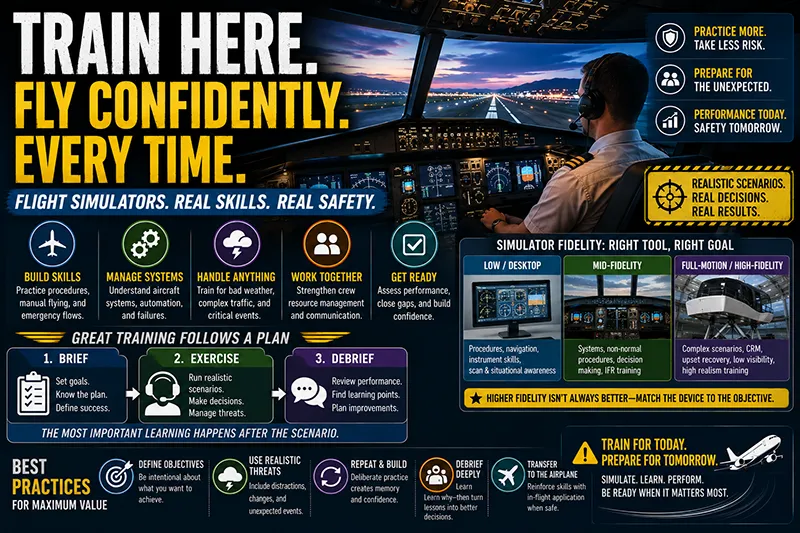
Simulator fidelity means how closely the device reproduces real aircraft behavior and cockpit environment. Fidelity ranges from basic desktop trainers that practice procedures and instrument interpretation to full flight simulators that replicate motion and visual cues. Higher fidelity is not automatically better for every training objective.
Use the right tool for the job. Use low- or mid-fidelity devices for procedural training, navigation practice, and instrument scan discipline. Reserve high-fidelity, full-motion simulators for tasks that require realistic sensory feedback, such as upset recovery, approach path control in low visibility, or complex crew coordination under workload. The instructor’s job is to match the scenario and training goals to the device capabilities.
Common Mistakes or Misunderstandings
Training programs sometimes misuse simulators, producing overconfidence or superficial learning. Common errors include treating simulator sessions as rote checklists, failing to inject realistic distractions, and ignoring transfer-of-training limits. Another frequent misunderstanding is assuming every simulator event translates identically to the airplane. Motion cues, visual fidelity, and tactile feedback differ between devices and aircraft, so a maneuvre that feels natural in a simulator may require subtle adjustments in the real cockpit.
Other pitfalls include failing to debrief effectively and not emphasizing decision making. The most valuable training happens during guided reflection: reviewing what went well, what didn’t, why, and how to apply the lessons in flight.
Practical Example
Imagine a multi-engine pilot undergoing recurrent training. The instructor sets a scenario in a high-fidelity simulator: an engine fails shortly after V1 on a single-engine climb, with a crosswind and a moderate fuel imbalance. The scenario forces the pilot to: recognize the failure; identify the inoperative engine; maintain directional control; secure the failed engine; reconfigure the airplane for climb; and coordinate with ATC. The instructor introduces realistic interruptions such as radio calls and a cockpit annunciator warning that requires prioritization and task-sharing with the co-pilot.
After the scenario, the instructor debriefs using recorded flight data and voice playback. They highlight proper cross-control technique, callout discipline, and checklist use, and discuss decision points such as whether to return to the field or proceed to a diversion airport. Because the simulator allowed repeated practice and controlled variability, the pilot can rehearse the sequence multiple times to build proficiency and confidence before attempting similar practice in flight.
Best Practices for Pilots
Use these practical steps to get the most from simulator sessions:
- Define training objectives before you enter the simulator. Know whether you are working on manual flying, automation management, systems knowledge, or decision making.
- Create realistic scenarios that include common distractors such as weather changes, ATC interactions, and system warnings.
- Practice both normal and abnormal procedures. Repetition builds procedural memory, which frees cognitive bandwidth for higher-level decisions.
- Insist on structured debriefs. Use recordings when available. Discuss errors openly and plan corrective steps.
- Transfer learning deliberately. After simulator work, plan in-aircraft practice that replicates the skills where appropriate and safe to do so.
How Instructors Should Design Simulator Sessions
Good instructor design starts with measurable outcomes. Break the session into phases: brief, exercise, debrief. During the brief, set expectations and success criteria. During the exercise, keep interventions limited to let the trainee experience consequences. During the debrief, focus on decision points and cognitive processes, not only on stick-and-throttle technique.
Use progressive difficulty. Start with a constrained scenario emphasizing a single skill and then layer additional complexity: introduce degraded automation, system failures, or higher traffic density. When working on crew resource management, include explicit role-sharing challenges and communication tasks.
Regulatory and Operational Considerations
Simulators are integrated into many training programs and regulatory frameworks. Different devices meet different standards for training credit and qualification, and operators must ensure the device type and level are appropriate for the intended training objectives. Training providers should document device capabilities and limitations, and pilots should understand what skills a particular device is designed to teach.
When planning recurrent or type-specific training, coordinate with your training department or regulatory guidance to confirm which simulator sessions fulfill regulatory or company requirements. Where simulators substitute for in-aircraft training, ensure that transfer-of-training limitations are acknowledged and that any in-flight validation steps are completed as required by your operator or local aviation authority.
Common Safety Risks and How to Mitigate Them
Relying too heavily on automation within a simulator can reduce manual handling proficiency. To mitigate this risk, set aside deliberate manual-flying practice time and train automation rollback strategies. Another safety risk is insufficient realism in threat exposure. If simulators never present realistic threats, pilots may be unprepared when problems occur in flight. Use well-designed threat-and-error management scenarios that force recognition, containment, and recovery of errors.
Finally, maintain an honest appraisal of simulator limitations. Motion systems have transient cues and visual systems have limited field-of-view. Recognize these constraints during scenario design and debriefs so pilots understand what aspects of performance are likely to transfer directly to the airplane and which require additional in-flight practice.
Frequently Asked Questions
Are simulator hours equivalent to actual flight hours?
Simulator hours and flight hours are different categories. Regulatory authorities and training organizations specify when simulator time can substitute for aircraft time. Beyond regulatory substitution, consider the training purpose. Simulators are highly effective for procedures, systems practice, and emergency rehearsals, but some manual handling skills are best reinforced in the airplane.
How often should pilots train in a simulator?
Frequency depends on the pilot’s experience, aircraft type, and operational environment. Airline and operator programs often schedule recurrent simulator training annually or semiannually. For other pilots, periodic simulator sessions can support instrument currency, emergency procedure practice, and proficiency maintenance. Use simulator training when it addresses a clear proficiency gap or objective.
What can’t a simulator teach effectively?
Simulators cannot fully reproduce certain physiological sensations, real-world risk, and some tactile cues. Also, real-world factors such as maintenance irregularities, unpredictable human behavior outside the cockpit, and actual aircraft wear may not be fully represented. Use simulators as a complement to, not a replacement for, in-aircraft exposure where those elements matter.
How should a pilot prepare for a simulator session?
Review the aircraft procedures and brief the training objectives beforehand. Bring notes on specific maneuvers or systems you want to practice. Be ready to work on decision-making as well as stick-and-throttle skills, and prepare to participate actively in the debrief.
Key Takeaways
- Practical takeaway: Match device fidelity to your training objective so practice transfers effectively to the airplane.
- Safety takeaway: Use scenario-based threats and realistic distractions to build decision-making under stress.
- Training/regulatory takeaway: Verify which simulator sessions meet regulatory or company credit and document device limitations for instructors and trainees.
Flight simulators are powerful training tools when used intentionally. They reduce risk, enable repeatable practice, and develop the cognitive skills pilots need for modern operations. The most effective use combines realistic scenarios, disciplined debriefs, and deliberate transfer of skills to the airplane.