
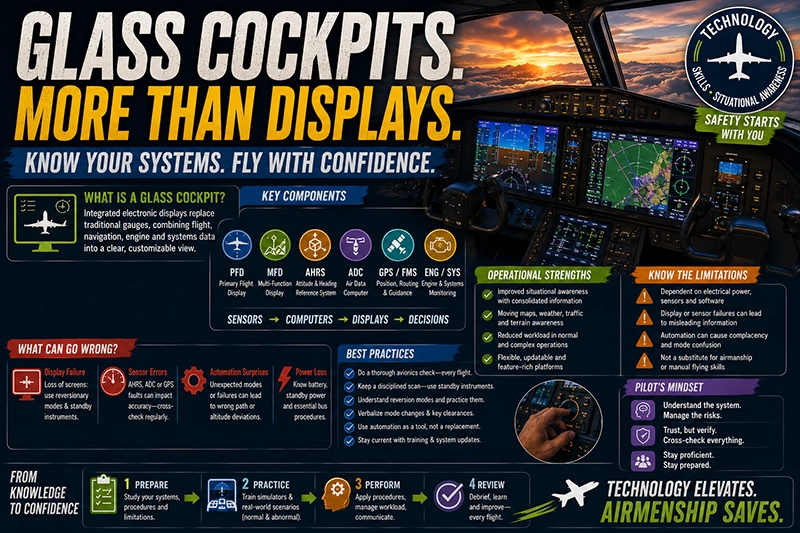
Glass cockpits have transformed modern aviation by replacing many traditional mechanical instruments with integrated electronic displays and automated systems. For pilots, instructors, and maintenance professionals, understanding how glass cockpits work, their operational strengths and limitations, and how to manage their failure modes is essential for safe flight operations.
This article explains the evolution of glass cockpit technology, describes key components and architectures, and discusses the human factors and training implications that matter most in day-to-day flying. Practical examples, common misunderstandings, and best-practice recommendations are included to help pilots integrate glass-cockpit flying into sound decision-making and procedural discipline.
How Glass Cockpits Work: Core Concepts and Components
At a high level, a glass cockpit replaces individual analog gauges with a digital display system known as an Electronic Flight Instrument System, or EFIS. The EFIS typically includes a primary flight display (PFD) and a multi-function display (MFD). The PFD shows primary attitude, airspeed, altitude, vertical speed, and course information in a consolidated view. The MFD generally handles navigation maps, engine and systems data, weather information, and checklist or procedural pages.
Several sensor and data systems feed a glass cockpit. Inertial and magnetic sensors provide attitude and heading information through an Attitude and Heading Reference System (AHRS). Air data computers (ADCs) calculate indicated airspeed, altitude, and air temperature from pitot-static inputs. Flight management systems (FMS) and GPS receivers provide positioning, route data, and guidance. Engine and systems controllers feed parameters to the MFD, while alerting logic prioritizes warnings and cautions to the crew.
Modern glass cockpits also integrate synthetic vision, terrain awareness, traffic displays, and predictive tools. The software-driven nature of these systems makes them flexible and capable, but it also increases dependence on correct system configuration, redundancy, and pilot understanding of display logic.
Why This Matters in Real-World Aviation
Glass cockpits change how pilots acquire, process, and prioritize information. The consolidation of critical flight data into fewer displays can improve situational awareness when used correctly. Navigation pages, moving maps, and predictive flight paths reduce workload on long, complex procedures and help crews plan ahead.
At the same time, glass cockpits introduce specific operational considerations. They rely on electrical power, multiple sensors, and software that may behave differently under partial failure. Redundancy and reversion modes exist in many certified systems, but pilots must understand exactly what each reversion mode provides and which instruments remain available during partial or total display failure.
From the training and regulatory perspective, transitioning to a glass cockpit requires more than learning new button presses. Flight crews need procedural discipline, effective scan techniques, and recurrent training that emphasizes degraded-mode operations. Operators must ensure that standard operating procedures cover power-up checks, reversionary mode operations, and the use of standby instruments or portable backups.
How Pilots Should Understand Glass Cockpits
Pilots should view glass cockpits as advanced avionics ecosystems rather than single instruments. Understanding the data flow and failure modes is more important than memorizing every display page. Key practical concepts to master include:
- Data sources vs. displays: Separate the sensors and computers that generate flight data from the displays that present it.
- Primary vs. secondary: Know which display is primary for attitude and flight guidance, and which display provides backup or supplemental information.
- Reversionary modes: Learn the behavior of the system when one display fails, including which indicators appear and whether the standby instruments remain required for safe flight.
- Alerting logic: Understand how caution and warning messages are prioritized, how to silence or acknowledge alerts, and what immediate actions those alerts require.
Practical training should include power-loss and partial-display scenarios, cross-checking instrument failures against standby instruments, and practicing partial-panel procedures in the aircraft type or a simulator when available.
Common Mistakes or Misunderstandings
Glass cockpits reduce some types of workload while introducing other risks. Recognizing common errors helps prevent incidents that stem from misplaced trust or training gaps.
Overreliance on automation is a frequently encountered problem. Pilots may allow automated systems to fly tasks while they monitor, but when automation fails or commands an unexpected maneuver pilots can be surprised. This problem shows up as delayed manual takeover, inappropriate control inputs, or loss of spatial orientation under high workload.
Mode confusion is another risk. Modern flight directors and autopilot systems allow multiple modes for lateral and vertical guidance. If a pilot believes the autopilot is following one mode while it is actually in another, the aircraft can execute a different flight path than expected. Clear mode awareness and verbalizing mode changes help mitigate this risk.
Misreading trend vectors or predicted path markers on displays can produce incorrect expectations about near-term aircraft behavior, especially in dense instrument meteorological conditions or during critical phases like approach and landing. Pilots should practice interpreting these cues during recurrent training and build mental models that match how the avionics represent predictions.
Finally, poor scan technique remains an issue. Glass cockpits concentrate many data elements in a few places, which can lead to narrow scanning habits. Integrate external visual cues, radio calls, and standby instrument cross-checks into routine scan patterns.
Practical Example: IFR Approach with Partial Display Loss
Consider an instrument approach in IMC where the captain is flying and the MFD suddenly blanks due to a display fault. The PFD remains operational but alerts indicate loss of certain navigation data. In this scenario, good procedural discipline prevents escalation.
First, the crew establishes control and communicates. The pilot flying announces the malfunction and the pilot monitoring confirms aircraft attitude and performance using the PFD and standby instruments. If navigation guidance from the FMS is degraded, the crew requests vectors from ATC while the pilot flies using the PFD flight-director cues or raw navigation aids like VOR or localizer signals, depending on availability.
If the autopilot is engaged and still reliable, the crew can keep it engaged while assessing failures. If autopilot disconnects unexpectedly, the pilot must transition smoothly to hand-flying using attitude and performance indications on the remaining PFD and standby instruments. If the aircraft has a reversionary mode that merges PFD and MFD functions to a single display, crew members should activate it per the aircraft procedures so navigation and engine information remains available.
This practical example highlights the importance of knowledge about reversion modes, quick identification of what data are lost, and using ATC and company resources to maintain a safe flight path while troubleshooting.
Best Practices for Pilots
Adopting consistent habits reduces the likelihood of glass-cockpit related errors. These practices are applicable across single-pilot and multi-crew operations.
- Conduct a structured power-up and preflight avionics check. Verify that attitude, air data sources, navigation sensors, and standby instruments are aligned and showing expected values before flight.
- Practice specific failure scenarios in a simulator or during supervised training: partial display loss, AHRS drift, ADC failures, and GPS outages.
- Maintain a disciplined scan that includes glance checks of the standby instruments, cross-checks of airspeed and altitude trends, and timely interpretation of alert messages.
- Verbally confirm mode changes when arming or selecting flight director, autopilot, or FMS modes. Use sterile-cockpit principles during critical phases to limit distractions.
- For single-pilot operations, use brief verbal callouts to structure tasks when interacting with the FMS or moving between display pages. This reduces the chance of missing critical information during high workload.
- Carry a portable backup, such as an approved electronic flight bag with attitude and navigation apps or a dedicated portable GPS, following airworthiness and operational approvals for your aircraft and operation.
Training and Transition Recommendations
Transitioning from analog to glass requires more than technical familiarity. Training should emphasize systems thinking, failure management, and human factors. Type-specific differences between manufacturers can be significant. For example, the way one system presents reversionary data or highlights failures can differ from another, so pilots must train in the specific avionics suite installed in their aircraft.
Recurrent training should include manual flying skills under partial automation and night and IMC scenarios. Scenario-based training that includes task management, communication with ATC, and the use of checklists under stress helps crews internalize correct responses to system anomalies.
Maintenance and Operational Considerations
Glass cockpits are software-driven and can require different maintenance practices than traditional instruments. Software updates, database currency, and sensor calibrations are critical for safe operation. Operators should follow manufacturers' guidance about software patches and database updates and incorporate those requirements into maintenance planning.
Electrical system integrity and redundancy are important because displays typically rely on aircraft power. Regular checks of power buses, standby battery systems, and circuit protections reduce the risk of display loss due to electrical fault. Where permitted by the aircraft’s certification, installing and maintaining redundant data sources such as dual ADCs or multiple GPS receivers improves resilience.
Common Misconceptions and Safety Risks
Some pilots assume that glass cockpits will prevent all navigation or pilotage errors. That is not true. Glass cockpits can reduce certain errors but also hide problems until they become urgent. For instance, a subtle AHRS drift can produce steady but incorrect attitude indications that are difficult to detect without cross-checking against standby instruments or external references.
Another misconception is that all alerts are equally urgent. Alerting systems typically use a prioritized hierarchy: warnings indicate immediate danger requiring immediate action, while cautions indicate conditions that require corrective action but are not immediately dangerous. Pilots must understand how their specific avionics implement and present these priorities because actions differ by alert level.
Regulatory and Certification Context
Aircraft certification and operational approval for glass cockpit installations include design requirements for redundancy, failure indication, and fallback instruments. While certification ensures certain protections, operational risk remains where pilots or operators do not maintain currency with system behaviors or do not practise degraded-mode operations.
Pilots should consult and comply with applicable regulations and the aircraft or avionics manufacturer’s approved procedures. Operational policies in a flight department or training organization should reflect the capabilities and limitations of the installed avionics and ensure that flight crews receive appropriate initial and recurrent training.
Future Trends
Glass cockpits will continue to evolve. Expect improved sensor fusion, increased use of synthetic vision and enhanced traffic displays, and tighter integration between flight automation and predictive maintenance systems. While these advances will offer new safety and efficiency gains, they will also require ongoing emphasis on human factors and pilot training to avoid new categories of error.
Frequently Asked Questions
What is a reversionary mode and why should I know it?
Reversionary mode is a display configuration that consolidates critical flight information onto a single functioning display after one screen fails. Knowing reversionary mode is essential because it defines what information remains available, how to activate it, and how to continue safe operation until the aircraft reaches a maintenance facility.
Can I legally use a portable electronic device as a backup attitude source?
Portable devices may provide useful situational awareness, but their use as required backup instruments depends on regulatory and operator policies. Pilots should verify airworthiness approvals, operational permissions, and whether the device meets the reliability and accuracy needed for the intended use before relying on it for primary safety functions.
How does automation complacency affect glass-cockpit pilots?
Automation complacency occurs when a pilot becomes overly reliant on automated systems and reduces active monitoring. In glass cockpits, this can allow a subtle sensor error or a mode mismatch to go unnoticed until too late. Regular manual flying practice, active scan techniques, and treating the automation as an aid rather than a substitute for vigilance mitigate complacency.
What should I check during preflight on a glass cockpit aircraft?
During preflight, verify display alignment and brightness, confirm that attitude and heading references are initialized, check ADC and AHRS status pages, ensure navigation databases are current, and verify standby instruments and standby power. Follow manufacturer and operator checklists for system-specific checks.
How do I train for partial-panel flight in glass-cockpit aircraft?
Train in a simulator or under instructor supervision in the aircraft. Practice hand-flying with limited instrumentation, interpreting degraded displays, and using raw navigation aids. Scenario-based training that includes communications with ATC and workload management improves competence and confidence.
Key Takeaways
- Practical takeaway: Learn the specific behavior of your aircraft's reversion modes and perform regular partial-display practice in training.
- Safety takeaway: Maintain cross-checks with standby instruments and practice manual flying to counter automation complacency and mode confusion.
- Training/regulatory takeaway: Ensure recurrent training covers degraded-mode operations and that operational procedures reflect certified avionics capabilities and limitations.