
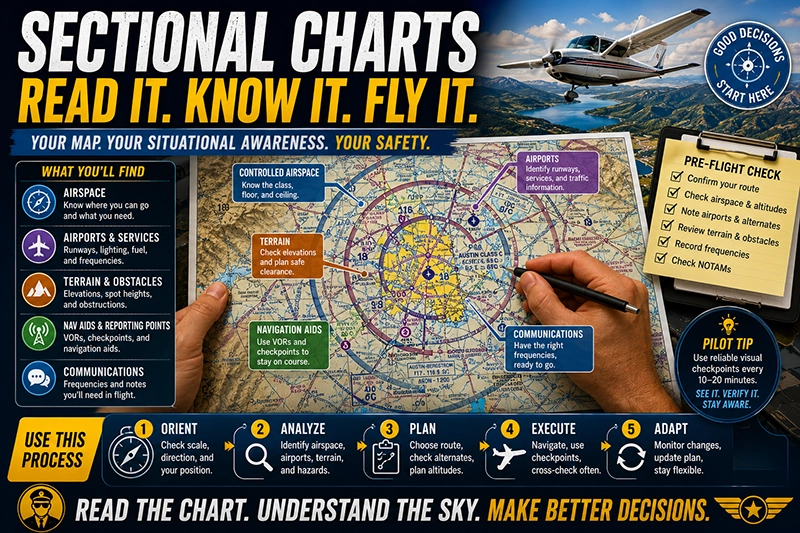
Sectional charts are an essential tool for VFR navigation. For pilots, student pilots, instructors, and aviation professionals, the ability to read a sectional quickly and accurately improves situational awareness, supports sound decision-making, and reduces in-flight workload. This article explains how to interpret sectional charts efficiently and use them as a practical navigation and safety resource.
Continue reading to learn a structured approach to reading chart elements, which features to prioritize during preflight and in the cockpit, common misunderstandings, and concrete examples of how pilots turn chart information into safe, effective flight decisions.
What a Sectional Chart Is and How It's Organized
A sectional chart is an aeronautical map designed principally for visual flight rules navigation. It combines geographic information, aeronautical symbols, airspace depiction, and other operational data in a single format intended for pilot use. Understanding the sheet layout and how information is grouped helps you find critical items quickly when planning or flying.
At a glance, a sectional usually includes: the main chart area showing terrain and aeronautical data; a margins area containing a legend and reference tables; and inset boxes for special airports or metropolitan areas. Familiarity with where common items live on the sheet reduces the time needed to look up frequencies, airports, or airspace limits.
Core Elements to Read First
Efficiency begins with priorities. When you open a sectional, use a top-to-bottom scan that answers the most immediate operational questions: where am I, what airspace am I in or near, what are the nearby airports and their services, what obstructions or terrain may affect my route, and which frequencies will I use.
Key chart elements to review in this order:
- Scale, latitude/longitude grid, and orientation. Verify the chart scale and use the latitude/longitude ticks or graticule if you need precise position fixes.
- Airspace depiction. Identify controlled airspace boundaries, their vertical limits, and any special use airspace along the planned route.
- Airports and services. Note airport symbols, runway lengths (where shown), lighting, and any traffic pattern or operational notes.
- Terrain and elevations. Check elevation shading, highest terrain along the route, and prominent obstacles with their heights and lighting status.
- Navigation aids and reporting points. Look for VORs, VFR reporting points, and visual checkpoints for navigation or emergency use.
- Communications and special instructions. Record control frequencies, terminal area procedures, and listed phone or CTAF data you will need in flight.
How Airspace Appears on the Chart
Airspace depiction is one of the most critical uses of a sectional. Recognizing the differences in symbology and color saves time and prevents airspace incursions.
Common airspace depictions and what they mean operationally:
- Solid blue or magenta lines around airports usually identify different classes of controlled airspace around terminal areas. Pay attention to ringed or segmented boundaries and read the associated labels for floor and ceiling information.
- Class B typically appears with heavy lines and an emphasized pattern near major airports; its shelves and altitudes are indicated by numbers on the boundary. Class C and D each have their own distinct styles; recognizing them helps you determine whether ATC clearance or two-way radio communication is required before entry.
- Special use airspace such as restricted areas, prohibited areas, and warning areas are usually shown with specific boundary styles and labels. If your planned route approaches or crosses such areas, check current status via NOTAMs or the appropriate controlling agency.
When you need to determine the vertical dimension of any airspace, read the labels near the boundary carefully. Labels often show the floor and top in hundreds of feet MSL, with separate figures for the base and ceiling. Understanding how those numbers are presented speeds your mental model of the airspace you will fly through.
Airports, Runway Data, and Communications
Airport symbols convey a surprising amount of operational detail. Identify the airport symbol first, then confirm runway lengths, lighting, and available services. Many sectionals mark towered airports with a symbol distinct from nontowered fields. Some airport names are followed by runway length in hundreds of feet; others include lighting or fuel availability notes.
Frequencies are typically found in the margin or beside the airport identifier. For flight efficiency, record tower, ground, approach, and CTAF frequencies during preflight so you can tune radios without searching the chart in flight. Digital tools can supplement this, but knowing how to locate frequencies on a printed sectional remains a vital skill when electronics fail.
Terrain, Obstacles, and Elevation Data
Terrain depiction on sectionals uses shaded relief and color tinting to convey elevation differences. Higher elevations are emphasized with darker shading and contour-like transitions. Spot elevations are shown for significant terrain features and obstacles; their values are usually presented as heights above mean sea level.
Obstacles such as towers are shown with symbols and a number indicating height in feet. The number often represents height above mean sea level followed by height above ground level if that detail is shown. When planning minimum safe altitudes over unfamiliar terrain, use sectional elevations together with published minimum enroute altitudes for rough clearance planning, then follow appropriate in-flight terrain clearance practices.
Symbols, Abbreviations, and the Legend
Sectional charts include dozens of specialized symbols. Spend time with the chart legend until you can translate common symbols without hesitation. The legend describes symbols for airports, landing areas, obstructions, spot elevations, visual checkpoints, seaplane bases, and more.
Abbreviations are used extensively to conserve space. Common abbreviations indicate services like fuel, customs availability, runway characteristics, and lighting. If the meaning of an abbreviation is unclear in flight, consult the legend or use a digital reference before relying on the information operationally.
Practical Navigation Techniques Using a Sectional
Efficient sectional use in flight involves integrating map reading with basic dead-reckoning and pilotage. Instead of scanning every symbol, focus on features that provide situational fixes and cross-checks.
Techniques to increase efficiency:
- Pick two or three reliable visual checkpoints for each leg of a flight. These should be easily recognized on the ground and spaced far enough apart to validate groundspeed and heading.
- Use VFR checkpoints such as bridges, highway intersections, or distinctive terrain. Match their relative position on the chart to confirm your progress.
- When flying along a coastline, river, or other linear features, use the feature as a one-dimensional navigation line and cross-reference spot elevations or small towns to confirm lateral position.
- Combine radio navigation with the sectional: tune a VOR or GPS waypoint, then use the chart to identify the visual features near the navaid to confirm bearing and distance.
Why This Matters in Real-World Aviation
In real-world operations, the sectional is the primary source for visual navigation and local operational knowledge. Pilots use it to avoid controlled or hazardous airspace, identify emergency landing options, and maintain safe terrain clearance. Proficiency with sectionals is essential for safe VFR flight planning, traffic avoidance in terminal areas, and cross-country navigation.
For instructors, sectional proficiency is a teachable skill that supports basic cross-country training and risk management. For operators and flight departments, standardized briefing practices that include sectional review help ensure crews start each flight with a common mental picture of airspace and terrain risks.
How Pilots Should Understand This Topic
Pilots should view the sectional as a living document that informs their mental model of the airspace and terrain environment. Learning to extract the right details quickly is more valuable than memorizing every symbol. Interpret the chart with an operational focus: what does this mean for the next 5 to 20 minutes of flight?
Build habits that integrate chart use into your scan and decision-making process. Before taxi, confirm the departure airport, tower or CTAF frequency, and immediate airspace. During climb and cruise, reference the chart when approaching new airspace or terrain. When planning diversion options, use the sectional to identify nearby airports and landing surfaces with appropriate lengths and services.
Common Mistakes or Misunderstandings
Pilots commonly make several avoidable errors when using sectionals. Recognizing these errors helps you avoid them in training and operational flying.
Frequent mistakes include:
- Misreading colors or line styles. Similar color tones or thin line prints can be mistaken for different types of airspace. Use magnification or a clear reference to confirm ambiguous boundaries.
- Overreliance on digital charts without verifying printed symbology. Electronic displays are useful, but devices can fail or display outdated data; printed familiarity reduces dependency risk.
- Confusing airport traffic patterns with control zones. Some charted symbols indicate towered operations, while others are uncontrolled. Assume the wrong traffic environment and you may miss communication responsibilities.
- Ignoring vertical limits. Seeing an airspace boundary and assuming it applies from the surface up is a common misconception. Always read the annotated base and top when planning altitudes.
- Mistaking terrain shading for clouds. Shaded relief indicates elevation; do not interpret shaded areas as meteorological phenomena.
Practical Example
Imagine planning a short VFR cross-country from a small field near a coastal town to a regional airport located inland. Your route takes you toward a larger metropolitan area with busy terminal airspace. How do you use the sectional efficiently?
First, orient the chart and mark your departure and destination. Identify the most direct route that avoids unnecessary controlled airspace. Scan the boundary of the terminal area for the floor and ceiling labels to determine whether your planned cruising altitude will require communication or clearance. If the terminal area has a shelf with a base below your cruise altitude, plan a routing that keeps you outside the airspace or request clearance if routing through it is necessary.
Next, pick visual checkpoints spaced every 10 to 20 minutes along the route. Choose features that show up clearly on the sectional, such as a marina, major highway junction, or a river bend. Record the airports within glide distance along your route as emergency options, noting runway lengths and surface types.
Finally, make note of any special use airspace or military activity areas that could be active. If your route crosses a restricted area, plan an alternate course or a clearance request. During the flight, use the sectional to confirm each checkpoint visually and to cross-check with any navigation receiver or GPS display.
Best Practices for Pilots
Efficient sectional usage becomes a habit when you adopt a few consistent practices.
- Pre-flight: Mark your route, annotate checkpoints, and write down critical frequencies. Use a highlighter or pencil to trace the intended track and note altitudes where necessary.
- In-flight: Keep the chart accessible and secured on your kneeboard. Reference the chart during calm moments rather than only when you are lost; regular scanning reduces surprises.
- Cross-check: Use at least two methods to verify position—visual checkpoints plus time, groundspeed, or radio navaids. Redundancy improves confidence and reduces risk of navigation error.
- Currency: Use the most current charts and check NOTAMs and en route information during preflight. Chart updates affect airspace and frequencies and can change operational decisions.
- Training: Practice reading the sectional during VFR hood work, simulated diversions, and navigation lessons. Instructors should include chart interpretation in each cross-country lesson until students can extract needed data under pressure.
Tools and Techniques to Speed Chart Reading
A few technical aids can reduce chart-reading time without diminishing pilot skill. Use a ruler or plotter to measure distances and bearings quickly. Electronic flight bags and portable GPS units offer route plotting and automatic distance calculations, but you should be able to replicate those calculations manually if needed.
Consider preprinting a small checklist or note card with local frequencies, diversion airports, and altitude planning guidance. Having this compact reference reduces the time spent searching the margins for the same information during multiple flights in the same area.
Common Training Progressions
When teaching sectional interpretation, start with map orientation and symbol recognition, then move to problem-solving exercises such as planning alternates and navigating visually using checkpoints only. Simulated diversions and scenario-based briefings force students to use the chart under time pressure and help build rapid interpretation skills.
Instructors should emphasize scenarios where chart misinterpretation could lead to safety issues, such as entering controlled airspace inadvertently, misjudging terrain clearance, or failing to identify a nearby tower. Repeat exposure to these scenarios cements the habit of verifying critical information before and during flight.
Frequently Asked Questions
How often should I update my sectional charts?
Charts should be current for the flight you plan to fly. Many pilots use the latest available edition and cross-check NOTAMs for temporary changes. If you rely on a printed chart, ensure it is the most recent revision for your region or use an approved electronic charting source that provides current data.
Can I rely solely on digital sectional charts in the cockpit?
Digital charts are valuable and can speed route planning and situational awareness. However, electronics can fail, and data may become outdated. Maintain the ability to read a printed sectional and know where to find critical items on that chart in case you need to revert to paper-based navigation.
How do I determine whether an airspace boundary applies to my altitude?
Read the label adjacent to the airspace boundary. The chart typically shows the base and top values in hundreds of feet MSL. Interpreting these numbers accurately tells you whether the airspace extends to the surface or begins at a specified altitude above mean sea level.
What should I do if a sectional symbol is unfamiliar during flight?
If you encounter an unfamiliar symbol, reference the chart legend or a quick-reference card. Avoid making assumptions about the meaning. If that is not possible in the moment, maintain a conservative safety margin, such as staying clear of the feature and requesting advisories from ATC when appropriate.
How can I practice sectional reading effectively?
Use structured exercises such as planning short cross-country legs with predetermined checkpoints, timing legs to estimate groundspeed, and creating diversion scenarios to locate alternate airports. Simulated flights using only a sectional and dead reckoning reinforce practical skills and speed.
Key Takeaways
- Practical takeaway: Prioritize airspace, airports, and terrain when you first open a sectional to support safe route selection and in-flight decision-making.
- Safety takeaway: Always confirm airspace vertical limits and communication responsibilities to avoid inadvertent airspace incursions.
- Training/regulatory takeaway: Maintain proficiency with both printed and digital sectionals and cross-check chart data with current operational notices and briefings.
Becoming efficient with sectional charts is a matter of prioritization, repetition, and integrating chart reading into your flight routines. Use sectionals actively in preflight planning and as a cross-check in the cockpit to support safe, informed VFR navigation.