
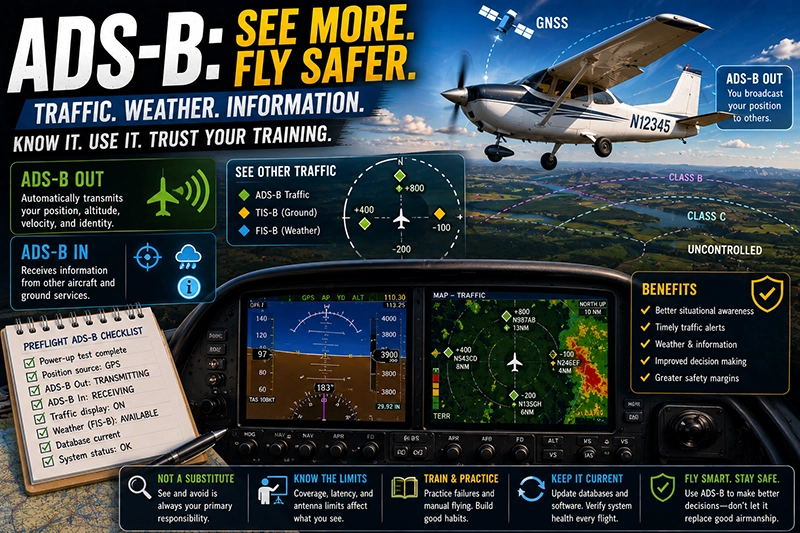
ADS-B is now part of the everyday avionics landscape and every student pilot should understand what it does, how it helps, and where it can mislead. ADS-B, short for Automatic Dependent Surveillance–Broadcast, broadcasts an aircraft's position and other data so nearby aircraft and ground systems can see it. Learning the fundamentals will make training flights safer, improve situational awareness, and help you use traffic and weather services effectively.
This article explains ADS-B in practical terms for pilots in training, flight instructors, and aviation technicians. You will learn the difference between ADS-B Out and ADS-B In, the common equipment types, operational benefits and limits, and routine preflight and in-flight considerations. The goal is practical familiarity, not system design; by the end you will be better prepared to operate with ADS-B-equipped traffic, ask the right questions when buying avionics, and avoid common mistakes that can erode safety.
What ADS-B Actually Is
ADS-B is a surveillance technology that depends on an aircraft transmitting its position, velocity, identification, and other information periodically. Other aircraft and ground stations that can receive ADS-B use that data for traffic displays, separation services, and broadcast weather information where available. ADS-B simply extends the concept of the transponder by adding position information derived from a GNSS receiver and by making that information available to anyone with a compatible receiver.
There are two functional roles pilots need to understand. ADS-B Out is the automatic transmission of the aircraft's data to others. ADS-B In is the ability to receive ADS-B data from other aircraft or ground-based services, which can provide traffic targets and some weather or flight information services. These roles are complementary: Out makes you visible to others; In gives you extra situational data in the cockpit.
Why This Matters in Real-World Aviation
In training and typical general aviation operations, ADS-B influences three practical areas: traffic awareness, ATC interactions, and weather/information services where offered. For student pilots, ADS-B traffic displays can reinforce visual scanning and teach students to interpret electronic targets relative to real traffic. In controlled airspace or when talking to ATC, ADS-B can simplify identification; when combined with a capable transponder it can reduce the need for protracted verbal position reporting.
On cross-country flights, ADS-B In can provide on-screen traffic advisories and broadcast weather updates if available in your region. That information can be valuable for weather avoidance, route adjustments, and anticipating ATC requests. At the same time, pilots must understand that ADS-B does not replace see-and-avoid, and it does not guarantee ATC separation for VFR flights.
How Pilots Should Understand This Topic
Start by separating the technical terms from operational use. Technically, ADS-B combines GNSS-derived position and a data link to broadcast that position. Operationally, focus on three items: whether the aircraft is transmitting ADS-B (Out), whether the cockpit receives ADS-B services (In), and what services are available in the airspace you fly.
When evaluating equipment or interpreting cockpit displays, check these practical items: the aircraft's position source, whether your installation supports traffic display and weather services, and how the traffic symbology corresponds to see-and-avoid responsibilities. Learn what your avionics display shows when it receives a traffic target versus when a target is derived from ground-based systems. Remember that some ADS-B traffic comes from direct broadcasts while others are provided through ground rebroadcast services; the display should indicate the source.
Common Mistakes or Misunderstandings
Several recurring errors show up in training environments. The most frequent is overreliance on ADS-B In for collision avoidance. ADS-B In provides additional information but does not replace visual scanning and proper lookout. Another common misconception is equating a traffic target on a screen with a guaranteed separation solution. ADS-B targets can be delayed, filtered, or absent in areas without coverage.
Students and instructors also sometimes misunderstand equipment compatibility. Not all ADS-B equipment provides the same services; an installation that transmits ADS-B Out does not automatically provide traffic or weather displays in the cockpit. Additionally, some pilots assume ADS-B coverage is universal. Ground transmitter density, terrain, and out-of-service units can create gaps, especially at low altitudes or over remote areas.
Practical Example
Imagine a cross-country training flight from a small uncontrolled field to a busy regional airport. Your avionics suite includes a portable ADS-B receiver linked to a tablet and the aircraft is equipped with ADS-B Out. Near the destination, your ADS-B In traffic display shows several targets converging toward final approach. One target shows as a traffic advisory from ground-rebroadcast, while another is a direct broadcast from a nearby aircraft's Out-equipped transponder.
During the approach, you use the ADS-B traffic display to supplement visual scanning. The display helps you identify a fast-moving target that was momentarily out of sight behind a cloud. You continue to scan visually, cross-check the instruments, and comply with ATC instructions. After landing, you debrief with your instructor on how the ADS-B information influenced your scan pattern and decision to go-around when spacing appeared tight. The key lesson: ADS-B provided timely cues that improved situational awareness but did not substitute for disciplined visual technique and sterile cockpit discipline during high workload phases.
Best Practices for Pilots
Develop habits that integrate ADS-B into safe airmanship rather than turning it into a crutch.
- Verify what your installation actually transmits and receives before flight. Know whether the cockpit display receives direct broadcasts, ground rebroadcasts, or both.
- Use ADS-B traffic cues to prioritize visual scanning, not to replace it. When a target is displayed, transition to targeted visual lookout and verify closure rate and relative altitude by sight when possible.
- Understand coverage limits. If you fly low over remote terrain, expect gaps and use conservative separation assumptions.
- Practice failure scenarios. Simulate ADS-B outages during training flights to maintain proficiency in non-electronic traffic scanning and position reporting.
- Keep software and databases current. Avionics providers release updates that fix bugs and improve display logic; follow the manufacturer’s recommended update schedule.
Frequently Asked Questions
What is the difference between ADS-B Out and ADS-B In?
ADS-B Out transmits your aircraft's position and identification. ADS-B In receives transmissions from other aircraft and certain ground services, giving you traffic targets and, in some regions, broadcast weather and flight information. You can have Out without In, and In without Out, depending on the avionics installed.
Will ADS-B replace my transponder or radio communications?
No. ADS-B complements the transponder and radios. A transponder still responds to ATC radar interrogations, and radios remain essential for communication with ATC and other aircraft. Use ADS-B as an additional source of information rather than a replacement.
Can I rely on ADS-B traffic for collision avoidance?
No. ADS-B traffic increases situational awareness but is not a replacement for see-and-avoid. ADS-B targets may be delayed, filtered, or unavailable in areas without coverage. Always prioritize visual scanning and follow established procedures for traffic avoidance.
Does ADS-B provide weather information?
In some regions, ground services rebroadcast weather and flight information over ADS-B In. The availability of those services depends on local infrastructure and the frequency band used by your equipment. Treat broadcast weather as supplemental and verify critical weather decisions with official sources.
How do I know if an ADS-B target is accurate?
Look at multiple cues. If traffic symbology shows a consistent track, correct relative motion, and matches visual sightings, it is likely accurate. If a target jumps, disappears, or shows implausible motion, treat it with caution and rely on visual confirmation where possible.
Key Takeaways
- Practical takeaway: Learn whether your aircraft transmits ADS-B Out and whether your cockpit receives ADS-B In; each provides different capabilities.
- Safety takeaway: Use ADS-B as an aid to visual scanning; do not rely on it as a primary collision-avoidance system.
- Training/regulatory takeaway: Confirm airspace requirements and manufacturer guidance for your installation and practice ADS-B failure scenarios during training.
ADS-B represents a significant improvement in situational awareness for general aviation, but its benefits are maximized when pilots understand both capabilities and limits. For student pilots, that means using ADS-B to enhance training, not to shortcut essential scanning and communication skills. Ask questions about your avionics, practice without ADS-B present, and use ADS-B cues to inform conservative, safe decisions in the cockpit.