
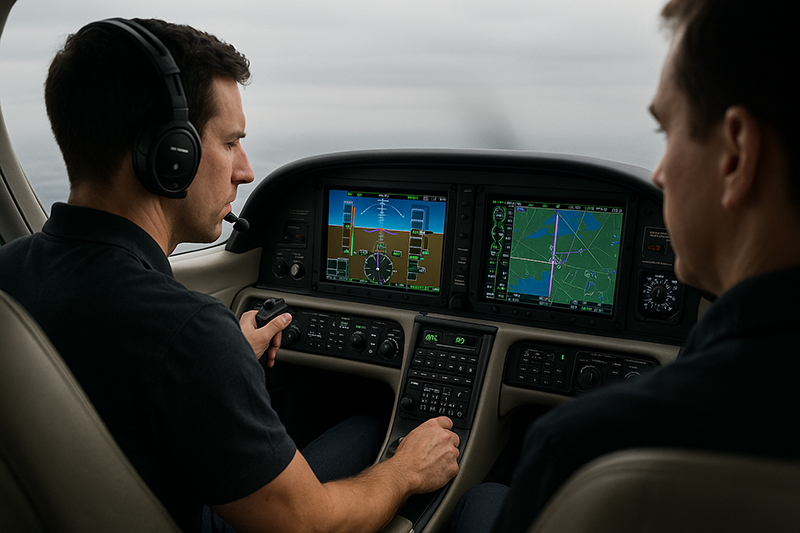
Automation dependency in IFR flying is not a criticism of modern avionics. Autopilots, flight directors, GPS navigators, moving maps, electronic flight instruments, and integrated flight decks have made instrument flying more capable and, when used well, more manageable. The problem begins when the pilot becomes a passenger in the system rather than the manager of the flight path. In instrument meteorological conditions, that distinction matters.
For pilots, student pilots, flight instructors, and aviation professionals, the practical question is not whether automation should be used. It should. The better question is whether the pilot can still aviate, navigate, communicate, and make sound decisions when the automation surprises them, disconnects, captures the wrong mode, displays unexpected guidance, or simply becomes a distraction at the worst possible time. Avoiding automation dependency means using technology as a tool while preserving the manual flying skill, instrument scan, systems understanding, and judgment needed to safely complete the flight.
What Automation Dependency Means in IFR Flying
Automation dependency occurs when a pilot relies so heavily on automated systems that basic instrument flying, navigation interpretation, and flight path management skills become weak or delayed. It is not limited to pilots flying advanced turbine aircraft or highly integrated glass cockpits. A technically advanced single-engine trainer with a GPS navigator and two-axis autopilot can create the same habit pattern if the pilot routinely lets the system do the thinking and flying.
In IFR operations, automation usually includes several layers. The autopilot may control pitch, roll, altitude, vertical speed, heading, navigation tracking, or approach guidance. The flight director may command attitudes for the pilot or autopilot to follow. A GPS navigator or flight management system may define the lateral path. A PFD and MFD may provide attitude, air data, navigation, traffic, terrain, weather displays, and engine information. Each component can be helpful, but each also requires correct pilot input, monitoring, and interpretation.
The central risk is mode confusion. A pilot may believe the aircraft is tracking a course, descending on a vertical path, holding altitude, or capturing an approach when the system is actually doing something else. In visual conditions, the outside picture often reveals the error quickly. In IMC, the pilot may have only instruments, annunciations, and cross-checks to detect the problem. If the pilot has not maintained a disciplined scan and mental model, the aircraft can drift away from the intended flight path while the pilot is heads-down troubleshooting.
Automation dependency also affects workload management. A well-used autopilot can reduce workload, improve precision, and free attention for communication, weather decisions, abnormal procedures, and approach briefing. Poorly used automation can do the opposite. It can turn a simple heading change or descent clearance into several minutes of button pushing, menu searching, and uncertainty. The pilot who can smoothly transition between automated and manual control has more options. The pilot who cannot may become overloaded when the airplane needs decisive control inputs.
Why This Matters in Real-World Aviation
IFR flying compresses time. Clearances change, weather evolves, approach plans shift, and aircraft performance must be managed precisely. Automation can help pilots handle that environment, but it does not remove the pilot’s responsibility for aircraft control and navigation. The pilot remains responsible for confirming what the airplane is doing, where it is going, and whether that matches the clearance and the plan.
In the real world, automation surprises often appear during transitions. Examples include leveling at an assigned altitude, intercepting an airway or approach course, loading or activating an instrument approach, switching from enroute navigation to approach guidance, complying with vectors, or flying a missed approach. These are not obscure situations. They are ordinary IFR tasks, and they occur when the pilot is already managing radio calls, weather, speed, configuration, and situational awareness.
Training environments can unintentionally reinforce dependency. If every instrument lesson begins with the autopilot on and every approach is flown coupled, the learner may become excellent at programming but less comfortable at hand-flying pitch and power. Conversely, training that ignores automation is also incomplete. Modern IFR proficiency requires both manual competence and automation competence. A pilot should be able to fly raw data when appropriate, use automation when appropriate, and know when to change strategies.
Automation dependency is especially important in single-pilot IFR. Without another pilot to verify entries, monitor mode changes, or catch altitude and course deviations, the single pilot must create personal safeguards. That includes verbalizing modes, cross-checking navigation sources, briefing expected behavior, and being willing to disconnect the automation when it becomes a distraction. The most valuable automation habit is not pressing the right button. It is recognizing quickly when the system is not supporting the flight path.
For instructors, the topic matters because habits formed during early IFR training often persist. A pilot who learns to treat the autopilot as a silent copilot without actively monitoring it may carry that assumption into more complex aircraft. A pilot who learns to brief automation modes, maintain a scan, and hand-fly accurately under the hood is better prepared for higher workload operations later.
How Pilots Should Understand Automation
The healthiest way to think about automation is as a capable but literal assistant. It will generally do what it is commanded to do, not necessarily what the pilot meant to command. If the wrong navigation source is selected, the wrong course is activated, the altitude preselect is not armed, or the approach is not sequenced as expected, the automation may continue flying with confidence in the wrong direction or mode. The pilot must understand the system well enough to predict its behavior and monitor the result.
There are three practical levels of automation management. The first is aircraft control: who or what is controlling pitch, bank, power, and trim? The second is guidance: what source is telling the aircraft or flight director where to go? The third is navigation intent: does the active flight plan, procedure, or clearance match what ATC expects and what the pilot intends?
Those levels should never be assumed. A pilot flying with an autopilot coupled to a GPS course should still know the assigned heading, current altitude, next fix, expected altitude restriction if applicable, and the basic pitch and power setting required for the phase of flight. If the autopilot disconnects, the pilot should not need several seconds to rediscover the airplane. The scan should already be alive.
Mode awareness is a key discipline. The annunciations on a flight display are not decorative. They are the cockpit’s answer to the question, “What is the system doing right now?” A pilot should build the habit of checking active and armed modes after every significant input. If heading mode is selected, verify heading mode. If navigation capture is expected, verify whether it is armed or active. If altitude capture is expected, confirm that the altitude target and vertical mode make sense. This is not busywork. It is how the pilot closes the loop between intention, input, and aircraft response.
Another useful concept is reversion. Reversion means deliberately simplifying the operation when complexity is increasing. If a pilot is unsure why the aircraft is not intercepting the course, the safest next step may be to select heading mode, turn to a known safe heading, and sort out the navigation. If the vertical mode is not behaving as expected, a basic pitch or vertical speed mode, or hand flying, may be more appropriate than continuing to chase automation logic. If the pilot is behind the aircraft, disconnecting the autopilot and flying a known attitude and power setting can restore control and clarity.
Manual Flying Skill Is Still an IFR Safety Skill
Manual flying in IFR is more than passing a training event. It is the foundation that gives automation its safety value. A pilot who can hold attitude, altitude, heading, and airspeed precisely by reference to instruments is less likely to panic when the autopilot disconnects or the flight director commands something unexpected. Manual competence creates mental bandwidth because the pilot trusts their ability to control the aircraft.
Instrument scan remains central, even in glass cockpits. The display may be different from traditional round-dial instruments, but the pilot still needs to interpret attitude, performance, and trend. A common trap is staring at the magenta line, moving map, or flight plan page while the basic aircraft state changes. In IFR, the first priority remains aircraft control. Navigation information is valuable only if the airplane is under control.
Pitch and power knowledge is a practical antidote to dependency. Every IFR pilot should know approximate pitch and power combinations for climb, cruise, descent, approach configuration, and missed approach in the aircraft they fly. These are not universal numbers and should come from aircraft-specific training and operating information. The principle is universal: when the pilot knows the basic attitude and power picture, they can quickly stabilize the aircraft without waiting for automation to solve the problem.
Hand-flying also supports better automation monitoring. A pilot who understands how the aircraft should behave during a level-off or approach intercept is more likely to notice when the automation is late, aggressive, or not engaged. Manual skill makes the pilot a better supervisor of the machine.
Common Mistakes and Misunderstandings
One common misunderstanding is that automation use and pilot skill are opposites. They are not. Skilled IFR pilots use automation frequently, especially when workload is high, but they use it deliberately. The issue is not using the autopilot. The issue is losing the ability to fly and think without it.
Another mistake is confusing programming with planning. Loading an approach is not the same as briefing it. Activating a leg is not the same as understanding the intercept geometry. Selecting a vertical mode is not the same as confirming terrain, altitude, and descent planning. Automation can display and execute a plan, but the pilot must still build the plan mentally.
Pilots also get into trouble when they treat the magenta line as clearance authority. The active flight plan is a navigation aid, not a substitute for ATC clearance or pilot judgment. If the display shows a path that conflicts with an assigned heading, altitude, route, or approach clearance, the pilot must resolve the discrepancy. The airplane should not be allowed to follow a box simply because the box is confident.
Overmanaging the automation is another frequent problem. Some pilots make repeated small changes to vertical modes, heading bugs, flight plan sequencing, or approach setup while the airplane is close to a high-workload phase of flight. The result is not sophistication. It is instability. If the pilot is making automation changes faster than they can verify aircraft response, the system is no longer reducing workload.
A subtle but important error is failing to brief the disconnect. Pilots often brief how the autopilot will fly the arrival or approach, but not what they will do if it disconnects or misbehaves. A useful personal brief includes a simple fallback: “If anything looks wrong, I will maintain aircraft control, use heading and altitude as assigned, and simplify before troubleshooting.” That mindset makes it easier to act decisively.
Some pilots also underestimate how quickly instrument scan can degrade. If a pilot spends months flying coupled approaches without hand-flying in actual or simulated instrument conditions, the first manual approach after an automation failure may feel surprisingly demanding. Proficiency is perishable. The solution is not fear of automation. The solution is regular, structured practice.
Practical Example: The Unexpected Approach Mode
Consider a realistic single-pilot IFR training scenario in a technically advanced piston aircraft. The pilot is flying in IMC on vectors for an RNAV approach. The autopilot is engaged in heading mode and altitude hold. The GPS approach is loaded, the pilot has briefed the final approach course, and ATC assigns a heading to intercept the final approach course before clearing the aircraft for the approach.
The pilot presses the approach mode button expecting the autopilot to capture the final approach course. But the aircraft continues through the course. The pilot looks down at the navigator, then back to the PFD, then to the flight plan page. Workload rises quickly. The aircraft is still flying, but it is no longer doing what the pilot expected. The pilot’s first instinct might be to keep pressing buttons, reload the procedure, or try to force a capture.
A proficient automation manager responds differently. First, the pilot maintains aircraft control and confirms the current attitude, altitude, and heading. If the aircraft is deviating from the clearance or course, the pilot may select a safe heading mode or hand-fly to correct the situation. Next, the pilot verifies the navigation source, active leg, CDI scaling or approach status as applicable to the installed equipment, and the active or armed autopilot modes. If needed, the pilot advises ATC and requests vectors or additional time.
The training value of this scenario is that the exact button sequence is not the main lesson. Different avionics systems behave differently. The essential lesson is the pilot’s priority order. Fly the airplane. Confirm the mode. Confirm the navigation source. Simplify. Communicate when needed. Then rebuild the automation plan only when the aircraft is stable and the pilot understands what the system is doing.
This scenario also shows why hand-flying practice matters. If the pilot can comfortably maintain heading, altitude, and airspeed while troubleshooting, the event remains manageable. If the pilot’s scan collapses as soon as the autopilot becomes uncertain, a minor automation issue can become a major flight path management problem.
Best Practices for Avoiding Automation Dependency
Avoiding automation dependency requires deliberate habits, not a rejection of technology. The goal is to become fluent across the full range of control options: hand flying, flight director guidance, basic autopilot modes, navigation tracking, coupled approaches when appropriate, and manual reversion when necessary.
One of the most effective habits is to brief automation before using it. Before departure, arrival, or approach, ask what modes will be used, what altitude is selected, what navigation source is active, what should happen next, and what the fallback plan is. This brief can be short, but it should be specific. “Autopilot on after climb cleanup, heading mode initially, GPS navigation after intercept, altitude armed for 4,000” is more useful than a vague expectation that the system will handle it.
Another best practice is to verbalize changes, even when flying alone. Saying “heading mode active,” “altitude armed,” or “GPS source selected” may feel unnecessary at first, but it reinforces awareness. In crew operations, callouts help both pilots maintain a shared understanding. In single-pilot IFR, they help the pilot slow down mentally and verify the result of each input.
Pilots should also practice using lower levels of automation. Instead of always flying coupled from shortly after takeoff to minimums, consider structured training sessions that include hand-flown climbs, basic heading and altitude modes, raw-data tracking, and manual missed approaches. The objective is not to make every flight harder. It is to keep the pilot comfortable when automation is reduced.
Use automation early enough to help, not so late that it becomes a distraction. For example, if the pilot intends to use the autopilot during a complex arrival, it is better to set it up while the aircraft is stable and workload is moderate. Waiting until the aircraft is close to the final approach fix, descending, configuring, communicating, and correcting a navigation issue is poor workload management.
When automation behaves unexpectedly, simplify first. The simplest safe mode may be wings-level hand flying, heading mode, altitude hold, or a basic climb or descent attitude, depending on the situation and aircraft. The best choice depends on the aircraft, airspace, clearance, and phase of flight. What matters is that the pilot stops the escalation. Troubleshooting should not come before flight path control.
- Maintain a continuous instrument scan, even when the autopilot is engaged.
- Confirm active and armed modes after every automation input.
- Know aircraft-specific pitch and power settings for normal IFR phases of flight.
- Practice hand-flying and partial automation during recurrent training.
- Brief a simple fallback plan before high-workload phases of flight.
- Ask ATC for delay vectors, a climb, or clarification when workload or uncertainty requires it.
These habits support both safety and efficiency. They also make automation more useful because the pilot is managing it with intention rather than reacting to it with surprise.
Training Strategies for Students and Instrument Pilots
For student pilots beginning instrument training, automation should be introduced as part of the overall instrument skill set. Early training often benefits from strong emphasis on attitude instrument flying, basic navigation, holding, intercepting, tracking, approaches, and missed approaches by hand. Once the student has a reliable scan and control technique, automation can be integrated in a way that reinforces, rather than replaces, understanding.
Instructors should avoid making automation a reward or a crutch. It is neither. It is a normal cockpit resource. A balanced lesson might include a hand-flown departure, autopilot-assisted enroute segment, manual holding entry, coupled approach setup discussion, and a hand-flown missed approach. The mix should match the student’s level, aircraft equipment, weather, and training objectives.
Scenario-based training is especially valuable. Instead of simply covering which buttons to press, instructors can ask the pilot to predict what the system will do. What mode will capture? What happens if the aircraft crosses the course at too large an angle? What if ATC changes the runway or approach? What if the autopilot disconnects at glidepath intercept? These questions move the training from memorization to understanding.
Instrument-rated pilots should include automation management in recurrent proficiency work. A useful session might include one approach fully coupled, one using the flight director only, one raw-data or minimally automated approach, and at least one automation abnormality or unexpected mode scenario. The purpose is not to create artificial stress. It is to confirm that the pilot can transition smoothly among levels of automation.
Flight reviews, instrument proficiency checks, aircraft checkouts, and transition training are good opportunities to discuss automation philosophy. Each aircraft and avionics suite has its own logic, limitations, alerts, and recommended procedures. Pilots should use current manuals, approved supplements where applicable, and qualified instruction for the specific equipment installed in the aircraft they fly.
Automation, Workload, and Aeronautical Decision-Making
Good automation management is a decision-making skill. It involves knowing when to use automation, when to change modes, when to stop programming, when to hand-fly, and when to ask for help. In IFR, those decisions should be made before workload peaks whenever possible.
A common workload trap occurs when a pilot tries to salvage a poorly managed setup instead of choosing a simpler option. For example, if the arrival and approach are not properly loaded, the aircraft is close to the airport, weather is low, and ATC is issuing rapid instructions, the safer decision may be to request delaying vectors or another approach setup rather than continue rushing. There is no prize for staying overloaded.
Automation can also create a false sense of stability. A coupled aircraft may appear calm while the pilot’s understanding is weak. The flight path may be stable for the moment, but if the pilot does not know the next fix, altitude, mode change, or missed approach action, the stability is fragile. A good question during IFR flight is, “If the automation stopped right now, what would I do in the next ten seconds?” If the answer is unclear, the pilot should rebuild situational awareness before workload increases.
Decision-making also includes recognizing personal proficiency. A pilot who has not recently flown approaches by hand in simulated or actual instrument conditions should be conservative about weather, workload, and automation assumptions. A pilot transitioning into unfamiliar avionics should treat early flights as training, even if they already hold an instrument rating. Familiarity with one system does not guarantee fluency with another.
Building a Personal Automation Philosophy
A personal automation philosophy helps pilots make consistent decisions under pressure. It does not need to be complicated. It should answer four questions: What will I let automation do? What will I always monitor? When will I simplify? How will I maintain manual proficiency?
A strong philosophy might look like this: use automation to reduce workload during high-demand IFR operations, but never allow it to replace flight path awareness. Verify every mode change. Keep the instrument scan active. Hand-fly regularly enough that manual control remains comfortable. If confused, simplify first and troubleshoot second. If workload exceeds capacity, communicate and request assistance.
For flight instructors and training organizations, the philosophy should be visible in lesson design. Students should not leave training believing that the autopilot is either forbidden or magical. They should understand that automation is a cockpit resource that must be managed with the same discipline as fuel, weather, airspace, and aircraft performance.
For experienced pilots, the challenge is often complacency. The more reliable the automation has been, the easier it is to stop questioning it. A disciplined pilot resists that drift. They check the modes, anticipate the next action, and remain ready to fly the airplane manually at any time.
Frequently Asked Questions
Is using the autopilot during IFR flying a bad habit?
No. Using the autopilot during IFR flying can be an excellent workload management tool when the pilot understands and monitors it. The bad habit is relying on it so completely that manual flying, instrument scan, and navigation awareness deteriorate.
How often should instrument pilots practice hand-flying?
There is no single interval that fits every pilot, aircraft, or operation. Pilots should practice often enough that holding altitude, heading, airspeed, and course by reference to instruments remains comfortable. Recurrent training with a qualified instructor is a good way to evaluate whether proficiency is being maintained.
What should I do first if the automation does something unexpected in IMC?
Fly the airplane first. Confirm attitude, altitude, airspeed, and heading. Then simplify the automation or disconnect it if appropriate, verify the navigation source and modes, and communicate with ATC if you need clarification, vectors, or more time.
Does glass cockpit training reduce the need for traditional instrument skills?
No. Glass cockpit displays change how information is presented, but they do not remove the need for attitude control, performance interpretation, navigation understanding, and disciplined cross-checking. Traditional instrument skills remain directly relevant.
Can automation dependency affect experienced pilots?
Yes. Experience does not prevent skill fade or complacency. Pilots with many hours can still become overly comfortable with reliable automation and may need deliberate recurrent practice to maintain manual and raw-data proficiency.
Should instrument students learn automation early or later?
Students should learn both manual instrument flying and automation management. Many training programs emphasize basic instrument control first, then integrate automation progressively. The best sequence depends on the aircraft, syllabus, instructor judgment, and the student’s progress.
Key Takeaways
- Automation dependency in IFR flying develops when pilots stop actively managing the flight path and begin assuming the system is doing what they intended.
- Manual instrument proficiency, mode awareness, and a disciplined scan remain essential even in highly capable glass cockpit aircraft.
- The safest automation habit is to simplify when confused: fly the airplane, verify modes and navigation sources, communicate as needed, and rebuild the plan deliberately.