
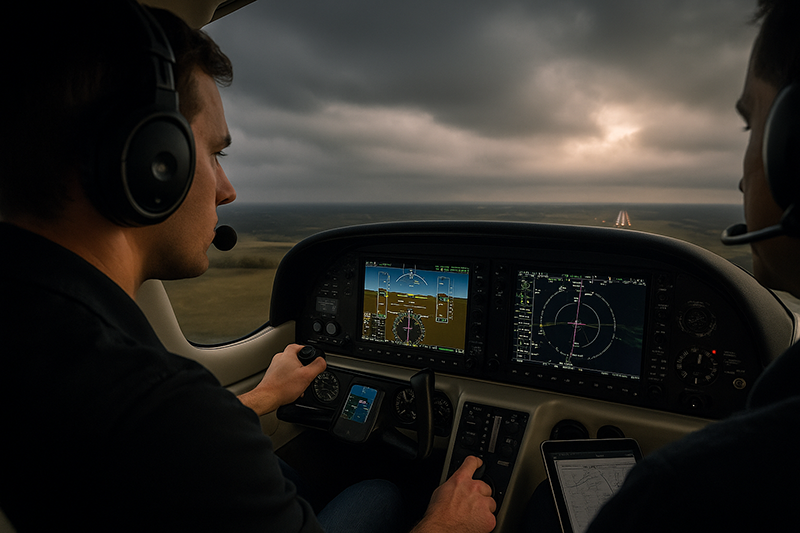
Automation dependency in IFR flying is one of the most important training topics for modern instrument pilots because it sits at the intersection of cockpit technology, workload management, situational awareness, and basic airmanship. GPS navigators, flight directors, autopilots, electronic flight displays, coupled approaches, and moving maps have made instrument flying more capable and often less fatiguing. They can also quietly weaken the pilot’s raw instrument scan, mental navigation, and ability to recognize when the airplane is no longer doing what the pilot intended.
The goal is not to reject automation. The goal is to use it with discipline. A proficient IFR pilot should be able to manage automation, monitor it, and disconnect it when appropriate without becoming disoriented, overloaded, or surprised. This article explains how automation dependency develops, why it matters in real-world IFR operations, and how pilots and instructors can build durable skills that remain available when the panel gets busy, the equipment behaves unexpectedly, or the flight does not go as planned.
What Automation Dependency Means in IFR Flying
Automation dependency is the tendency to rely on automated systems so heavily that manual flying, independent navigation, and cross-checking skills degrade. In IFR flying, that dependency can appear in subtle ways. A pilot may be comfortable loading an RNAV approach but less comfortable briefing the lateral and vertical path without the magenta line. Another pilot may be able to fly an approach well with the autopilot engaged but struggle to maintain altitude, heading, airspeed, and course when hand flying in actual instrument conditions. A pilot may follow a flight director confidently but fail to notice that the selected mode is not the mode expected.
Automation includes more than the autopilot. It includes GPS navigation, flight management functions, altitude preselect, vertical navigation, electronic checklists, traffic and terrain displays, coupled approach capability, and even tablet-based moving maps. Each tool can reduce workload when used correctly. Each can also create a false sense of certainty if the pilot stops asking basic questions: Where am I? What is the airplane doing? What mode is active? What will it do next? Does that make sense for the clearance, the chart, and the airplane’s energy state?
In instrument training, automation dependency often begins with good intentions. A student learns the avionics because the aircraft is equipped with them. An instructor uses the autopilot during high-workload phases to teach systems management. A pilot uses the navigator and moving map because they are accurate and efficient. None of that is inherently unsafe. The problem begins when automation becomes the pilot’s primary skill rather than a tool supporting pilot judgment.
A healthy automation philosophy treats technology as a crew member that must be briefed, commanded, monitored, and corrected. It does not receive blind trust. It does not replace instrument interpretation. It does not relieve the pilot of aircraft control. The pilot remains the final authority for flight path management, clearance compliance, aircraft configuration, and decision-making.
Why This Matters in Real-World Aviation
IFR flying is a high-consequence environment because small errors can compound quickly. A wrong altitude selection, an incorrect approach loaded in the navigator, a missed mode change, or a failure to capture a course can become a serious problem if the pilot is not actively monitoring the aircraft. Automation can reduce workload, but it can also delay error recognition when the pilot assumes the system is correct.
Real-world IFR rarely looks exactly like a training script. Air traffic control may issue a late runway change, vector an aircraft through final, amend an altitude, assign a hold, or clear the pilot for an approach sooner than expected. Weather may require more attention than forecast. Turbulence may make data entry difficult. A passenger concern, radio issue, or equipment alert may arrive at the same time as a clearance. These are the moments when pilots discover whether they are using automation intelligently or merely following it.
Automation dependency also matters because instrument flying relies on layered awareness. The pilot needs attitude awareness to keep the airplane under control, navigation awareness to remain on the cleared route or approach, energy awareness to stay ahead of descent and configuration changes, and procedural awareness to comply with clearances and published procedures. Automation can assist with all of these layers, but it can also mask a weakness in any one of them.
For example, a pilot who allows the autopilot to fly nearly every IFR leg may not notice a gradual decline in hand-flying precision until a system disconnects in turbulence or during an approach. A pilot who always uses a moving map may not maintain the habit of visualizing the route from the chart and raw navigation sources. A pilot who trusts vertical guidance without question may fail to compare the displayed path to the published altitudes, descent planning, and aircraft configuration.
From an instructional standpoint, automation dependency can become a training trap. If every lesson is flown with the same automation sequence, the student may learn button flows instead of IFR reasoning. The pilot may know what to press but not why the aircraft responds as it does. Good IFR training develops both automation fluency and automation resilience. Fluency means the pilot can use the installed equipment correctly. Resilience means the pilot can continue safely when the equipment is unavailable, misconfigured, or intentionally turned off for training.
How Pilots Should Understand Automation in the IFR Cockpit
The most useful way to understand cockpit automation is to separate three tasks: command, monitor, and intervene. First, the pilot commands the system by selecting modes, entering navigation data, arming functions, and engaging or disengaging automation. Second, the pilot monitors the system by confirming annunciations, flight path, altitude behavior, navigation source, and aircraft response. Third, the pilot intervenes when the airplane is not doing what was intended, when workload becomes excessive, or when hand flying is safer and simpler.
Mode awareness is central to this process. A mode is the active or armed function that tells the automation how to control the aircraft. In many airplanes, the autopilot or flight director can track a heading, a navigation course, an altitude, a vertical speed, an approach path, or another selected target. The exact modes and indications vary by aircraft and avionics installation, so pilots must learn the specific system they fly. The practical principle is universal: never assume the airplane will do something because you intended it. Verify what is active, what is armed, and what the aircraft is actually doing.
Automation also requires navigation source awareness. Many IFR aircraft can display and fly guidance from multiple sources, such as GPS, VOR, localizer, or an approach mode selected through the navigator and primary flight display. If the wrong source is selected, the aircraft may track something different from what the pilot expects. A pilot who monitors only the moving map may miss a mismatch between the chart, the course indicator, and the autopilot mode.
Another key concept is workload timing. Automation works best when it is managed early, deliberately, and during low workload periods. Waiting until the final approach fix to clean up a poorly loaded procedure, correct an altitude bug, brief minimums, and configure the aircraft is poor cockpit management. A disciplined pilot sets up the avionics in advance, verifies the setup, briefs the expected sequence, and keeps a simple backup plan ready.
Finally, pilots should distinguish between automation use and automation dependence. Using the autopilot in IMC during cruise while reviewing weather, briefing an approach, or reducing fatigue can be a strong risk management choice. Depending on the autopilot because the pilot cannot maintain instrument control by hand is a very different situation. Using GPS to improve situational awareness is excellent. Depending on the GPS so completely that the pilot cannot describe the route, fix sequence, or missed approach without it is a weakness that training should address.
The Core Skills Automation Must Not Replace
Automation should enhance fundamental IFR skills, not replace them. The first core skill is attitude instrument flying. Even in a glass cockpit, the pilot must be able to control pitch, bank, power, trim, and configuration using reliable instrument references. The scan may look different on a primary flight display than on round gauges, but the task remains the same: establish the desired aircraft attitude, verify performance, and correct deviations before they grow.
The second core skill is mental position awareness. A pilot should be able to say, in plain language, where the aircraft is relative to the route, the approach, terrain considerations, assigned altitude, and next expected fix. The moving map can support that awareness, but it should not be the only source of it. Charts, briefings, navigation displays, raw data, and ATC clearances all contribute to an accurate mental model.
The third core skill is procedural discipline. IFR operations require careful attention to clearances, route changes, altitude assignments, approach briefings, frequency changes, and missed approach planning. Automation can help organize these tasks, but it cannot decide whether a clearance was understood correctly or whether an approach setup matches the intended procedure. The pilot must verify.
The fourth core skill is energy management. Autopilots can hold altitude, descend, or track a vertical path depending on the system and selected mode, but they do not replace pilot judgment about speed, configuration, power, descent planning, or stabilized approach criteria. A coupled approach can still be flown with poor energy management if the aircraft is too fast, too high, improperly configured, or not adequately briefed.
The fifth core skill is decision-making. Automation can present information, but it does not determine whether conditions are acceptable for continuing, whether the pilot is becoming task saturated, or whether a missed approach, diversion, delay, or request for vectors is the better choice. IFR judgment remains a human responsibility.
Common Mistakes and Misunderstandings
One common mistake is treating the autopilot as a substitute for proficiency. The autopilot is a valuable tool, especially in IMC and high workload environments, but it should not be the only reason the pilot can complete the flight. If a pilot feels unsafe hand flying in the conditions being flown, the correct response is training, conservative decision-making, and personal minimums, not blind reliance on automation.
Another common misunderstanding is assuming that a coupled approach is automatically well managed. Coupled guidance may reduce workload, but the pilot still needs to brief the procedure, confirm the correct approach and transition, verify altitude constraints and step-down fixes where applicable, monitor lateral and vertical path, configure the aircraft, and be ready to disconnect. A coupled approach flown without monitoring is not a safety strategy.
A third mistake is failing to verify mode annunciations. Pilots sometimes press a button and assume the aircraft accepted the command. In reality, the mode may not arm, may not capture, or may change because of system logic or pilot input. The safest habit is simple: press, verify, then monitor. If the aircraft does not respond as expected, disconnect or revert to a simpler mode before the situation becomes confusing.
A fourth mistake is programming during high workload periods. IFR cockpits become vulnerable when a pilot is heads-down at the wrong time. Long data-entry tasks close to the airport, during vectors, in turbulence, or while descending toward an approach can erode situational awareness. When possible, pilots should load, brief, and verify procedures early. If a late change occurs, it may be safer to request delaying vectors, a hold, or a simpler clearance than to rush a complex avionics change.
A fifth mistake is using automation without a fallback plan. Before relying on any automated feature, the pilot should know what the airplane should do next and what the pilot will do if it does not. That fallback may be as simple as hand flying a heading and altitude, using basic lateral navigation, asking ATC for vectors, or executing a missed approach if approach stability is lost.
A sixth misunderstanding is believing that glass cockpit proficiency and IFR proficiency are the same thing. A pilot may be very comfortable with a particular avionics suite but less prepared to fly a different aircraft, use raw navigation, or manage a partial panel scenario. True IFR proficiency transfers across equipment because it is built on aircraft control, instrument interpretation, navigation understanding, and sound judgment.
Practical Example: A Late Approach Change in IMC
Consider a realistic IFR training scenario. A pilot is flying a single-engine airplane equipped with an IFR GPS navigator, primary flight display, multifunction display, and two-axis autopilot. The aircraft is in IMC, descending toward a non-towered destination. The pilot expected an RNAV approach to one runway, loaded and briefed that procedure, and set up the autopilot to navigate toward the initial approach fix. As the flight nears the terminal area, ATC advises that traffic and winds favor a different runway and offers an alternate RNAV approach.
An automation-dependent pilot might immediately go heads-down, delete the existing approach, load the new one, activate a transition, adjust minimums, change frequencies, review the chart, and attempt to keep up with the descent all at once. During that time, altitude awareness and heading compliance may suffer. The pilot may accept the approach without fully understanding the new fix sequence or may accidentally activate the wrong leg. If the autopilot remains engaged, the aircraft may continue to follow a path the pilot no longer clearly understands.
A more resilient IFR pilot slows the situation down. The pilot first maintains aircraft control and confirms the current clearance. If workload is high, the pilot tells ATC that additional time or vectors are needed. The pilot uses the autopilot, if appropriate, to hold a simple heading and altitude while reprogramming, or hand flies if that is simpler and clearer. The new approach is loaded deliberately, the correct runway and transition are verified, the navigation source and mode annunciations are checked, and the pilot reviews the final approach course, altitude expectations, missed approach instructions, and minimums.
The key difference is not whether automation is used. In the better scenario, automation is used thoughtfully. The pilot commands it clearly, verifies it, and does not allow programming to become more important than flying the aircraft. The pilot also recognizes that asking ATC for time is a professional tool, not an admission of weakness. IFR pilots are not required to accept rushed cockpit management when a safer alternative is available.
Best Practices for Avoiding Automation Dependency
Avoiding automation dependency requires intentional habits, not occasional reminders. The first habit is regular hand flying. Instrument pilots should preserve the ability to maintain heading, altitude, airspeed, and course by hand in realistic conditions. That does not mean every flight must be hand flown from takeoff to landing. It means training and proficiency flights should include meaningful segments without the autopilot, including climbs, descents, intercepts, holds, and approaches when appropriate and safe.
The second habit is deliberate automation briefings. Before engaging or changing automation, ask what you want it to do, which mode should be active, which mode should be armed, and what indication will confirm it. For example, if using a heading mode to intercept a navigation course, the pilot should know when to expect navigation capture and what the display should show. If using vertical guidance, the pilot should know the target altitude, vertical mode, descent rate or path expectation, and what will happen at capture.
The third habit is maintaining a raw-data cross-check. Raw data means navigation and flight information that confirms the actual aircraft state without relying solely on the moving map or flight plan depiction. Depending on the aircraft, this may include the course deviation indicator, bearing pointers, localizer or VOR indications, altitude, vertical speed, heading, attitude, and distance information. The point is not to reject integrated displays. The point is to preserve independent confirmation.
The fourth habit is using the simplest automation that solves the problem. In some situations, a fully coupled lateral and vertical mode is appropriate. In others, heading mode and altitude hold may be safer because they reduce complexity while the pilot communicates, reviews weather, or resolves confusion. If the cockpit becomes confusing, simplify. Fly a heading. Hold an altitude. Slow down if appropriate. Ask for help from ATC when needed.
The fifth habit is practicing automation failure and automation confusion in training. Instructors can create valuable lessons by asking the pilot to recover from an unexpected autopilot disconnect, an incorrectly selected navigation source, a missed course capture, or a late approach change. These exercises should be conducted safely and with clear instructional control. The objective is not to trick the pilot. The objective is to build recognition, prioritization, and recovery skills.
The sixth habit is keeping avionics knowledge current. Modern avionics are powerful, but they are not all alike. Button sequences, mode logic, approach activation behavior, missed approach sequencing, and vertical guidance indications vary. A pilot should study the equipment installed in the aircraft and practice on the ground when possible. Ground practice is especially valuable because it allows pilots to learn menus and logic without sacrificing airborne attention.
The seventh habit is verbalizing expectations. Single-pilot IFR can benefit from a quiet cockpit callout style. Saying “heading mode active, altitude hold active, GPS is the nav source, next fix is ahead” may feel simple, but it forces the pilot to compare intention with indication. In crewed or instructional operations, these callouts improve shared awareness and make errors easier to catch.
Training Strategies for Students and Instrument Instructors
For student pilots and instrument students, automation should be introduced as part of IFR decision-making rather than as a shortcut around core skills. A student should understand how to fly the airplane, interpret instruments, brief procedures, and navigate before being asked to manage multiple layers of automation in demanding conditions. At the same time, ignoring installed equipment is not realistic. The modern instrument pilot must learn both.
A balanced training sequence often alternates between manual and automated flight. One lesson might emphasize raw instrument skills and hand-flown approaches. Another might use the autopilot to teach workload management, approach setup, and cockpit verification. The instructor can then combine the two by asking the student to use automation during one phase and disconnect during another. This prevents the student from associating IFR competence with only one cockpit configuration.
Instructors should be cautious about rescuing every high-workload moment with the autopilot. There are times when using automation is the right lesson, especially to show how a pilot can reduce workload safely. But there are also times when the student needs to experience workload, recognize task saturation, and prioritize aircraft control. The instructional art is deciding when automation supports learning and when it conceals a skill gap.
Scenario-based training is particularly effective. Rather than simply saying “the autopilot failed,” an instructor might present a realistic sequence: ATC assigns a heading, the aircraft is descending, the pilot is preparing for an approach, and then the autopilot disconnects. The student must maintain control, communicate as needed, reduce workload, and decide whether to continue, request vectors, or go missed. This type of scenario develops resilience because it links technical skill to judgment.
Instructors should also teach students to respect aircraft and avionics limitations without inventing rules from memory. Each aircraft’s approved flight manual, pilot operating handbook, supplements, and avionics documentation are the controlling references for system-specific procedures and limitations. Training should direct pilots back to those documents for the exact equipment they operate.
Single-Pilot IFR and Workload Management
Automation dependency can be especially significant in single-pilot IFR because there is no second pilot to catch mode errors, manage radios, brief changes, or monitor the flight path. The same automation that reduces workload can also consume attention if the pilot is trying to solve an avionics problem at the wrong time. A disciplined single-pilot IFR strategy uses automation to create capacity, not to create complexity.
One practical approach is to divide the flight into high and low workload windows. During low workload phases, such as cruise, the pilot can review weather, confirm alternates, brief arrivals, load likely approaches, and prepare frequencies. During high workload phases, such as descent, vectors, and approach, the pilot should minimize unnecessary programming and keep the automation setup stable. If something changes late, the pilot should consider whether accepting the change is worth the added workload.
Another useful strategy is preselecting conservative personal triggers. For example, a pilot may decide that if the avionics setup is not verified before a certain point, the flight will request delaying vectors or hold rather than continue inbound. A pilot may decide that any unexplained automation behavior inside the final approach segment means disconnecting, going missed, or reverting to a clearly understood procedure depending on the situation. These triggers should be tailored to the pilot’s experience, aircraft, environment, and training.
Single-pilot IFR also benefits from cockpit organization. Charts should be readily available, approach briefings should be completed early, and unnecessary distractions should be reduced. Tablets and panel avionics should support the same plan rather than compete for attention. If two displays disagree, the pilot should resolve the discrepancy before relying on either one for critical decisions.
When to Disconnect the Autopilot
Knowing when to disconnect the autopilot is as important as knowing how to use it. A pilot should be ready to disconnect when the aircraft is not doing what was intended, when the pilot cannot quickly explain the active mode, when the system is increasing workload, or when hand flying provides a clearer and safer solution. Disconnecting should not be viewed as a failure. It is a normal pilot action.
There are also times when keeping the autopilot engaged may be the safer choice, such as during high workload IMC when the system is functioning properly and the pilot is actively monitoring it. The decision depends on aircraft control, pilot proficiency, system behavior, workload, weather, phase of flight, and the pilot’s understanding of the active modes. The best pilots are flexible. They do not cling to automation when it is confusing, and they do not reject it when it improves safety.
A useful rule of thumb in training is this: if the automation surprises you, first fly the airplane, then simplify. That may mean pressing the disconnect button, selecting a basic mode, leveling off, or asking ATC for vectors. What matters is that the pilot interrupts the surprise before it becomes a loss of situational awareness.
Building a Personal Automation Policy
Every IFR pilot should develop a personal automation policy. This is not a regulatory document. It is a practical set of habits that guide how the pilot will use automation in normal, abnormal, and training situations. The policy should reflect the aircraft flown, avionics installed, pilot experience, mission type, and typical weather environment.
A strong personal policy answers several questions. When will I use the autopilot to reduce workload? When will I hand fly to maintain proficiency? How will I verify mode changes? What is my plan if the navigator does not sequence as expected? What will I do if the autopilot disconnects in IMC? At what point during an approach will I stop troubleshooting and fly the missed approach? How often will I practice without automation?
The best policies are simple enough to use under pressure. A pilot does not need a long checklist to avoid automation dependency. The pilot needs disciplined habits: brief it, set it, verify it, monitor it, and be ready to fly without it.
Frequently Asked Questions
Is using the autopilot in IFR a bad habit?
No. Using the autopilot in IFR can be a sound workload management technique when the pilot understands the system and monitors it actively. The problem is not automation use. The problem is relying on automation so completely that hand-flying skill, navigation awareness, or decision-making deteriorates.
How often should instrument pilots practice hand flying?
There is no single universal interval that fits every pilot, aircraft, and operation. A practical answer is that hand flying should be practiced often enough that the pilot can maintain control, track courses, manage climbs and descents, and fly approaches confidently without the autopilot. Pilots should use instructors, safety pilots, simulators, and proficiency flights to keep those skills current.
What is the biggest warning sign of automation dependency?
A major warning sign is discomfort or confusion when automation is removed or behaves unexpectedly. If a pilot cannot maintain a stable instrument scan, explain the aircraft’s position, or continue with a simpler plan after disconnecting the autopilot, additional training is appropriate.
Should student instrument pilots learn automation early or later?
They should learn both core instrument skills and installed automation, but in a balanced sequence. Students need enough manual flying and navigation understanding to avoid becoming button-pushers. They also need enough automation training to operate real IFR aircraft safely and efficiently.
What should a pilot do if the avionics setup becomes confusing during an approach?
The pilot should prioritize aircraft control and simplify the situation. Depending on the phase of flight and conditions, that may mean disconnecting automation, using a basic mode, requesting vectors, leveling at an assigned altitude, or executing the missed approach. Continuing while confused is rarely the best option.
Can moving maps reduce IFR situational awareness?
Moving maps can greatly improve situational awareness when used correctly, but they can also become a crutch if the pilot stops reading charts, verifying navigation sources, and maintaining a mental model of the flight. The moving map should confirm the pilot’s understanding, not replace it.
Key Takeaways
- Use IFR automation as a tool to reduce workload, but continue to command, verify, monitor, and cross-check every important mode and navigation change.
- Preserve hand-flying, raw-data navigation, and mental position awareness so you can respond safely when automation disconnects or behaves unexpectedly.
- Build training scenarios that include late changes, mode confusion, manual flight, and simplified fallback plans rather than practicing only ideal automation sequences.