
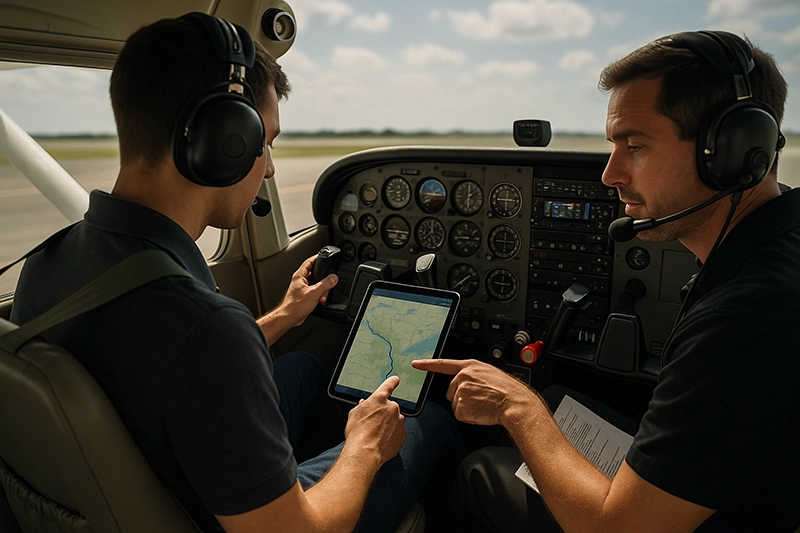
Modern pilots rely on aviation apps for flight planning, navigation, weather awareness, charts, and in-flight decision-making. Whether you are a student pilot preparing for a cross-country, a flight instructor teaching situational awareness, or an operator managing dispatch, aviation apps shape how we prepare, fly, and manage risk.
This article explains how aviation apps work in practical flight operations, their strengths and limitations, training and safety implications, common misunderstandings, and how to integrate apps into sound pilot decision-making. The primary keyword "aviation apps" appears early because using the right app in the right way can reduce workload and improve safety when paired with proper training and judgment.
What Aviation Apps Do and Why They Matter
Aviation apps consolidate critical flight information into handheld devices or tablets. Common functions include chart display, airport data, NOTAMs, weather briefings, weight-and-balance and performance calculators, route planning, synthetic vision, traffic and ADS-B display, and logbook management. Apps can also connect to aircraft systems via Wi-Fi, Bluetooth, or portable ADS-B receivers to provide live traffic, weather, and position data.
The practical value of aviation apps is threefold. First, they centralize information that previously required multiple paper products or separate devices. Second, they enable dynamic updates such as real-time weather and NOTAMs when connectivity exists. Third, they provide tools that support decision-making, for example alternate planning or visualizing terrain and obstacles.
Why This Matters in Real-World Aviation
Aviation apps change operational workflows and training requirements. They reduce preflight preparation time when used correctly, but they also introduce new failure modes you must manage. Pilots who depend on an app without cross-checking other sources risk missing outdated products, misinterpreting data, or failing to recognize an app configuration issue. For instructors and training programs, apps create teaching opportunities around automation management, information cross-checking, and contingency planning when digital tools fail.
For safety and operational decisions, apps should be treated like any other instrument or avionics system: understand how they produce data, know their limitations, and practice failure response. The best pilots integrate app output into a broader decision framework rather than treating the app as the final authority.
How Pilots Should Understand Aviation Apps
Think of aviation apps in three layers: data source, processing, and presentation. Data sources include official products (charts, FAA data, AIP-like material in some countries), weather providers, ADS-B feeds, and third-party databases. Processing combines those sources and applies filters, routing algorithms, or performance calculations. Presentation is how the app visualizes the results on your device.
Understanding each layer helps pilots assess risk. Ask these questions before relying on an app in flight: What are the original data sources? How recent is the data? Does the app apply any assumptions for performance or routing? What network connectivity is required for critical functions? If you lose connection, what remains available offline?
Operationally, treat apps like a decision aid. Use them to identify potential hazards, then validate with other resources. For example, an app can show nearby convective weather cells, but visual interpretation, ATC advisories, and official weather briefings remain part of the decision-making process. If an app offers automatic performance numbers, verify that those numbers reflect your aircraft configuration and current conditions before using them to commit to an operation.
Common Aviation App Categories and Typical Uses
While app features vary, pilots will generally encounter the following categories and should match them to task and phase of flight:
- Flight Planning and Navigation - Route building, fuel planning, enroute and terminal charts, and integration with GPS position. Useful for preflight and in-flight route management.
- Weather and NOTAMs - Briefings, METAR/TAF, radar, lightning, and graphical forecasts. Use for preflight go/no-go and tactical deviations in flight.
- Performance and Weight-and-Balance - Calculators for takeoff, landing, and weight and balance. Useful for validating aircraft performance assumptions during preflight planning.
- Traffic and ADS-B - Portable receivers and app displays show nearby traffic and ADS-B weather. Helpful for traffic awareness but not a substitute for see-and-avoid or ATC services.
- Charts and Electronic Flight Bags (EFB) - Charting apps store approach plates, airport diagrams, and IFR/VFR sectional charts. The electronic form reduces paper load but requires disciplined currency management.
- Logbooks and Training Tools - Digital logbooks, endorsements tracking, and scenario-based training aids. Useful for maintaining records and tracking proficiency.
Integration with Aircraft Systems and Operational Considerations
Many apps pair with portable devices such as ADS-B receivers, GPS modules, or the aircraft's avionics through Wi-Fi. Integration improves situational awareness but introduces dependencies. Consider power management, mounting and sightlines, and electromagnetic interference. Confirm whether your installation affects the pilot's forward field of view or instrument scan.
Operators should define standard operating procedures (SOPs) for app use. SOPs typically address which apps are authorized for operational tasks, who is responsible for updates, where backup sources are kept, and how pilots cross-check app output. Without SOPs, different crews may rely on inconsistent data or assume app-based decisions are authoritative when they are not.
Common Mistakes and Misunderstandings
Pilots often make predictable errors when using aviation apps. Recognizing these can prevent unsafe decisions.
- Overreliance without cross-checking - Treating an app's single readout as the final answer rather than one input among several.
- Assuming continuous connectivity - Expecting live weather or traffic feeds without ensuring offline data is available for critical phases of the flight.
- Failing to validate performance inputs - Using default aircraft profiles or incorrect weight, temperature, or configuration settings can lead to misleading performance numbers.
- Poor human-machine interface management - Placing a tablet where sunlight or glare prevents reading, or where it becomes a distraction during critical flight phases.
- Neglecting updates and database currency - Using expired charts, outdated airport information, or stale approach plates increases risk. Confirm update policies and keep them current.
Practical Example: Preflight to In-Flight Decision Flow
Imagine a cross-country from a small field to a major terminal airport. Use an aviation app in these practical steps:
1. Preflight planning: Build the route, review current METARs/TAFs, check NOTAMs affecting runways and airspace, and run weight-and-balance and takeoff/landing performance calculations. Save offline copies of charts for the route.
2. Preflight verification: Confirm that the aircraft weight and configuration used in the app match the actual aircraft. Cross-check critical performance numbers with the airplane flight manual or POH if available.
3. Taxi and departure: Use an app's airport diagram to identify hot spots and taxi routes. While moving, maintain visual scan and communicate with ground control; an app should not replace required clearances or ground communications.
4. En route: Monitor position on charts, watch for convective weather indicated by the app, and verify any ATC-provided traffic advisories or reroutes. If real-time weather or ADS-B traffic is lost, revert to the planned alternates and prebriefed diversion strategies.
5. Destination arrival: Use the app for approach charts and airport diagrams, but cross-check frequencies, runway conditions, and NOTAMs. During high workload phases, minimize interaction and rely on crew coordination to manage the app.
Best Practices for Pilots
Practical habits improve safety when using aviation apps. Adopt the following practices and tailor them to your operations:
- Know your app: Spend time off the flight deck learning menus, settings, and where critical information is displayed.
- Maintain a backup: Keep paper charts, a secondary app, or offline downloads available for contingency. A single-point digital failure should not end your navigation capability.
- Validate inputs: Always confirm weight, runway surface condition, and aircraft configuration entries before trusting performance outputs.
- Manage updates: Establish a regular schedule to update charts and databases, and verify that updates completed successfully before flight.
- Limit in-flight interaction during high workload phases: Program the route and brief alternates before departure so changes in flight are infrequent and deliberate.
- Train to failure scenarios: Practice navigating without live data, using only onboard instruments and dead reckoning or backup charts.
Training and Instructor Considerations
Flight instructors should incorporate app use into lesson plans in two ways: technical proficiency and decision-making. Technical proficiency covers how to use an app correctly, manage settings, and interpret displays. Decision-making focuses on when to rely on app output, how to cross-check, and how to handle app failures while maintaining safety margins.
Instructors should simulate common app failure modes during training flights. Examples include loss of ADS-B weather, stale charts, incorrect aircraft profile entries, or a device failure. Structured scenarios teach students to maintain situational awareness and execute prebriefed contingencies rather than improvising under stress.
Human Factors and Distraction Management
Tablets and phones change cockpit ergonomics. Human factors considerations include how the device is mounted, how pilots allocate attention to screens versus outside the cockpit, and how alerts are managed. Designate when and who handles the device, particularly in single-pilot operations, to avoid distraction during critical phases of flight.
When alerts appear on the device, pilots should treat them like any other cockpit annunciation: confirm relevance, evaluate risk, and act according to established procedures. Random or frequent noncritical alerts can desensitize crews, so configure notifications to reduce nuisance alerts while keeping safety-critical warnings active.
Legal, Operational, and Regulatory Notes
Regulatory acceptance of electronic flight bags and mobile aviation apps varies by jurisdiction and operator. Some operations require specific approvals, database validation methods, or equipment standards. Pilots must follow applicable regulations, operator policies, and manufacturer guidance for avionics and electronic devices.
For private recreational flying, pilots still bear responsibility for using current, reliable information. For commercial operations, company procedures typically define approved apps, update schedules, and recordkeeping requirements. Always verify the policies that apply to your flight.
Key Takeaways
- Practical takeaway: Use aviation apps as decision aids and cross-check their outputs against other sources and your aircraft documents.
- Safety takeaway: Plan for degraded or lost app functionality by keeping offline charts, practicing loss-of-data scenarios, and maintaining situational awareness.
- Training takeaway: Instructors should teach both technical app skills and failure management so students build resilient operational habits.
Frequently Asked Questions
Can I use a tablet or phone app as my primary navigation source?
Yes, many pilots use tablets or phones as primary navigation aids, but you must ensure the app provides current, reliable data and that you have contingency plans for device or data loss. For commercial operations, follow your company policies and any applicable regulations regarding authorized equipment.
How often should I update an aviation app and its databases?
Update schedules depend on the app and data type. Chart and navigation databases typically follow regular cycles, while weather and NOTAMs update in near real time. Establish an update routine before flight and verify that an update completed successfully. For operational flights, follow any mandated update intervals required by operators or authorities.
Are ADS-B and traffic displays on apps reliable for collision avoidance?
ADS-B and traffic displays add valuable situational awareness but are not a substitute for see-and-avoid and air traffic control advisories. Display range, update latency, and whether traffic broadcasts position and velocity data influence the reliability of the depiction. Treat app traffic as an aid, not as an assurance of separation.
What do I do if an app gives unexpected performance numbers?
If an app provides performance numbers that conflict with your aircraft flight manual or your expectations, stop and verify all inputs, including weight, altitude, temperature, runway surface condition, and configuration. Cross-check with the POH or manufacturer guidance before committing to a takeoff or landing based on those numbers.
Should flight schools standardize on specific apps?
Standardizing app use in a flight school simplifies training, maintenance of currency, and instructor oversight. A defined set of authorized apps reduces variability and makes SOPs and failure drills consistent across students and instructors.
How do I reduce distraction when using aviation apps in single-pilot operations?
Prepare routes, brief alternates, and set up the app before taxi. Use mounts that keep the device in the pilot's natural field of view without blocking external sightlines. Limit in-flight interactions during critical phases, and use audio alerts where appropriate to reduce the need to visually scan the device.
Adopting aviation apps effectively requires more than downloading software. It requires disciplined training, operational procedures, and contingency planning. When integrated properly, apps improve situational awareness, reduce workload, and enhance safety. When treated as unreliable or singular authorities, they introduce new risks. Your role as a pilot or instructor is to ensure tools support sound flying, not replace it.
For the next flight, conduct a deliberate review of the app or apps you plan to use: confirm data currency, validate performance inputs, ensure offline availability, and brief how you will respond to a failure. That short habit turns a convenience into a robust part of safe, effective flight operations.