
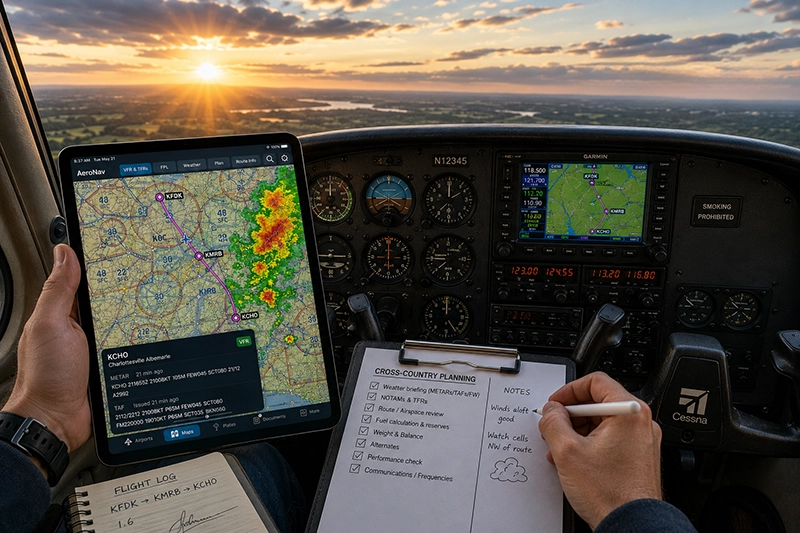
Student pilots today carry a powerful workstation in their pocket. Aviation apps for student pilots provide aerodynamic theory refreshers, sectional charts, weather overlays, flight planning, weight-and-balance calculators, and digital logbooks. Used intelligently, these tools accelerate learning and improve situational awareness. Misused, they can become a distraction or a source of overconfidence.
This article is written for student pilots, flight instructors, aviation professionals, and serious enthusiasts who want a practical, safety-minded guide to choosing and using the best aviation apps for training and daily flying. You will find how to evaluate apps, the categories that matter most during primary training, operational cautions, a realistic training scenario that demonstrates app use, common mistakes to avoid, and a focused FAQ that answers typical pilot questions.
Main categories of aviation apps student pilots should know
Aviation apps fall into functional groups. Each category supports a different part of training and flight operations. The categories below reflect what most student pilots will find useful during private pilot training and in the early stages of instrument training.
Core categories to consider are flight planning and charts, weather and meteorology, navigation and situational awareness, performance and weight-and-balance calculators, aeronautical references and training resources, logbooks and record-keeping, and ATC/communications or frequency lookup tools. Safety and decision-making apps also deserve attention because they directly affect risk assessment and go/no-go decisions.
Why aviation apps matter in real-world flying and training
Apps compress traditionally bulky resources into accessible, searchable formats. For student pilots, that means quicker access to sectional charts, easier preflight weather briefings, and on-demand explanations of procedures and maneuvers. Instructors can use apps to demonstrate real-time weather changes, annotate approach plates during briefings, or simulate cross-country flight planning in the briefing room.
Operationally, apps influence decision-making. A pilot who uses a reliable weather overlay and understands limitations can detect deteriorating conditions earlier and make safer decisions. Conversely, pilots who use apps without cross-checking official sources or without understanding the underlying information risk following incomplete or outdated data.
How pilots should understand and evaluate aviation apps
Approach app selection like you would choose an instrument or check a POH: understand its purpose, limitations, required inputs, and how it integrates into your workflow. Key evaluation criteria are accuracy of aeronautical data, currency of charts and NOTAMs, offline capability, ease of use under workload, and how the app surfaces important safety information like ceilings, visibility, icing potential, and precipitation.
Also consider human factors: screen readability in bright cockpit sunlight, menu depth when you need quick information, and whether the app encourages head-down time during critical phases of flight. A well-designed app reduces cognitive load; a poorly designed app creates distraction. Look for these features when you evaluate an app:
- Current aeronautical charting and simple chart layering controls.
- Robust weather overlays and the ability to cache data for offline use.
- Flight-planning tools that calculate leg times, fuel burn estimates, and basic weight-and-balance checks.
- Reliable access to airport information, frequencies, and runway data.
- Logbook functionality or export options for legal record-keeping.
Common app categories and what they do for student pilots
Below are expanded descriptions of the most useful app categories and the pilot tasks they support.
Flight planning and electronic flight bags (EFB)
Flight planning and EFB apps combine charting, routing, performance calculators, and filing tools into a single interface. For student pilots, these apps simplify cross-country planning by letting you sketch routes, inspect airspace, and get rough time and fuel estimates. They often include sectional, terminal area, and instrument approach charts. When you use a planning app, verify that charts and airport data are current before relying on them for navigation.
Weather and meteorology
Weather apps aggregate METARs, TAFs, radar, satellite imagery, and graphical wind/temperature aloft data. For students, weather apps are an essential learning tool: they make synoptic weather patterns visible and help you link theoretical weather knowledge to operational decisions like go/no-go calls and diversion planning. Make sure you understand what each weather product represents and its refresh frequency.
Navigation and situational awareness
These apps provide moving maps, traffic information when supported, terrain warnings, and route overlays. They translate raw navigation data into a spatial picture pilots can interpret quickly. In training flights, a moving-map app helps build mental models for pilotage and cross-country navigation, but instructors should coach students to use the app as a supplement to pilotage and radio navigation—not as a substitute.
Performance, weight, and balance
Performance and weight-and-balance calculators help students apply POH numbers to practical scenarios: density altitude effects, takeoff and landing distances, climb performance, and weight-and-balance limits. These apps can speed preflight planning but require the pilot to input accurate aircraft configuration and environmental conditions. Validate any output against your aircraft POH when available.
Aeronautical reference and training resources
Reference apps include simple FAA documents, exam prep questions, and interactive maneuver or systems explanations. They are useful for reinforcing ground school topics and practicing for knowledge tests. Use them to clarify concepts before a flight and to review in the debrief after training flights.
Logbook and currency tracking
Digital logbooks reduce paperwork and make currency tracking easier. They can summarize hours by category, track endorsements, and export records for instructors or examiners. Confirm that your digital logbook exports in a format accepted by your examiner or aviation authority before relying solely on it for certification evidence.
ATC/communications helpers and frequency lookup
Frequency lookup and ATC reminder apps let you find tower, ground, and approach frequencies quickly. For students still learning radio flow and phraseology, these apps are convenient brief references. They do not replace good radio training and should be used to support, not replace, learning proper communications and procedures.
How to integrate aviation apps into your training routine
Integrate apps intentionally. Make them part of preflight briefings and post-flight debriefs rather than a mid-flight crutch. During preflight, use a planning app to develop a route, note altitudes and checkpoints, and run a basic weight-and-balance check. During the flight, use a moving map conservatively: confirm visual checkpoints with pilotage and cross-check GPS fixes against VOR or pilotage when practicing navigation skills. In debrief, review weather decisions and any deviations from planned track to turn app data into learning points.
Common mistakes or misunderstandings when using aviation apps
Poor app habits introduce risks. Below are frequent errors and how to avoid them.
Overreliance on a single data source. Treat app-supplied information as one input among many. Cross-check critical data against official sources when possible.
Assuming data currency. Not every app updates charts, NOTAMs, or weather at the same cadence. Confirm that your app’s data is current for the timeframe you plan to fly.
Ignoring human factors. Small screens, bright sunlight, and cockpit workload make complex menus a hazard. Choose apps with clear displays and keep critical information accessible with minimal taps.
Using performance calculators without verifying inputs. A calculator is only as good as the inputs. Always confirm aircraft configuration, runway conditions, and environmental inputs with actual values.
Failing to practice without technology. Students must learn basic navigation, instrument interpretation, and radio communication without relying solely on apps. Develop core skills independently so apps are an augmentation, not a dependency.
Practical example: planning and executing a first cross-country
Scenario: A student pilot plans a 150-nautical-mile cross-country to meet the minimum solo requirement for distance-based cross-country training. Use an app in the planning phase, then fly with conservative use in the cockpit.
Preflight with apps: Sketch a route that avoids restricted airspace using a charting app. Use the weather app to check METARs, TAFs, and radar for the departure, en route, and destination airports. Run a weight-and-balance check with a performance app and estimate fuel burn with conservative reserves. Save offline chart tiles for the route in case of intermittent connectivity.
In-flight use: Use a moving-map app to confirm checkpoints and monitor ground track. Cross-check the app’s estimated groundspeed and time-to-waypoint with your pilotage and true airspeed calculations. If the app indicates unexpected convective activity or a lowering ceiling ahead, practice a conservative diversion decision—identify alternates and make that call early.
After the flight: Use a logbook app to record flight time and annotate lessons learned. Debrief with your instructor and review any discrepancies between planned and actual performance to identify what to practice next.
Best practices for pilots using aviation apps
Use these practical habits to gain benefits and reduce risk.
- Validate critical outputs against the aircraft POH and official sources when possible.
- Cache charts and weather for planned flights to avoid surprise data gaps.
- Limit head-down time during critical phases. Pre-program routes on the ground and brief expected tasks in advance.
- Practice basic navigation, radio procedures, and instrument skills without apps so you retain fundamental capabilities.
- Keep your devices charged and bring a backup battery or power plan for longer flights.
- Document currency and endorsements in a format accepted by examiners; verify that digital exports are admissible for certification evidence.
Frequently Asked Questions
Which aviation app should a student pilot get first?
Prioritize a charting and flight-planning app with offline charting and weather overlays. That combination supports cross-country planning, situational awareness, and learning to read charts and airspace. Complement it with a weather app that aggregates METARs, TAFs, and radar imagery.
Are digital logbooks acceptable for pilot certifications?
Many examiners and authorities accept digital logbooks if they can produce an export that clearly shows dates, aircraft make/model, flight time, and endorsements. Confirm acceptance with your instructor or examiner before relying solely on a digital logbook for certification evidence.
Can apps replace learning traditional navigation skills?
No. Apps are tools that enhance navigation and situational awareness, but foundational skills—pilotage, dead reckoning, and radio navigation interpretation—remain essential. Relying solely on apps can create gaps in judgment when technology is unavailable or degraded.
How should I verify app data accuracy?
Cross-check critical information with official sources such as current aeronautical charts, NOTAMs, and approved weather briefings. For performance numbers, compare app outputs to aircraft POH data. Treat app data as an operational aid, not the sole authority.
What should I do if an app displays conflicting information during a flight?
Prioritize safety: revert to the most reliable and verifiable information available. If instrumentation and pilotage disagree with the app, use certified instruments and pilotage. Consider diverting to a safe location if uncertainty affects safe continuation of the flight.
Common mistakes and misunderstandings revisited
Students often assume that a popular app is automatically accurate and up-to-date. Popularity does not guarantee real-time currency or appropriate data cadence. Another common mistake is neglecting battery and data contingency planning. A third is failing to adapt workload management when using apps in the cockpit—what is manageable during cruise may be hazardous during takeoff and landing phases.
Key Takeaways
- Practical takeaway: Use a primary charting/flight-planning app with offline capability to support cross-country planning and situational awareness.
- Safety takeaway: Cross-check app data with official sources and the aircraft POH; do not rely solely on a single app in critical situations.
- Training takeaway: Practice navigation, communications, and performance calculations without apps so tools augment skills rather than replace them.
Modern aviation apps are powerful learning and operational tools when used with discipline and understanding. Student pilots who learn to integrate apps into preflight planning, in-flight decision-making, and post-flight debriefs gain efficiency and situational awareness. The critical skill is judgment: know when to trust an app and when to revert to fundamentals.
Finally, keep your app selection practical. Choose apps that align with your training goals, support offline operation, and make it easy to access critical information without adding cockpit workload. Review your app habits during each debrief and iterate—technology should be an extension of safe pilot technique, not a substitute.