
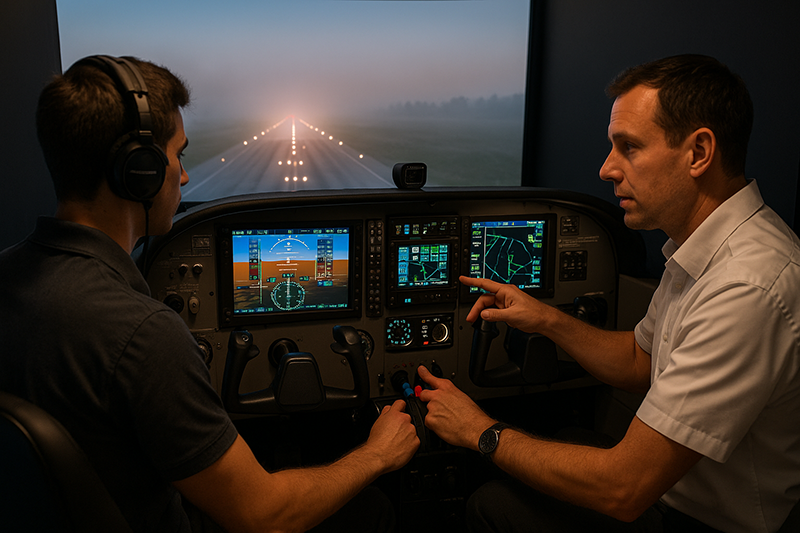
Flight simulation training can be one of the most effective ways to sharpen real-world pilot skills, but only when it is used with purpose. A simulator is not a video game, a shortcut, or a replacement for aircraft handling experience. It is a training environment where pilots can rehearse procedures, make decisions, manage workload, practice communication, and experience scenarios that may be impractical or unsafe to repeat in an airplane.
For student pilots, flight instructors, instrument pilots, recurrent trainees, and aviation professionals, simulation offers something the aircraft cannot always provide: repetition under controlled conditions. You can pause, reset, debrief, and try again. You can practice an instrument approach to minimums, a missed approach, a systems abnormality, or a weather diversion without adding unnecessary risk. The value comes from how the session is planned, flown, evaluated, and connected back to real cockpit behavior.
What Flight Simulation Can and Cannot Do
Modern simulation ranges from desktop training software to FAA-approved aviation training devices, flight training devices, and full flight simulators. Each type has a different purpose, level of realism, and potential training value. Some devices are designed for procedure practice, some are built around cockpit familiarization and systems training, and some are approved for specific training uses under defined conditions. Pilots should not assume that all simulator time has the same training or regulatory value.
The most important distinction is between skill development and formal credit. A pilot can gain useful practice from many types of simulation, including non-approved desktop systems, but regulatory credit depends on the device, the training program, the instructor, and the applicable rules. If the goal is loggable time, certificate training, instrument currency, or a required training event, the pilot or instructor should verify the applicable requirements before the session begins.
Simulation is strongest when the task depends on procedure, decision-making, scan, communication, aircraft systems understanding, and workload management. It is especially useful for instrument procedures, avionics familiarization, checklist discipline, abnormal scenarios, cockpit flows, route planning, emergency decision-making, and crew or instructor-student communication. It is less effective when the training goal depends heavily on physical sensations, seat-of-the-pants cues, real aircraft inertia, peripheral visual references, or the exact control feel of a specific airplane.
That limitation does not make simulation less valuable. It simply means the pilot must understand what is being trained. A simulator can help a student learn the sequence of a short-field landing, but the actual sight picture, flare timing, crosswind feel, and touchdown control must be refined in the aircraft. A simulator can help an instrument pilot fly an approach briefing, intercept the final approach course, manage avionics, and execute the missed approach, but the pilot still needs real aircraft proficiency, weather judgment, and disciplined aircraft control.
Why This Matters in Real-World Aviation
Aviation rewards preparation. Many cockpit errors do not begin with a lack of courage or motivation; they begin with high workload, unfamiliar procedures, rushed decision-making, or weak habits that were never practiced under pressure. Simulation gives pilots a way to rehearse those moments before they occur in the aircraft.
Consider a private pilot transitioning to a more capable airplane with a different avionics suite. The pilot may understand the aircraft performance numbers, but still be slow loading flight plans, activating approaches, finding the correct display page, or managing the autopilot. In the airplane, that delay can consume attention during departure, arrival, or changing weather. In a simulator, the pilot can practice the cockpit flow repeatedly until the avionics become less distracting.
For instrument pilots, simulation can help maintain the habit of staying ahead of the airplane. Holding entries, approach briefings, missed approach procedures, course intercepts, descent planning, and radio calls all benefit from repetition. The best instrument training is not just about keeping the needles centered. It is about maintaining orientation, recognizing deviations early, managing task saturation, and making conservative decisions when the plan begins to change.
For instructors, simulation is a powerful teaching tool because it allows demonstration and correction without burning aircraft time. An instructor can freeze a scenario at the moment a student becomes saturated, ask what the student sees, discuss options, then restart from the same point. That kind of immediate feedback is often difficult in the airplane, where airspace, fuel, weather, and traffic continue to move the flight forward.
For aviation operators and professional pilots, simulation supports standardization. Crews can practice callouts, automation management, abnormal procedures, and decision-making in a consistent environment. The goal is not to make every flight predictable. The goal is to give pilots a shared mental model so that when something unexpected occurs, they respond with disciplined coordination rather than improvisation.
How Pilots Should Understand This Topic
The best way to use a simulator is to treat it like a training aircraft with a defined lesson objective. Before the session begins, decide what skill is being trained, what standard will be used, and what the debrief should answer. A vague plan such as “practice approaches” is less useful than “fly two ILS approaches with correct briefing, stabilized configuration, missed approach execution, and no loss of situational awareness during frequency and avionics changes.”
Good simulation training has three parts: preparation, execution, and debrief. Preparation includes reviewing the procedure, aircraft profile, weather, airport layout, checklist, and expected avionics steps. Execution means flying the scenario as if it were a real flight, including checklists, callouts, navigation setup, sterile cockpit discipline, and go-around or missed approach decisions. Debrief means identifying what happened, why it happened, and how the pilot will change behavior next time.
A simulator should also be used at the correct difficulty level. If a student is still learning basic attitude instrument flying, it may not be helpful to add a complex clearance, turbulence, equipment abnormalities, and low weather all at once. If an experienced instrument pilot is preparing for recurrent training, a simple straight-in approach in calm weather may not provide enough challenge. Training should build from familiar to demanding, with each session adding a specific layer of complexity.
Pilots should also separate procedural learning from performance learning. Procedural learning is about knowing what to do and when to do it. Examples include briefing an approach, configuring avionics, running a checklist, identifying a fix, or selecting the correct navigation source. Performance learning is about controlling the aircraft accurately. Examples include pitch and power control, heading control, altitude control, airspeed management, and maintaining a stabilized approach. Simulation can train both, but the session should make clear which one is primary.
Another practical concept is transfer of training. Positive transfer occurs when a simulator habit improves performance in the aircraft. Negative transfer occurs when a simulator habit creates a poor cockpit behavior. For example, pausing frequently, ignoring checklists, flying with unrealistic power settings, or relying on outside views during instrument practice can teach habits that do not belong in the airplane. Pilots should use simulation in a way that reinforces the behavior they want in flight.
Building a Productive Simulation Session
A productive simulation session begins with a training objective that can be observed. “Improve IFR confidence” is a worthwhile long-term goal, but it is difficult to measure in one session. “Fly a departure procedure, manage a reroute, and brief an approach without losing aircraft control or missing required tasks” is much easier to evaluate. The more specific the objective, the better the learning.
Start with a short briefing. The briefing does not need to be complicated, but it should answer several practical questions. What aircraft or cockpit configuration will be used? What airport, route, weather, and airspace will be simulated? What procedures will be flown? What level of realism is expected? Will the session include failures or abnormal events? When will the instructor intervene, and when will the pilot be expected to continue and solve the problem?
During the session, the pilot should use the same discipline expected in the aircraft. That includes checklist usage, proper callouts, realistic cockpit flow, altitude and heading assignments, approach briefings, and communications. If the simulator allows unrealistic shortcuts, resist them unless the training objective requires it. A pilot who practices sloppy simulator habits may be surprised when those habits appear under workload in the aircraft.
The debrief is where much of the learning occurs. A good debrief should not be limited to whether the airplane arrived at the runway. It should examine decision points, workload management, situational awareness, automation use, checklist discipline, and recovery from errors. The most useful question is often not “Did you make a mistake?” but “When did the situation begin moving faster than your plan?”
Instructors can strengthen the debrief by asking the pilot to reconstruct the flight. Where was your attention during the descent? What were you expecting ATC to do? When did you recognize the approach was becoming unstable? What cue told you the navigation source was wrong? These questions build self-assessment, which is one of the most important skills a pilot can carry from the simulator into the airplane.
High-Value Skills to Practice in Simulation
Some aviation skills are especially well suited to simulation because they benefit from repetition, scenario variation, and immediate feedback. Instrument flying is one of the most obvious examples. A pilot can practice holding, intercepting courses, briefing approaches, flying missed approach procedures, and managing avionics in a controlled environment. The emphasis should be on precision, planning, and early error recognition rather than simply completing the approach.
Avionics and automation management are also excellent simulator topics. Many pilots are legal and current but not truly comfortable with the equipment in the panel. They may know how to enter a direct-to clearance, but struggle with loading an arrival, activating a leg, changing a missed approach hold, or understanding the difference between armed and active autopilot modes. Simulation allows pilots to slow down the learning process and build confidence before handling those tasks in busy airspace.
Emergency and abnormal procedures can be practiced effectively when they are handled realistically. The goal is not to create dramatic surprises. The goal is to develop calm recognition, correct prioritization, and disciplined checklist use. A simulated alternator failure, vacuum system issue in an aircraft equipped with such a system, engine roughness scenario, pitot-static problem, or avionics malfunction can teach pilots to aviate, navigate, communicate, and use available resources.
Weather decision-making can also be trained in simulation. The simulator cannot duplicate every feature of real weather, but it can place the pilot in scenarios involving lowering ceilings, reduced visibility, stronger winds, convective avoidance decisions, icing concerns in applicable aircraft discussions, or the need to divert. The instructor can evaluate whether the pilot recognizes deteriorating conditions early or continues pressing into a plan that no longer makes sense.
Communication and cockpit resource management are often overlooked in single-pilot simulation. Even without another crewmember, a pilot can practice verbalizing a plan, setting personal minimums, briefing passengers, making radio calls, and prioritizing tasks. Speaking the plan out loud can reveal confusion that would otherwise remain hidden until workload increases.
Using Simulation for Student Pilot Training
Student pilots can benefit from simulation when it supports, rather than replaces, aircraft instruction. Early in training, simulation can help students understand the relationship between pitch, power, trim, and performance. It can also introduce cockpit flows, checklist usage, radio phraseology, traffic pattern orientation, and basic navigation concepts.
For a new student, the simulator is especially useful before lessons that introduce high workload. A student preparing for the first few traffic pattern flights can rehearse downwind, base, and final callouts, power changes, flap selections, airspeed targets, and go-around decision points. The student will still need real aircraft experience to learn sight picture, flare, wind correction, and control feel, but the mental sequence will be less overwhelming.
Simulation can also help students prepare for cross-country training. They can practice reading a route, identifying checkpoints, using navigation equipment, recognizing airspace boundaries, and making diversion decisions. The instructor can pause the scenario and ask the student to estimate position, fuel status, and options. This reinforces pilotage, dead reckoning, and cockpit organization without the distractions of a first-time real cross-country environment.
However, students should be guided carefully. Without instructor oversight, a student may practice unrealistic control movements, develop poor scan habits, or become overly dependent on moving maps and outside views. The goal is not to make the student a simulator expert. The goal is to build mental organization that transfers to safe aircraft operation.
Using Simulation for Instrument Proficiency
Instrument pilots often get the greatest value from simulation because IFR flying is procedure-rich and workload-sensitive. A well-designed session can include clearance copying, departure procedures, enroute changes, holding, approach setup, missed approach execution, and diversion planning. Each event can be repeated until the pilot becomes smoother and more deliberate.
One of the most valuable instrument simulation exercises is the missed approach. In real flying, many pilots do not practice missed approaches as often as they fly approaches to a landing. In simulation, the missed approach can become a normal, expected maneuver. The pilot can practice adding power, controlling pitch, configuring the airplane, navigating the published procedure, communicating, and preparing for the next clearance.
Another useful exercise is managing a late runway change or approach change. The pilot may be established on a plan, then receive a new clearance that requires reloading avionics, briefing a different procedure, and adjusting descent planning. This scenario tests whether the pilot can slow the pace, ask for delay vectors if appropriate, and avoid rushing into an unstable setup.
Instrument simulation should also include partial-panel or equipment-abnormal scenarios when appropriate to the aircraft and training objective. The purpose is not to surprise the pilot with every possible failure. The purpose is to reinforce instrument cross-check, redundancy awareness, and conservative decision-making.
Common Mistakes or Misunderstandings
One common mistake is treating simulator practice as casual flying. If the pilot skips checklists, ignores clearances, flies unrealistic profiles, or restarts every time the scenario becomes difficult, the session may build confidence without building competence. Real improvement requires realistic constraints and honest debriefing.
Another misunderstanding is assuming that more difficulty always means better training. A session filled with severe weather, multiple failures, heavy radio traffic, and unfamiliar procedures may overwhelm a pilot without producing useful learning. Challenge is important, but training should be progressive. The pilot should leave with a clearer understanding of how to improve, not just a memory of being overloaded.
A third mistake is focusing only on stick-and-rudder precision while ignoring decision-making. Aircraft control matters, but many real-world problems involve judgment: whether to continue, divert, delay, ask for help, climb, descend, go around, or simplify the plan. Simulation is an excellent environment for practicing those decisions because it allows the instructor to explore consequences in a safe setting.
Pilots also sometimes over-trust the simulator’s realism. A desktop system may not match the control feel, trim response, sight picture, performance, avionics behavior, or failure modes of a specific airplane. Even high-quality devices have limits. Pilots should avoid making aircraft-specific performance assumptions from a simulator unless the device, data, and training program are designed for that purpose.
Finally, some pilots confuse simulator familiarity with real-world readiness. Being able to fly a procedure at home in calm conditions does not automatically mean the pilot is prepared for night weather, turbulence, ATC workload, passenger pressure, fatigue, or a real aircraft abnormality. Simulation should increase readiness, but it should also increase humility. It should reveal what still needs practice.
Practical Example: Turning a Weak IFR Approach Into a Training Plan
Imagine an instrument-rated pilot who has not flown much actual IMC recently. The pilot is comfortable in visual conditions but feels slow when briefing approaches and managing avionics. During a simulator session, the instructor sets up a short IFR flight from a familiar departure airport to a nearby destination with marginal weather. The plan includes a standard departure, a short enroute segment, vectors to an ILS, and a missed approach.
On the first attempt, the pilot flies acceptable headings and altitudes but becomes saturated during the approach setup. The navigation source is not changed at the right time, the approach briefing is incomplete, and the descent checklist is rushed. The aircraft remains under control, but the pilot is behind the airplane. Instead of simply repeating the whole flight, the instructor freezes the lesson and debriefs the sequence.
The pilot and instructor identify the real issue: the pilot does not have a reliable flow for approach preparation. They build a simple routine. Review weather and runway. Select and verify the approach. Brief the chart. Set frequencies and navigation sources. Confirm altitude constraints and missed approach instructions. Review aircraft configuration targets. State the go-around or missed approach plan before reaching the final approach segment.
On the second attempt, the weather and route are the same. The pilot flies more smoothly because the mental sequence is clearer. On the third attempt, the instructor changes the runway and assigns a different approach. The pilot asks for time, sets up the procedure deliberately, and briefs the new plan before accepting a tight vector. The lesson has now moved beyond button-pushing. It has trained workload management, communication, and judgment.
That is the power of good simulation. The instructor did not use the device to create a dramatic failure. The instructor used it to identify a training gap, isolate the skill, repeat the scenario, and connect the lesson to real cockpit behavior.
Best Practices for Pilots
To get the most from flight simulation, pilots should approach it with the same seriousness they bring to aircraft training. The session should have a purpose, a realistic setup, and an honest review. It should also be connected to the pilot’s current flying. A student pilot, a weekend VFR pilot, an instrument pilot, and a professional crew will not need the same simulator session.
Start with the airplane or operation you actually fly. If the simulator cockpit differs from your aircraft, identify the differences before training begins. Some differences are harmless for general procedure practice, while others may affect how you interpret the lesson. For example, an avionics workflow that makes sense in one system may not transfer directly to another.
Use realistic weather, fuel, aircraft configuration, and airspace constraints. If the session is about decision-making, include enough context for the decision to matter. If the session is about instrument flying, require proper briefings, checklists, and missed approach planning. If the session is about emergency procedures, focus on recognition, aircraft control, memory items only if applicable to the aircraft and training program, checklist use, and diversion planning.
Keep a training record even when the session is not being logged for regulatory credit. A simple record of objectives, scenarios, strengths, weaknesses, and next steps helps convert practice into a training program. Over time, patterns become visible. A pilot may discover that altitude control is consistent, but avionics setup becomes rushed. Another pilot may find that approaches are accurate, but diversion decisions come too late.
The following habits can make simulation more effective without turning every session into a formal event:
- Define one or two primary objectives before starting.
- Fly the session with real cockpit discipline, including checklists and callouts.
- Use scenarios that match your aircraft, rating, and current proficiency.
- Debrief decisions and workload, not just technical accuracy.
- Repeat the same scenario after correction to reinforce improvement.
- Move the lesson to the aircraft when physical handling, sight picture, or real-world environmental cues are essential.
For instructors, the best practice is to resist using the simulator only as a test. It is tempting to create a difficult scenario and watch what happens. That can be useful at times, but teaching usually requires building blocks. Demonstrate, let the pilot try, correct, repeat, then add complexity. The simulator is a classroom, a cockpit, and a decision laboratory. It should be used as all three.
Regulatory and Logging Considerations
Pilots should be careful with assumptions about logging simulator time. Some flight simulation devices may be used for specific training, experience, or currency purposes when the device, instructor, and conditions meet applicable requirements. Other simulation tools may be excellent for practice but not acceptable for formal credit. The details can depend on the type of device, the pilot certificate or rating involved, the training provider, and the purpose of the session.
The practical takeaway is simple: decide before the session whether the goal is skill improvement, regulatory credit, or both. If credit is expected, verify the requirements in advance with a qualified instructor, training provider, or appropriate regulatory guidance. Do not wait until after the session to determine whether it can be logged for the intended purpose.
Even when a session does not qualify for formal credit, it may still be valuable. A pilot who spends time learning avionics flows, briefing procedures, and practicing weather decisions may arrive at the aircraft better prepared. That preparation can make flight training more efficient and can support safer decision-making, provided the pilot understands the limits of the simulation environment.
How to Connect Simulator Learning to the Airplane
The final step in simulation training is transfer. After a simulator session, the pilot should identify what needs to be tested or reinforced in the aircraft. If the simulator lesson focused on traffic pattern procedures, the next flight should confirm whether the student can apply the sequence while handling real sight picture, wind correction, and aircraft energy. If the simulator lesson focused on IFR approach management, the next flight should confirm whether the pilot can maintain the same discipline while dealing with actual aircraft workload.
One effective method is to carry a small number of simulator lessons into the preflight briefing. For example, “Today I will use the same approach briefing flow we practiced,” or “If the approach becomes unstable, I will call it early and go missed.” This turns simulator practice into a specific cockpit commitment.
After the flight, compare the aircraft experience with the simulator session. What transferred well? What felt different? Did the pilot use the same checklist discipline? Did the workload appear at the same moment? Did the avionics behave as expected? This comparison helps refine future simulator sessions and prevents the pilot from assuming that a simulator success automatically equals aircraft proficiency.
Frequently Asked Questions
Can flight simulation replace time in the aircraft?
No. Simulation can improve procedures, decision-making, instrument scan, avionics management, and emergency preparation, but it cannot fully replace real aircraft handling, environmental cues, traffic awareness, weather judgment, or the physical experience of flight. The best training programs use simulation and aircraft time for different but connected purposes.
Is home flight simulation useful for pilots?
Home simulation can be useful when the pilot uses it for structured practice, such as checklist flows, navigation procedures, radio rehearsal, instrument scan, or avionics familiarization. It is less useful when it encourages unrealistic habits. Pilots should be especially careful not to treat home simulation performance as proof of aircraft proficiency.
What skills are best practiced in a simulator?
High-value simulator skills include instrument procedures, missed approaches, holding, avionics setup, automation mode awareness, checklist discipline, abnormal procedures, route changes, weather diversions, and cockpit workload management. Physical landing feel and aircraft-specific handling should be refined in the airplane.
Can simulator time be logged?
Some simulator or aviation training device time may be loggable for specific purposes when applicable requirements are met. The answer depends on the device, instructor, training objective, and regulatory context. Pilots should confirm the requirements before relying on a session for credit, currency, or training minimums.
How often should pilots use simulation?
The best frequency depends on the pilot’s goals, aircraft, rating, and recent experience. Short, focused sessions can be valuable before aircraft lessons, instrument proficiency flights, recurrent training, avionics transitions, or complex cross-country operations. Quality and purpose matter more than simply accumulating hours.
What should instructors avoid when using simulation?
Instructors should avoid overloading the pilot without a clear learning objective, creating unrealistic failure combinations, skipping debriefs, or allowing sloppy cockpit habits. Simulation works best when it is realistic, progressive, and tied directly to the skills the pilot needs in the aircraft.
Key Takeaways
- Flight simulation training is most effective when each session has a clear objective, realistic cockpit discipline, and a meaningful debrief.
- Simulation is excellent for procedures, instrument work, avionics, emergencies, and decision-making, but aircraft time remains essential for real handling, sight picture, and environmental judgment.
- If simulator time is intended for regulatory credit, pilots should verify the device, instructor, and applicable requirements before the session begins.