
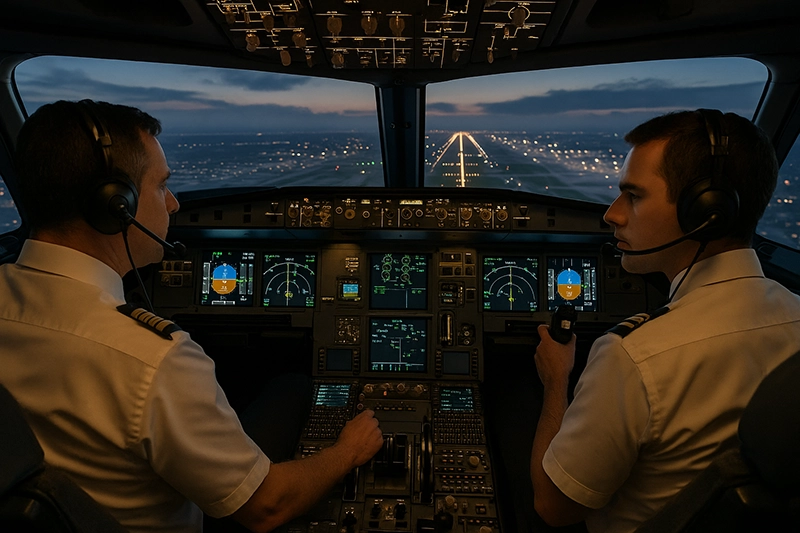
Simulator training in busy airspace is an essential tool for pilots and instructors preparing for the complexity of modern terminal operations. Busy airspace concentrates high traffic density, frequent ATC interactions, complex arrival and departure procedures, and variable weather, all of which place demands on pilot workload, communication, and decision-making. A well-structured simulator program lets crews rehearse those demands in a controlled environment where mistakes become learning opportunities rather than safety incidents.
This article explains how to design and use simulator training specifically for busy airspace scenarios, what pilots should expect from simulator sessions, the operational skills that translate directly to the cockpit, and common mistakes instructors and students make. The practical value is immediate: better situational awareness, improved ATC communications, smoother cockpit resource management, and safer handling of non-normal events that occur while traffic density is high.
What Simulator Training in Busy Airspace Means
Simulator training focused on busy airspace recreates the traffic, procedures, and dynamic environment pilots face around large airports and congested corridors. This includes simultaneous arrivals and departures, complex standard instrument arrivals and departures, step-down altitudes, speed control, holding patterns, frequency changes, reroutes, and coordination with approach and departure control. The goal is to practice decision-making under time pressure, refine procedural flying, and build communication discipline.
Simulators used for this work range from desktop procedural trainers and fixed base trainers up to full flight simulators. Each device type has strengths and limits. The important design principle is fidelity where it matters: accurate ATC flow, realistic traffic behavior, and systems and performance responses that reflect how the real aircraft behaves in high-workload phases of flight.
Why This Matters in Real-World Aviation
Busy airspace amplifies the consequences of small errors. A misread restriction, a slow frequency change, or an imprecise speed can create conflicts or generate go-arounds. For single-pilot operations, the workload spike can overwhelm available capacity. For multi-crew operations, poor crew coordination or inconsistent task-sharing can degrade safety margins.
Simulator work addresses these risks by allowing teams to rehearse layered tasks: flying a precise path, monitoring traffic, communicating succinctly with ATC, and managing automation. These sessions reinforce habits that reduce distractions and prevent errors when operations are live. For flight instructors and training managers, the simulator provides a repeatable environment for assessing a pilot's ability to manage workload, prioritize tasks, and follow published procedures under pressure.
How Pilots Should Understand This Topic
Pilots often think of simulator training as an exercise in handling emergencies or practicing rare failures. For busy airspace, however, the highest training value is rehearsal of routine complexity: frequency changes, speed adjustments, lateral and vertical navigation discipline, and timely briefings. Pilots should approach a simulator session with defined learning objectives focused on decision-making, procedure compliance, and communication clarity rather than only on technical flying skills.
Understanding the limits of simulation fidelity is also crucial. Some devices accurately model avionics and flight dynamics, while others provide an abstracted approximation of traffic and ATC behavior. Before a session, review the simulator capability so you know which tasks will be realistic and which will be representational. Use high-fidelity elements to practice cross-checking automation, and use the representational parts to rehearse phraseology and sequencing.
Designing Effective Busy Airspace Scenarios
Scenario design is the heart of useful simulator training. Effective scenarios model complexity progressively, layer realistic traffic flows, and add common disruptions that force decision-making. Start with controlled variations of normal operations and gradually introduce complicating factors such as changing clearances, nearby traffic conflicts, partial automation failures, or deteriorating weather visibility.
Key elements to include in scenario design are specific and measurable: initial conditions, traffic density, expected clearances, timing of frequency handoffs, and objective performance markers such as adherence to crossing altitudes, stabilized approaches, or correct readbacks. For multi-crew training, distribute roles and craft events that test crew resource management including delegation, challenge-response, and mutual cross-checking.
Instructor and Training Manager Responsibilities
Instructors should clearly define learning objectives before the student enters the simulator. Objectives might be as narrow as executing continuous descent final approaches within given speed bands, or as broad as improving time management and prioritization while handling complex ATC routings. During the session, instructors need to manage scenario pacing to prevent artificial overload and to ensure students have opportunities to demonstrate recovery and corrective actions.
Training managers must match scenario complexity to device capability. They also need to document outcomes, identify recurrent training gaps, and tailor follow-up sessions. Objective performance criteria and structured debriefs help convert simulator events into long-term operational improvements.
Common Mistakes and Misunderstandings
One common mistake is treating simulator sessions as entertainment rather than focused training. Running random failures or excessive traffic without clear objectives reduces learning carryover. Another is assuming all simulators are equal. A procedural trainer may provide excellent practice for radios and checklists but will not replicate motion cues or exact aircraft handling. Training that over-relies on automation without requiring manual reversion can leave pilots underprepared for manual flight demands in dense traffic environments.
Misunderstandings about communication are frequent. Pilots sometimes use conversational or incomplete phraseology in the simulator. While it may seem efficient, inconsistent phraseology can lead to misinterpretation in live operations. Practicing crisp, standard readbacks and acknowledgement patterns translates directly to safer operations when real traffic density increases.
There is also a behavioral risk: pilots who become too comfortable with simulator crutches may not appreciate the sensory and visual differences in the real world. Simulators often cannot reproduce startle effects, real-world visual cues, or the precise feel of aircraft near operational limits. Training should intentionally bridge that gap by emphasizing monitoring, cross-checks, and conservative margins when transitioning to live flights.
Practical Example: Arrival into a Busy Terminal with a Sudden Reroute
Scenario outline: A commercial single-pilot or two-pilot crew practices a vector-to-final arrival into a busy terminal. The crew begins established on an arrival with assigned crossing altitudes and speed restrictions. Midway through the approach, ATC issues an immediate reroute to a different arrival due to runway changes, while traffic spacing behind tightens and a short-lived instrument meteorological condition reduces visibility.
Training objectives: manage the reroute while maintaining speed and altitude discipline, communicate clearly with ATC, execute a stable approach or initiate a safe go-around if unstable, and manage time-critical tasks without dropping essential monitoring tasks such as terrain awareness and traffic scanning.
What to observe: Did the pilot or crew request clarifying information promptly? Were readbacks complete and unambiguous? How well did the crew prioritize tasks during the reroute? Were checklist items deferred without compromising safety? How smoothly did the crew transition from automated flight modes to manual control if required?
Debrief focus: Break down the timeline and highlight decision points. Discuss alternate strategies that would have reduced workload, such as requesting a holding instruction to buy time, declaring inability to accept the reroute if the approach would be unstable, or seeking traffic advisories. Reinforce specific phraseology and callouts that helped maintain shared situational awareness.
Best Practices for Pilots
Well-designed simulator work produces habits that carry over into the cockpit. The following best practices reflect operational priorities rather than a checklist mentality.
- Define focused objectives for every session. Know whether the goal is communication discipline, automation management, manual flying, or workload prioritization.
- Practice standard phraseology and timely readbacks. Include radio failures and alternative communication strategies as part of the training progression.
- Balance automation and manual flying. Train pilots to manage automation while staying prepared to revert to manual flight when required by traffic or system limitations.
- Use layered complexity. Start with correct procedural execution, then add traffic, then disruptions. This yields better retention and avoids artificial overload.
- Debrief with objective metrics. Use recorded flights to review time-on-task, radio exchanges, and deviations from clearances. Convert observations into specific, actionable coaching points.
- Teach recovery and mitigation strategies. Practicing go-arounds, missed approaches, and safe reroutes under traffic pressure improves confidence and reduces hesitation in real operations.
Translating Simulator Skills to Flight Deck Performance
Transfer of training depends on deliberate practice. Skills that consistently translate are communication clarity, checklist discipline, procedural memorization, callouts, and crew coordination. To improve transfer, pair simulator sessions with brief in-aircraft flights that focus on the same objectives, even if at lower complexity, so crews can experience the sensory and visual cues missing in simulation.
Another important factor is repetition with variation. Practicing the same arrival multiple times with small changes in traffic or weather builds adaptable mental models rather than rote responses. Encourage reflective learning by having students self-assess what cues triggered their decisions and how they might recognize earlier opportunities to reduce workload.
Human Factors, Stress, and Startle Management
Busy airspace increases cognitive load and susceptibility to startle when unexpected events occur. Simulation can safely expose pilots to stressors while coaching techniques that preserve decision quality: controlled breathing, task triage, prioritization of flying first then troubleshooting, and effective delegation in multi-crew environments.
Training should incorporate scenarios that reveal common human factor errors such as confirmation bias, plan continuation bias, and fixation on nonessential tasks. Facilitated debriefs should surface these behaviors and teach concrete strategies to avoid them. For example, creating short, repeatable callouts that re-establish priorities during high workload moments helps reset attention and reduces the risk of missed critical changes.
Common Regulatory and Technical Considerations
Simulator-based training often supports currency, proficiency checks, and type-specific maneuvers within approved training programs. The specifics of what counts for regulatory credit depend on the training authority and the qualification of the simulator device. Training designers should match scenario goals to device capability and to any applicable requirements for official training or checks.
Because regulations and simulator qualification standards can vary, avoid assuming that any particular simulator session will meet regulatory requirements without confirmation. Training departments should coordinate with their approvals office or designated examiner to ensure that sessions intended for credit meet the correct device and syllabus standards.
Common Mistakes or Misunderstandings
Repeating a short list of pitfalls helps trainers and learners avoid recurring issues. Common misunderstandings include overestimating simulator fidelity, neglecting basic airmanship when relying on automation, failing to set clear objectives, and insufficiently structured debriefs. Another common error is not tailoring difficulty to the trainee’s skill level. If scenarios are either too easy or too chaotic, learning is reduced.
For multi-crew environments, instructors sometimes overlook the need to rehearse inter-crew communications and role transitions specifically for high-traffic phases. Those interactions are as important as handling the aircraft and deserve explicit practice time.
Practical Session Planning Template
Although this article avoids checklist-style instructions, a clear session flow helps create valuable outcomes. Consider this high-level template when planning a busy airspace session: establish objectives, brief the scenario and device limitations, run the exercise with controlled escalation of complexity, and debrief focusing on decision points and measurable outcomes. This structure keeps the session purposeful and ensures each run produces identifiable improvements.
Frequently Asked Questions
How often should pilots train in simulators for busy airspace skills?
Frequency depends on operational exposure. Pilots who routinely operate into complex terminals will benefit from regular simulator practice, perhaps quarterly or during recurrent training cycles, while less frequent operators can schedule targeted sessions before city trips. Align training frequency with operational risk and recent performance gaps revealed in checkrides or line observations.
Can procedural trainers adequately prepare pilots for real busy airspace?
Procedural trainers are excellent for phraseology, checklist flows, and familiarization with approach plates. They prepare pilots for the cognitive and communication aspects of busy airspace. However, they typically lack full flight dynamics and motion cues, so combine procedural practice with higher-fidelity sessions or supervised line experience to ensure manual handling and visual cue recognition are addressed.
What are the most valuable skills to practice in a busy-airspace simulator session?
Prioritized skills include clear and complete radio communication, strict compliance with crossing altitudes and speed restrictions, automation management and mode awareness, timely frequency handoffs, go-around and missed approach execution, and effective crew resource management. Practicing these skills under traffic pressure yields the highest operational payoff.
How should instructors debrief simulator sessions to maximize learning?
Debriefs should be objective, timely, and structured. Start with the trainee's self-assessment, then review critical decision points and compare actions to the training objectives. Use playback where available, highlight positive behaviors, and end with 2 to 3 actionable improvement points that can be practiced in the next session.
Is it safe to introduce system failures during busy airspace scenarios?
Introducing failures is useful if done incrementally and with clear learning goals. Start with minor anomalies that require procedural responses and escalate only when trainees demonstrate competence. Failures in high-pressure scenarios can produce startle responses; instructors should be prepared to pause and coach rather than letting the session devolve into confusion.
Implementation Tips for Flight Schools and Operators
Flight schools and operators should align simulator content with local operational exposures. Map common terminal procedures and typical disruption patterns into the simulator syllabus. Collect operational data and crew feedback to tailor scenarios. Train instructors in scenario design and debrief techniques so that sessions are efficient and evidence-based.
Additionally, prioritize instructor continuity. A consistent instructor who understands an individual student's gaps can design progressive learning sequences that build competence more efficiently than ad-hoc practice sessions.
Key Takeaways
- Practical takeaway: Use simulator sessions to rehearse decision-making, communication, and procedural discipline for busy airspace rather than only rare emergencies.
- Safety takeaway: Practice automation management and conservative margins in simulation so pilots can safely handle workload spikes and unexpected reroutes in live operations.
- Training takeaway: Structure scenarios with clear objectives, controlled escalation, and objective debriefs to maximize skill transfer to the flight deck.
Simulator training for busy airspace is not a magic fix. It requires thoughtful design, honest assessment of device capability, and disciplined debrief practices to produce lasting improvements. When used correctly, however, it is among the most efficient ways to prepare pilots for the real demands of complex terminal operations, improve safety margins, and build confidence in high-workload environments.
For instructors and training managers, the immediate action is to review current simulator syllabi and ask whether sessions target the cognitive and operational bottlenecks pilots face in busy airspace. For individual pilots, seek sessions with clear objectives, practice standardized phraseology, and request measured escalation so you build capability without creating unrealistic dependency on simulator quirks.