Simulator training for general aviation is one of the most effective tools pilots can use to build skill, manage risk, and practice rare or dangerous scenarios without leaving the ground. Whether you are a student pilot, a certified flight instructor, a private pilot seeking proficiency, or an operator managing a small fleet, deliberate work in a simulator sharpens judgment, procedures, and aircraft control.
This guide explains how simulator training works in practical terms, what pilots should expect, what it cannot replace, and how to get the most value from sessions. The primary keyword appears early to match search intent and guide readers looking specifically for simulator training for general aviation. Read on for operational advice, training design, common mistakes, and a realistic scenario you can use with an instructor or training device.
What Simulator Training Means for General Aviation
At its simplest, simulator training is purposeful flight instruction delivered with a device that reproduces cockpit controls, instruments, systems, and the flight environment. Devices range from desktop-based visual trainers to full-motion systems used by airlines. For general aviation pilots, the most common options are desktop simulators, instrument procedure trainers, and flight training devices that physically replicate cockpit panels and controls.
Simulator training focuses on three main objectives. The first is procedural proficiency. Simulators allow repeated practice of checklists, instrument approaches, emergency flows, and system troubleshooting. The second objective is risk management. Pilots can rehearse engine failures, electrical malfunctions, or instrument failures in a safe setting. The third is decision-making. High-quality scenario-based training in a simulator helps pilots refine aeronautical judgment under pressure.
Why This Matters in Real-World Aviation
Flight time in an aircraft is expensive and carries inherent risk. Simulators let pilots organize training that would be costly or unsafe to perform in the airplane. For example, practicing stalls, unusual attitudes, partial panel work, or high-density-traffic instrument procedures is far easier and safer in a simulator. That practical training translates to better command of the airplane, fewer surprises, and more confidence when facing in-flight abnormalities.
Simulator sessions also support recurrent training and proficiency. Many safety events in general aviation stem from loss of control, spatial disorientation, poor energy management on approach, or mishandled instrument conditions. Focused simulator scenarios that rehearse recognition and recovery increase the probability a pilot will respond correctly in a real emergency.
How Pilots Should Understand Simulator Training
Pilots should treat simulator training as a specific training modality with its own strengths and limits. The simulator is excellent for practicing procedures, refining scan and instrument crosschecks, rehearsing non-normal checklists, and building mental models for aerodynamics and systems. It is less helpful for teaching how an aircraft feels in turbulence, how a specific airframe responds to control inputs at a given weight and balance, or for validating aircraft-specific climb or cruise performance in real atmospheric conditions.
When planning simulator work, clearly define measurable objectives. Rather than saying simply I will use the simulator, state goals such as improve ILS intercept and tracking, practice partial-panel approach procedures, or rehearse a simulated engine failure after takeoff with a focus on pilot workload distribution. Measurable objectives let you evaluate training outcomes and iterate on future sessions.
Types of Simulators and Training Devices
General aviation pilots use a range of devices. Understand the practical differences so you can choose the right tool for your training goals.
Desktop and software-based simulators deliver useful instrument scan practice and procedure rehearsal. They are affordable and accessible. Desktop devices are excellent for learning avionics, navigation procedures, and initial instrument orientation. Their limitations include simplified flight dynamics and limited cockpit fidelity.
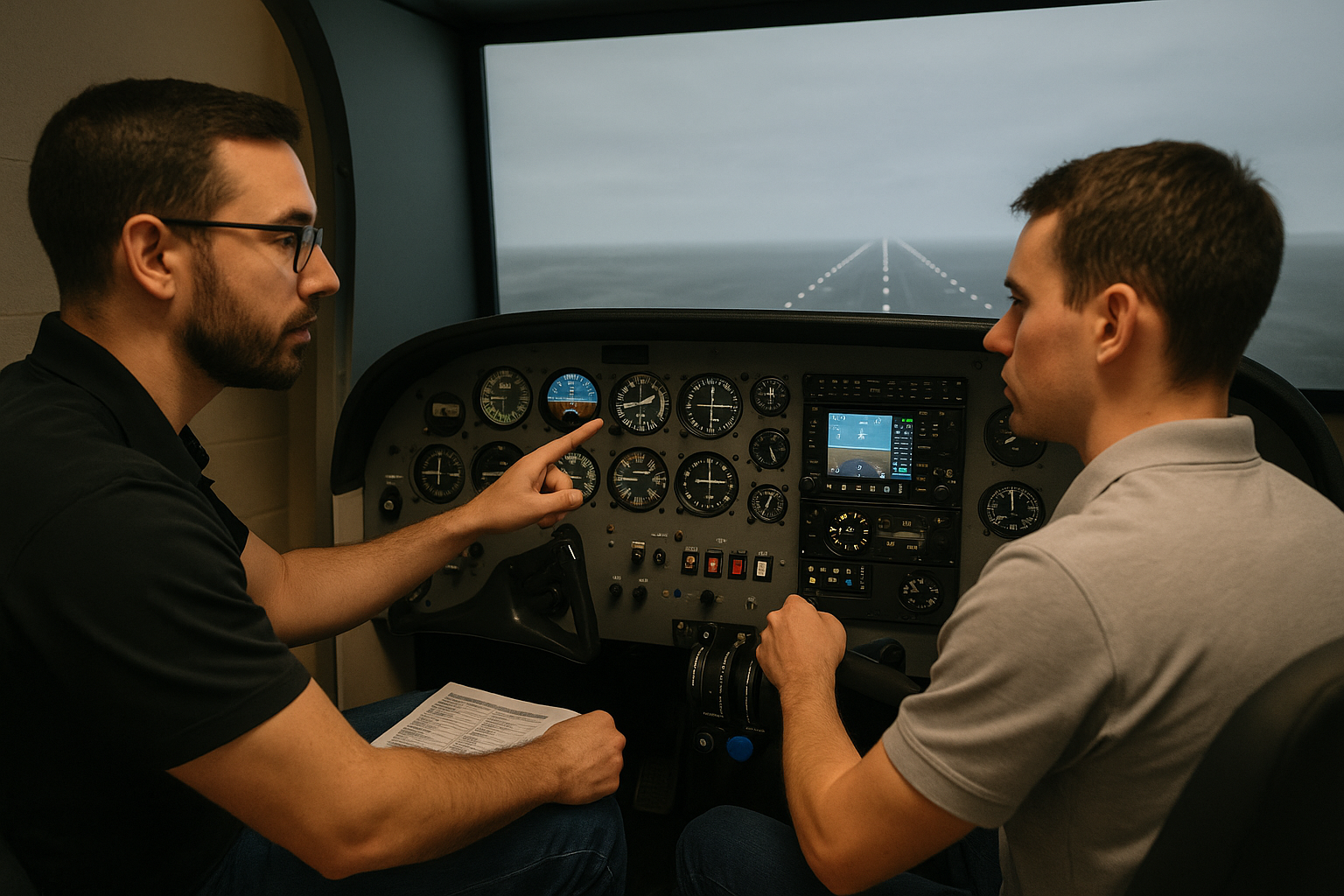
Flight training devices that include hardware panels, flight controls, and better visual systems improve tactile fidelity. They provide a more realistic environment for hand-flying, trim management, and cockpit coordination. These devices are valuable for simulating cockpit flows and practicing crew resource management in dual instruction settings.
Full-motion simulators increase sensory realism, which helps for motion-related training such as spatial disorientation exercises. For most general aviation pilots, full-motion devices are rare and expensive. Evaluate whether motion adds measurable value for your specific training objectives before pursuing this option.
Designing Effective Simulator Scenarios
High-quality simulator training rests on scenario design. A good scenario presents a plausible operational challenge, has clear learning objectives, and ends with a structured debrief. Keep scenarios realistic and targeted. Use scenarios that reflect the flying you do. If you fly mostly single-engine piston airplanes in weather-prone regions, prioritize partial-panel work, instrument approach transitions, and weather decision scenarios.
Start sessions with a short briefing that explains objectives, the conditions you will set, and what success looks like. During the scenario, introduce distractions and time-critical tasks to replicate workload. After the flight, conduct a focused debrief covering decision points, control technique, checklist use, and communication. Use recordings or logs when possible to provide objective feedback.
Practical Limitations and Safety Considerations
No simulator can perfectly replicate every variable of real flight. Be cautious about over-reliance on simulated instrument indications for exact aircraft behavior. Some simulators use simplified aerodynamic models that may not reproduce subtle stall buffet, control harmony changes, or propeller effects. Recognize those limits and avoid drawing exact performance conclusions from a simulator alone.
Simulators are also limited in representing tactile and environmental cues such as vibration, cabin noises, and real-world cockpit ergonomics in some devices. When training procedures that rely on those cues, combine simulator practice with in-aircraft time or supervised flights to validate skills.
How to Integrate Simulator Training with Flight Training
A balanced training plan mixes simulator practice with live flying. Use the simulator for systems learning, cockpit flows, instrument scan proficiency, and emergency procedure rehearsal. Use aircraft time for sensory training, pattern work, takeoffs, landings, and handling the airplane in the real atmosphere. When possible, sequence training so simulator sessions prepare you for a safe and efficient flight in the aircraft that follows. For example, rehearse a difficult instrument approach in the simulator, then perform the approach in the airplane under instructor supervision when conditions and regulations allow.
When working with a Certified Flight Instructor, align simulator objectives with the next aircraft lesson. Instructors can structure practice so that simulator repetition reduces the time needed in the airplane for maneuvers that are primarily procedural.
Common Mistakes or Misunderstandings
Pilots and instructors sometimes make predictable errors when using simulators. Recognizing these pitfalls improves training effectiveness.
One common mistake is using the simulator as an entertaining diversion rather than a deliberate training tool. Scenarios should be purposeful and measured. Random flying in a simulator rarely produces lasting improvement in decision-making or technique.
Another misunderstanding is assuming simulator handling equals aircraft handling. While simulators teach procedure and instrument scanning well, the physical feel of flight and the nuances of a specific airframe require actual aircraft experience. Overgeneralizing simulated control responses to real flight can lead to poor handling expectations.
Pilots may also neglect realistic task loading. Training that eliminates realistic cockpit workload by pausing the simulation during critical phases erodes the stress inoculation benefit. Avoid excessive pausing except when needed for corrective instruction. The aim is to practice coping with time pressure and task saturation in a controlled environment.
Practical Example: Engine Failure After Takeoff
Use this realistic scenario when training in a flight training device or with a desktop simulator and a qualified instructor. The objective is to build split-second decision-making and crew coordination when a single-engine piston aircraft experiences an engine failure shortly after takeoff.
Briefing. Set the aircraft near maximum gross weight, runway length representative of local airports, and light turbulence. Program a failure to occur at about 300 feet AGL soon after liftoff. Specify available options you expect the pilot to consider: return to the field, land straight ahead, or manage a forced landing to a nearby clear area. Establish communication expectations with air traffic if applicable.
Scenario. After takeoff and positive rate, reduce power slightly for climb. At 300 feet AGL, simulate a sudden loss of power. Require the pilot to identify the condition, maintain aircraft control, and decide on the best landing option. The instructor should introduce realistic distractions such as a failing radio or a passenger requiring attention.
Debrief. Review control inputs, airspeed management, flap and mixture configuration, checklist usage, and communication. Discuss the pilot's decision logic for selecting the landing site. Focus on energy management, altitude preservation, and handling the aircraft with asymmetric thrust if applicable. Repeat the scenario with variations to practice alternate decision paths.
Best Practices for Pilots
Approach simulator training with professionalism and structure. Effective habits include:
- Define clear, measurable objectives for each session.
- Use scenario-based training that reflects your typical missions.
- Allow for realistic task saturation to practice workload management.
- Debrief with focused feedback and, when possible, objective recordings.
- Combine simulator practice with aircraft time for sensory validation of skills.
- Work with an instructor who understands both the device and the airplane used in operations.
How Instructors Should Design Sessions
Flight instructors must balance pedagogical technique with device limitations. Start by selecting a device appropriate to learning outcomes. If your goal is avionics proficiency with a glass cockpit, a high-fidelity cockpit trainer that mirrors the avionics suite is essential. For general instrument scan practice, a visually simple trainer may suffice.
Create scenarios that escalate in complexity. Begin with single-task scenarios targeting one skill, then combine tasks into integrated scenarios that stress decision-making. Use a mixture of expected and unexpected events. Always include a structured debrief that focuses on observable behaviors, decisions, and techniques rather than subjective impressions.
Assessing Training Effectiveness
Measure progress by comparing objective performance against the session objectives. Useful metrics include task completion times, adherence to procedures, stabilized approach parameters, and error rates on checklists. Maintain a training log that records scenario parameters and outcomes. Over time, trends in the log reveal skill improvements or persistent weaknesses that require additional focus.
Cost and Accessibility Considerations
Simulator options range widely in cost. Desktop solutions offer inexpensive access for regular practice. Higher fidelity devices cost more but provide better tactile fidelity and thus faster transfer to the airplane. Consider the value of time saved in the aircraft, the frequency of training needed, and the training goals when selecting a device. Group training or shared device access at a flight school can reduce per-pilot cost while maintaining high-quality instruction.
Many community flight schools and training centers provide simulator time at competitive rates. Evaluate the device in person when possible and ask the facility about instructor experience and scenario design support.
Common Questions Pilots Ask
Can simulator time replace in-aircraft flight time?
Simulator time is a powerful supplement but not a wholesale replacement for aircraft flight time. Use simulators for procedures, emergency rehearsals, and instrument scan practice. Reserve aircraft time for sensory cues, landings, takeoffs, and final checks that depend on real-world aerodynamics and environment.
How often should I use a simulator to stay proficient?
Frequency depends on your flying activity and risk exposure. For instrument-rated pilots who fly regularly in IMC or on approaches, monthly or bi-monthly simulator practice focused on approaches and unusual attitudes is beneficial. Private pilots who fly less frequently may benefit from a simulator session before seasonal changes or complex cross-country flights. Tailor frequency to your personal proficiency goals.
What should I look for in a simulator facility or device?
Choose a facility that matches your training needs. Look for devices that replicate your avionics, realistic cockpit ergonomics, and instructors experienced with the device and aircraft type. Verify that the facility offers structured scenarios and debrief tools such as video or flight data logs.
Will practicing emergencies in a simulator make me complacent?
No. Practicing emergencies in a simulator builds recognition, procedure discipline, and confidence. It reduces the chance of panic and increases the likelihood of an organized response in real flight. The risk is overconfidence in simulated outcomes. Balance simulator practice with aircraft experience and maintain respect for real-world variables.
Frequently Asked Questions
Can I log simulator time as flight time?
Logging simulator time depends on regulatory rules and the type of device. Since regulations and acceptance differ by jurisdiction and device type, confirm current rules with your regulatory authority or instructor before logging simulator time for certificates, ratings, or currency.
Is simulator training effective for single-pilot operation in IMC?
Yes. Simulator training helps single pilots practice instrument scan discipline, approach procedures, avionics management, and workload prioritization. Work on scenario-based tasks that replicate single-pilot workload, including communication, navigation, and automation management.
How can I simulate realistic distractions during training?
Introduce distractions such as multiple radio calls, passenger concerns, unexpected system warnings, or navigational anomalies. The instructor should manage timing to create realistic task loads without creating unsafe conditions. The goal is to practice attention management, task prioritization, and communication while maintaining aircraft control.
Should I record simulator sessions for debrief?
Yes. Recordings of instrument displays, audio, and instructor commentary create objective material for debriefs. Replay specific moments to analyze scan patterns, command phrasing, and error management. Objective recordings accelerate learning and help create a corrective action plan.
Key Takeaways
- Practical takeaway: Use simulator training to rehearse procedures and decision-making before applying them in the airplane.
- Safety takeaway: Simulators let you practice dangerous or rare emergencies safely, increasing the chance of correct responses in real flight.
- Training takeaway: Combine simulator practice with in-aircraft validation and use scenario-based training with clear objectives and debriefs.
Simulator training for general aviation is a versatile, cost-effective, and safety-oriented tool when used deliberately. It enhances procedural knowledge, improves instrument scan and control technique, and strengthens aeronautical decision-making. Adopt a structured approach, align device selection with your objectives, and work with qualified instructors to translate simulator gains into safer and more competent real-world flying.