
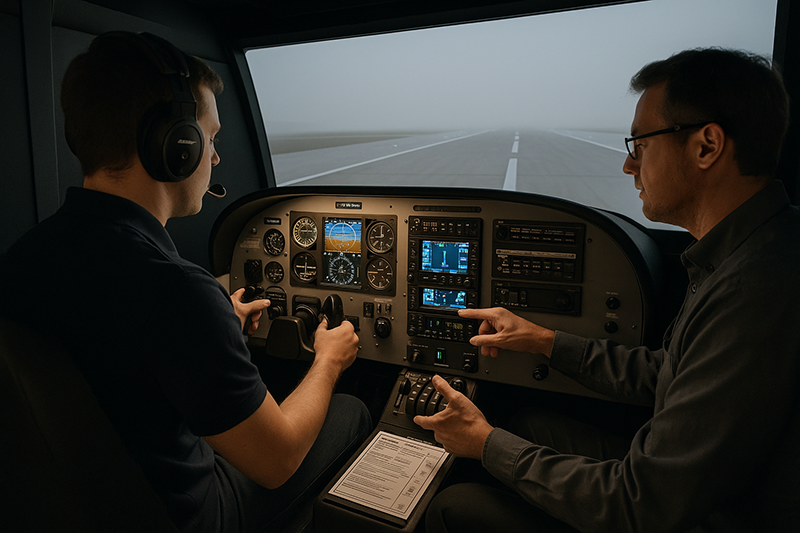
Using flight simulation effectively is one of the most valuable skills a modern pilot can develop, whether the tool is a desktop trainer at home, an approved aviation training device at a flight school, or a full-motion simulator in a professional training environment. Simulation can make training more efficient, safer, and more deliberate, but only when pilots use it with clear objectives and an honest understanding of its limitations.
For student pilots, flight instructors, instrument students, recurrent trainees, and aviation professionals, a simulator is not just a way to practice procedures when the weather is poor. It is a controlled learning environment where errors can be paused, repeated, analyzed, and corrected. The challenge is that simulation can also create false confidence if pilots treat it like entertainment, ignore real-world aircraft limitations, or practice habits that would not hold up in the airplane. This article explains how to use flight simulation as a serious aviation training tool while keeping the focus on judgment, proficiency, and transfer of learning to actual flight.
What Effective Flight Simulation Really Means
Effective flight simulation is not measured by how realistic the graphics look or how many monitors surround the pilot. The better question is whether the session improves a real aviation skill. A useful simulation session has a defined objective, an appropriate level of realism for that objective, a method for correcting errors, and a connection to real aircraft procedures.
For example, a pilot practicing an instrument approach in a simulator should not simply fly the approach several times and hope that repetition builds proficiency. A better session would begin with a briefing: the procedure to be flown, the expected aircraft configuration, the avionics setup, the missed approach instructions, the weather scenario, and the specific skill being evaluated. That skill might be intercepting and tracking a course, managing vertical guidance, briefing the missed approach, maintaining altitude during a workload spike, or recognizing when the approach has become unstable.
Simulation works best when it isolates a skill that would be difficult, expensive, unsafe, or inefficient to repeat in the airplane. A flight instructor can create a vacuum system failure, a partial-panel instrument scan, a rapid weather deterioration scenario, or an avionics programming mistake without placing the aircraft in actual risk. A student can repeat the same radio call, checklist flow, approach setup, or abnormal procedure until the basic mental pattern becomes reliable. This controlled repetition is one of the greatest advantages of simulation.
At the same time, simulation is not a perfect substitute for flying. A desktop simulator may teach avionics sequencing and instrument scan, but it may not reproduce seat-of-the-pants sensations, control pressures, peripheral cues, turbulence, radio congestion, cockpit heat, aircraft vibration, or the stress of actual consequences. Even advanced devices have boundaries. The most professional approach is to use simulation for what it does well and then deliberately connect that learning to aircraft operations.
Why This Matters in Real-World Aviation
Real-world aviation demands more than the ability to move controls. Pilots must manage time pressure, workload, changing weather, airspace, aircraft configuration, navigation, communication, and decision-making. Flight simulation gives pilots a place to practice those interactions without waiting for the perfect training day.
In primary training, simulation can help a student understand cockpit flows, checklist discipline, airport orientation, basic navigation, and radio phraseology before entering the aircraft. This can make aircraft lessons more productive because less time is spent on the first exposure to cockpit layout or procedure sequence. The airplane still teaches the feel of takeoff, landing, trim, energy management, and sight picture, but the simulator can reduce cognitive overload by making some tasks familiar in advance.
In instrument training, simulation is especially useful because many instrument skills are procedural and cognitive. Holding entries, approach briefings, avionics setup, course intercepts, missed approach procedures, and workload management can all be practiced in a repeatable way. A pilot can pause after an error and ask why it happened: Was the approach not briefed correctly? Was the navigation source wrong? Was the autopilot mode misunderstood? Was the descent started too late? These questions are often easier to answer in a simulator than in a busy cockpit during actual flight.
For experienced pilots, simulation supports recurrent training and risk management. A pilot who has not flown at night recently can rehearse departure procedures, cockpit lighting management, and instrument cross-check. A technically advanced aircraft pilot can practice avionics failures or mode awareness. A commercial operator can use simulation to reinforce crew coordination, abnormal procedures, and standard operating procedures, subject to the operator's training program and device approvals.
Simulation also matters because aviation errors often begin before the aircraft is in danger. They begin with a misunderstood clearance, a rushed checklist, a weak weather decision, an unbriefed missed approach, or an assumption about the automation. These are exactly the kinds of threats that can be built into scenario-based simulation.
How Pilots Should Understand Flight Simulation
Pilots should think of flight simulation as a training environment, not a replacement airplane. The difference matters. In an airplane, the pilot must operate the aircraft in real atmospheric conditions with real systems, real consequences, and physical sensations. In a simulator, the pilot can focus on specific tasks, repeat them, and receive structured feedback. Both environments are valuable, but they teach different parts of the overall skill set.
A useful way to understand simulation is to divide training into three areas: procedures, perception, and judgment. Procedures include checklist flows, avionics setup, instrument approach briefings, callouts, and emergency memory items when applicable to the aircraft and training program. Simulation is often excellent for procedural training because procedures can be repeated precisely.
Perception includes the physical and visual cues pilots use to control the aircraft. This includes runway sight picture, flare judgment, wind correction, control feel, trim feedback, vibration, acceleration, deceleration, and peripheral motion. Some simulators can represent these cues better than others, but no pilot should assume a simulator perfectly teaches the feel of an aircraft unless the training device and curriculum are specifically designed and approved for that purpose.
Judgment includes decision-making, risk assessment, prioritization, and recognizing when to change the plan. Simulation can be very strong here if the scenario is designed well. A simulated cross-country flight can include lowering ceilings, a passenger distraction, a fuel planning question, or an unexpected runway closure. The objective is not to trick the pilot. The objective is to give the pilot practice recognizing risk early and making a disciplined decision before the situation becomes urgent.
Another important distinction is between logging time and learning from time. Some approved flight simulation devices may be used toward certain training, experience, or currency requirements when the device, instructor, scenario, and recordkeeping meet applicable requirements. A home simulator or unapproved setup may still be educational, but pilots should not assume that all simulator activity is loggable or creditable. The training value can be high even when regulatory credit is not available, but the two concepts should not be confused.
Matching the Simulator to the Training Objective
The most effective simulator is the one that matches the lesson objective. A high-end device is not always necessary, and a simple desktop setup can be valuable if used properly. Conversely, an expensive simulator can be wasted if the session lacks structure or feedback.
For a student pilot preparing for the first few lessons, a simple simulator can help with cockpit orientation, taxiway awareness, traffic pattern visualization, and basic radio rehearsal. It should not be used to teach landing feel as if it were the airplane. If the student develops a habit of staring at instruments in the traffic pattern or overcontrolling based on unrealistic joystick feedback, the simulator may slow progress rather than help it.
For instrument students, the priorities are different. A simulator with accurate navigation data, realistic avionics behavior, and reliable instrument presentation may be more valuable than highly detailed exterior scenery. The goal is to practice instrument scan, procedure sequencing, approach setup, altitude discipline, missed approach execution, and workload management. If the simulator's avionics do not behave like the aircraft's avionics, the instructor should address that difference clearly so the pilot does not transfer incorrect buttonology into the airplane.
For technically advanced aircraft, avionics training may be one of the best uses of simulation. Modern flight decks can reduce workload when used correctly and increase confusion when misunderstood. Pilots should practice mode selection, navigation source changes, autopilot engagement and disengagement, flight director interpretation, and reversionary procedures using training resources that accurately reflect the equipment in the aircraft. If the simulator is generic, pilots should avoid memorizing switch positions or button sequences that do not apply to their aircraft.
For professional and crew environments, simulation supports standardization. Crews can practice briefings, callouts, rejected takeoff decision-making, non-normal procedures, approach gates, and workload distribution. The value is not only in manipulating the simulator. It is in building shared expectations, communication habits, and disciplined procedure use.
Designing a Productive Simulation Session
A productive simulation session begins before the simulator starts moving, even if the device is a desktop computer. Pilots and instructors should decide what the session is meant to improve. A vague goal such as “practice approaches” is less useful than “fly two nonprecision approaches with correct briefings, stable configuration, timely descent planning, and a properly executed missed approach.”
The session should include a pre-brief, the simulation event, and a debrief. The pre-brief establishes the aircraft configuration, weather, airport, route, performance assumptions, automation use, and success criteria. The simulation event should be flown as seriously as an aircraft lesson. That means using checklists, making realistic radio calls when appropriate, setting up navigation equipment correctly, and applying the same cockpit discipline expected in flight.
The debrief is where much of the learning happens. A pilot should not leave a session with only a general impression that it went well or poorly. The debrief should identify what improved, what broke down, and what to practice next. If the pilot became task saturated during an approach, the instructor might trace the problem back to a weak approach briefing, late descent planning, poor trim habits, or confusion about automation modes. The solution should be specific.
Repetition is useful, but only if the pilot repeats the corrected technique. Repeating a flawed scan, a late checklist, or an unstable approach profile can make bad habits more durable. When an error occurs in simulation, one of the advantages is that the event can be reset. The pilot can return to the point just before the error, brief the correct action, and practice again with a better mental model.
Using Simulation for Instrument Proficiency
Instrument flying is one of the strongest use cases for flight simulation because it depends heavily on procedures, instrument interpretation, mental discipline, and workload management. A simulator can quickly place the pilot on vectors to final, in a hold, at the initial approach fix, or in a missed approach. This saves time and allows focused repetition.
However, effective instrument simulation should not become mechanical. The pilot should brief the approach, verify navigation sources, identify altitude restrictions, review the missed approach, and consider weather and alternate planning when relevant to the scenario. Flying the magenta line without understanding the procedure is not instrument proficiency. It is automation following.
Simulation can also be helpful for partial-panel training, unusual attitude recovery by reference to instruments, and automation management. The instructor can introduce failures, distractions, and workload changes at carefully selected times. The purpose is to build resilience, not surprise the pilot for entertainment. A well-designed scenario gives the pilot enough challenge to expose weaknesses while still allowing learning and recovery.
Pilots should also practice hand-flying and automation use deliberately. In many modern aircraft, both skills matter. A pilot who never uses automation in training may be unprepared to manage it efficiently in actual instrument conditions. A pilot who relies on automation without understanding modes, limitations, and raw data cross-check may be vulnerable when the system behaves differently than expected. Simulation is an ideal environment to practice both ends of that spectrum.
Using Simulation for VFR Skills and Decision-Making
Visual flight rules training can benefit from simulation, but pilots must be selective about what they expect the simulator to teach. A simulator can help with preflight planning, route familiarization, airspace review, traffic pattern geometry, diversion planning, and radio communication practice. It can also support scenario-based decision-making, such as encountering lowering visibility, stronger-than-forecast winds, or a passenger who is pressuring the pilot to continue.
The simulator is less reliable for teaching the physical feel of landing, the exact flare sight picture, or the real effect of gusty crosswinds unless the device is specifically suitable for that training purpose and used within a structured program. Even then, the aircraft remains essential. Pilots should be cautious about developing control habits on a desktop yoke or joystick and assuming those habits will transfer directly to the airplane.
One of the best VFR uses of simulation is rehearsal. Before flying to an unfamiliar airport, a pilot can review the airport layout, surrounding terrain, runway orientation, nearby airspace, and likely arrival path. The pilot can rehearse pattern entries, identify potential hotspots, and consider go-around options. The goal is not to replace proper chart study or current airport information. The goal is to create a mental picture before the workload increases in the airplane.
Common Mistakes or Misunderstandings
The first common mistake is treating simulation time as inherently valuable. Time spent in a simulator is only useful if it builds correct habits. A pilot who spends hours flying unrealistic profiles, ignoring checklists, skipping briefings, or using incorrect procedures may become more comfortable doing the wrong things.
The second mistake is confusing visual realism with training realism. Beautiful scenery may increase immersion, but it does not guarantee accurate aerodynamics, correct avionics logic, reliable weather representation, or meaningful instruction. For some lessons, an accurate procedure trainer with modest visuals may be more valuable than a visually impressive setup with poor systems fidelity.
The third mistake is practicing emergencies without context. Emergency training should be aircraft-specific, procedure-based, and consistent with the appropriate checklist and instructor guidance. A simulator can be excellent for discussing priorities and flows, but pilots should avoid inventing emergency techniques or practicing dramatic scenarios that do not match the aircraft, training objectives, or approved procedures.
The fourth mistake is allowing pause and reset features to weaken decision-making. Pausing is a powerful teaching tool, but the pilot also needs practice managing a scenario in real time. In the aircraft, the pilot cannot freeze the weather, traffic, or descent path. A balanced training plan uses pause for instruction and then repeats the scenario without interruption to build flow and prioritization.
The fifth mistake is failing to debrief. Without a debrief, pilots may remember the outcome but miss the cause. A stable approach may have been stable by luck rather than planning. A missed approach may have succeeded despite a late navigation setup. A radio error may reveal workload saturation. The debrief turns simulator activity into aviation learning.
Practical Example: Turning a Simulator Session Into Real Training
Consider an instrument-rated private pilot preparing for a weekend trip after several months of mostly local VFR flying. The pilot is legal and current only if all applicable requirements are met, but legality alone does not guarantee comfort or proficiency. The pilot schedules a simulator session with an instructor before the trip.
The session begins with a short pre-brief. The scenario is a flight into an unfamiliar airport with marginal visual conditions near the destination. The pilot will fly an arrival, receive vectors for an instrument approach, brief the procedure, configure the avionics, use the autopilot initially, hand-fly the final segment, and execute the published missed approach if the runway environment is not in sight at the appropriate point.
During the first attempt, the pilot loads the approach correctly but forgets to verify the active navigation source before intercepting final. The aircraft begins drifting away from the desired course. In the simulator, the instructor pauses the scenario and asks the pilot to explain what information should have been cross-checked before final approach. They review the flight display indications, navigation source, course guidance, approach mode, and missed approach briefing.
The scenario is reset to a point before intercepting final. This time the pilot verbalizes the approach mode, verifies the correct navigation source, confirms the inbound course, reviews the altitude step-downs, and briefs the missed approach. The approach is more stable, but the pilot becomes busy near minimums and delays the missed approach decision. The instructor debriefs the timing and reinforces that the missed approach should be expected as a normal procedure, not treated as a failure.
On the final repetition, the pilot flies the approach with better anticipation. The missed approach is initiated promptly when required by the scenario. The learning outcome is not simply that the pilot flew an approach. The pilot identified a real weakness, corrected it, repeated the corrected behavior, and connected the lesson to an upcoming flight.
Best Practices for Pilots
The best simulation habits are simple, but they require discipline. Treat the session like aviation training, not casual screen time. Use the correct aircraft checklist when appropriate. Brief procedures before flying them. Fly realistic weather and fuel assumptions. Practice radio calls and cockpit flows. Debrief errors with enough honesty to make the next session better.
Pilots should also separate exploration from training. There is nothing wrong with exploring a new simulator, testing scenery, or learning software features. But that is not the same as structured training. When the goal is proficiency, the session should have clear standards.
- Define one or two training objectives before each session.
- Use aircraft-specific procedures when the simulator accurately supports them.
- Practice realistic briefings, checklists, callouts, and go-around or missed approach decisions.
- Debrief what happened, why it happened, and what will change next time.
- Confirm regulatory credit, logging rules, and device approvals before recording simulator time for a certificate, rating, or currency purpose.
Instructors should resist the temptation to overload every scenario with multiple failures. A focused lesson usually teaches more than a dramatic one. If the objective is approach briefing quality, do not bury the pilot under unrelated malfunctions. If the objective is automation mode awareness, design the session around mode selection, monitoring, and recovery from confusion. Training should be challenging, but it should also be purposeful.
Building Simulation Into a Training Plan
Flight simulation is most effective when it is integrated into a larger training plan. A student might use simulation before an aircraft lesson to preview a maneuver or procedure, then fly the aircraft lesson, then return to simulation to reinforce weak areas. An instrument pilot might alternate aircraft lessons with simulator sessions so that aircraft time is used for weather exposure, aircraft handling, and real cockpit management while simulator time is used for concentrated procedure practice.
A practical training plan should identify which skills belong primarily in the simulator, which skills belong primarily in the aircraft, and which skills benefit from both. For example, approach briefing, navigation setup, and missed approach sequencing may be strong simulator tasks. Landing flare, crosswind control feel, and energy management in the actual aircraft require aircraft time. Scenario-based decision-making can be trained in both environments.
For flight schools and instructors, simulation should not be treated as a filler activity when an aircraft is unavailable. It should have lesson plans, standards, and instructor expectations. Students quickly recognize whether the simulator is part of a serious training system or merely a backup option. When instructors set high standards in the simulator, students are more likely to transfer that discipline to the airplane.
Safety Considerations and Training Transfer
The central safety question is whether simulator learning transfers correctly to flight. Positive transfer occurs when simulator practice improves aircraft performance. Negative transfer occurs when the simulator teaches or reinforces habits that are wrong for the aircraft. Every pilot and instructor should be alert for both.
Negative transfer can occur when a simulator's control sensitivity differs significantly from the aircraft, when avionics are modeled incorrectly, when performance does not match the aircraft, or when the pilot practices procedures without reference to the correct checklist. It can also occur when pilots become comfortable with unrealistic risk-taking because the reset button removes consequences.
Positive transfer is encouraged by using accurate procedures, realistic scenarios, disciplined briefings, and effective debriefs. It is also helped by instructors who explicitly point out what the simulator does not represent well. Saying “this is good for procedure flow, but not for landing feel” protects the student from drawing the wrong conclusion.
Simulation should strengthen respect for the aircraft, not reduce it. A pilot who practices a system failure in a simulator should come away with clearer priorities and better checklist discipline, not a casual belief that emergencies are easy. A pilot who practices low-weather approaches should come away with stronger personal minimums and decision discipline, not a desire to push limits.
Frequently Asked Questions
Can a home flight simulator make me a better pilot?
Yes, a home simulator can support learning when it is used for appropriate tasks such as procedure rehearsal, radio practice, route familiarization, avionics familiarization, and instrument scan discipline. It should not be treated as a complete substitute for aircraft training, and pilots should be cautious about learning aircraft handling habits from consumer controls.
Does simulator time count toward FAA training or currency requirements?
It depends on the device, the training purpose, the applicable rules, the instructor or program, and how the session is conducted and logged. Some approved aviation training devices and simulators may be used for certain credits, but pilots should verify the current requirements before logging time for a certificate, rating, or currency purpose.
What is the best use of simulation for instrument pilots?
Instrument pilots often gain the most value from practicing approach briefings, holds, course intercepts, missed approaches, avionics setup, automation management, partial-panel procedures, and workload management. The key is to fly complete scenarios and debrief errors, not just repeat approaches mechanically.
Can simulation replace flight time in the airplane?
Simulation can supplement aircraft training and, in some approved contexts, may provide credit toward specific requirements. It does not replace the need to develop real aircraft handling, environmental awareness, aeronautical decision-making, and operational judgment in actual flight.
How should instructors use simulation without making it feel artificial?
Instructors should build realistic scenarios with clear objectives, normal cockpit discipline, meaningful weather and operational context, and a thorough debrief. The simulator should feel like a serious training environment, not a game or a surprise-failure exercise.
What should I practice before flying to an unfamiliar airport?
Simulation can help you rehearse the route, review airspace, visualize runway orientation, practice arrival and departure flows, and consider diversion options. Always confirm current charts, airport information, NOTAMs, weather, and aircraft performance data using appropriate preflight planning resources.
Key Takeaways
- Flight simulation is most effective when each session has a clear objective, realistic procedures, and a thoughtful debrief.
- Use simulation to build judgment and workload management, not just to repeat maneuvers or follow cockpit displays.
- Verify device approval, logging rules, and training credit before using simulator time for regulatory purposes.